9TI0075 - Expanse Table Installation Instructions
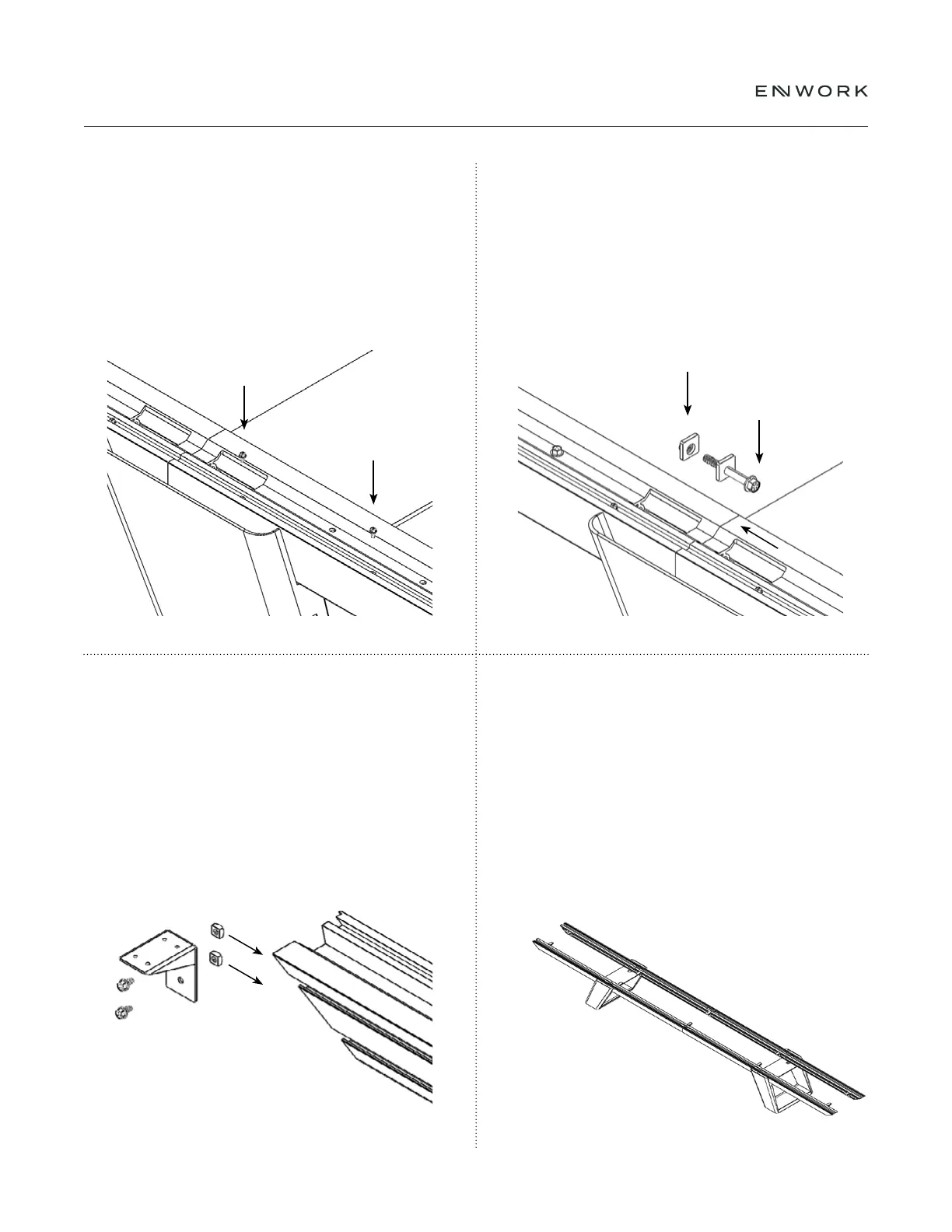
Insert (2).25-20 x .50" into the extrusion slots
to secure the C-Channel and nger tighten.
Note: Do not tighten the bolts at this time
Loosely assemble the Top Connection Bracket, (2)
375-16 x .50" bolts, and (2) .375-16 Square Nuts
Insert the this assembly into the inside of the extrusions
There will be 2 for every Top Connection
Bracket (EAM-1024).
Install Draw Plate 1, Draw Plate 2 and a .50 -13 X 4.00"
bolt into each Extrusion connection hole and tighten.
Note: The extrusions must be aligned and square before they
are fully tightening. Adjust as necessary while tightening.
Fully tighten the bolts connecting the extrusion
to the base at this time (see Fig 5.5).
5.5
5.7
5.6
5 — TABLE FRAME ASSEMBLY
Position the 2 outer most Top Connection
Brackets 10"-16" from the end of the extrusion
and then evenly distribute the remaining
Brackets along the length of the extrusion.
Do not tighten yet. These may need to be
repositioned later in the assembly process.
5.8


 To Next Page