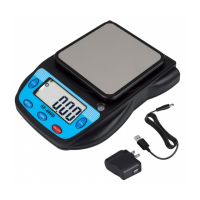
This document is a user manual for the Eosphorus Electronic Scale SF-400C-R. It provides detailed information about the scale's specifications, package contents, first-time use instructions, important notices, and function key descriptions.
Function Description
The Eosphorus Electronic Scale SF-400C-R is a precision instrument designed for weighing various items. It features multiple weighing modes and a piece counting function (PCS) for convenience. The scale is capable of displaying weight in different units and offers a calibration function to ensure accuracy.
Important Technical Specifications
- Color: Gray & White
- Material: Plastic, Metal
- Capacity: 600 g / 21 oz
- Readability: 0.01 g / 0.0005 oz
- Platform Size: 4.7 inches in diameter
- Weighing Modes: g (gram), oz (ounce), lb (pound), kg (kilogram), tl (thulam), pcs (pieces)
- Power Supply:
- USB cord (Included)
- USB cord + AC/DC Adapter (Included)
- 2 x 1.5V AAA Battery (Not Included)
- Scale Dimensions: (8.78 x 6.18 x 1.77) inches / (22.3 x 15.7 x 4.5) cm (L x W x H)
- Scale Weight: 12.35 oz / 350 g
- Package Dimensions: (9.65 x 6.69 x 2.36) inches / (24.5 x 17.0 x 6) cm (L x W x H)
- Package Weight: 18.34 oz / 520 g
Package Contents
The package includes:
- 1 x Electronic scale
- 1 x USB cord
- 1 x AC/DC adapter
- 1 x User manual
Usage Features
The scale offers several user-friendly features controlled by its function keys:
- On/Off: This button is used for switching the scale on and off.
- Mode: A short press of the MODE button allows users to switch between real-time convertible weighing units: Pound (lb), Ounce (oz), Kilogram (kg), Gram (g), and Thulam (tl).
- Tare: Pressing the TARE button once will set the scale to zero, allowing for the weight of a container to be subtracted, so only the net weight of the item is measured.
- Hold: Pressing the HOLD button will freeze the current weight reading on the display.
- PCS (Piece Counting Function):
- To activate, long press the PCS button.
- Press the MODE button to select a sample pool size (25, 50, 75, or 100 pieces).
- Place the selected preset sample pool on the scale.
- Press the PCS button again to confirm; the display will show "PASS."
- After confirmation, place the unknown number of items on the scale, and the LCD will display the calculated quantity.
Maintenance Features
- First Time Use: Before initial use, it is crucial to remove the protective pads located under the weighing pan and the protective film from both the weighing pan and the display.
- Precision Instrument Care: The scale is a precision instrument and requires careful handling.
- Temperature: Avoid exposure to extreme heat or cold. The scale performs best when placed on a flat surface and operated at normal room temperature. It is recommended to allow the scale to acclimate to normal room temperature for at least one hour before use.
- Cleanliness: Keep the scale clean. Dust, dirt, moisture, vibrations, air currents, and proximity to other electronic devices can negatively impact the reliability and accuracy of the scale.
- Handling: Handle the scale with care. Gently place items to be weighed on the platter. While designed to be durable, rough treatment can permanently damage the internal sensor. Avoid shaking, dropping, or shocking the scale.
- Calibration:
- To initiate calibration, long press the MODE button until the LCD displays "CAL" and indicates the required preset calibration weight, typically "200g" (not included).
- Short press the MODE button to confirm.
- Place a 200 g standard weight on the weighing pan.
- The display will show "PASS" to indicate successful calibration.
- If the loading weight is unstable or calibration is aborted, the scale will display "Err" and automatically turn off.

 Need help?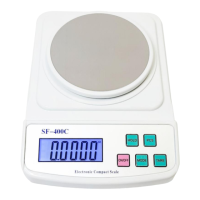

 To Next Page
 General