EasyManua.ls Logo

Epcom X67RB - User Manual

Epcom X67RB
2 pages
Print Icon
To Next Page IconTo Next Page
Loading...
Operation and Maintenance
To be able to manipulate the equipment, it is necessary to connect
the harness of the lightbar with the harness of the X303 controller,
making sure they are correctly connected until a click is heard.
It is recommended to periodically check the mounting bolts to
avoid any accidents.
Use mild soap and a soft cloth to clean the plastic
covers.
Note: Do not use gasoline or other organic solvents to clean the
plastic cover, otherwise they will crack or become opaque.
Content
Lightbar X67RB 1 Pz
Controller X303 1 Pz
Hook Mount 1 Pz
We are not responsible:
1) Hits or scratches during use.
2) If they use the wrong voltage.
3) By using a chemical to perform some maintenance
and / or cleaning of the equipment.
User Manual
Lightbar
X67RB
Question and Answer IconNeed help?

Do you have a question about the Epcom X67RB and is the answer not in the manual?

Overview

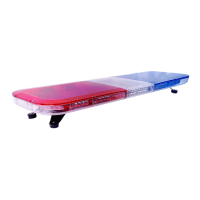
The X67RB Lightbar is an advanced emergency vehicle lighting system designed for high visibility and reliable performance. It incorporates 70 Brilliant LED Gen III (Generation III) modules, utilizing the highest LED technology to deliver high brightness, low power consumption, and a long service life.

Function Description:

The primary function of the X67RB Lightbar is to provide visual warnings and signals for emergency vehicles. It operates in conjunction with the X303 Controller, which allows for comprehensive control over its various lighting patterns and configurations. The system is designed to be connected by linking the lightbar's harness with the X303 controller's harness, ensuring a secure connection indicated by an audible "click."

Important Technical Specifications:

  • LED Technology: 70 Brilliant LED Gen III (Generation III) modules.
  • Voltage: 12VDC.
  • Consumption: 12 A Max.
  • Operating Temperature: -40°C to 55°C.
  • Flash Patterns: 13 distinct flash patterns.
  • Dimensions: 118cm x 34cm x 12cm.
  • Power Supply Connection: Red Cable (VCC) and Black Cable (GND).

Usage Features:

The X303 Controller provides extensive control over the lightbar's functions through two selectors and four switches:

  • Selector 1 (4 positions):

    1. Lightbar OFF: Turns off the entire lightbar.
    2. Rear Modules On: Activates 1 red module and 1 blue module from the rear of the lightbar.
    3. Front and Rear Modules On (Partial): Activates 1 red module and 1 blue module on the front, and 2 red modules and 2 blue modules on the back.
    4. Front and Rear Modules On (Full): Activates 2 red modules and 2 blue modules on the front, and 3 red modules and 3 blue modules on the back of the lightbar.
  • Switch 1: Changes the type of light pattern for the activated modules.

  • Switch 2: Activates the left alleyway light.

  • Switch 3: Activates the penetration lights.

  • Switch 4: Activates the right alleyway light.

  • Selector 2 (4 positions) - Signal Master Control:

    1. Turn OFF Signal Master: Disables the signal master function.
    2. Addressing from right to left: Initiates a directional signal sequence from right to left.
    3. Addressing from left to right: Initiates a directional signal sequence from left to right.
    4. Addressing the center out: Initiates a directional signal sequence from the center outwards.

Maintenance Features:

  • Cleaning: The plastic covers of the lightbar should be cleaned using mild soap and a soft cloth. It is crucial to avoid using gasoline or other organic solvents, as these can cause the plastic cover to crack or become opaque.
  • Connection Check: Periodically checking the mounting bolts is recommended to ensure they are secure and to prevent any accidents.
  • General Care: The manual emphasizes the importance of proper installation and usage to avoid damage. The manufacturer is not responsible for damage resulting from hits or scratches during use, incorrect voltage application, or the use of inappropriate chemicals for maintenance or cleaning.

The X67RB Lightbar is designed for durability and ease of use, providing essential warning capabilities for emergency services. Adherence to the provided instructions for installation, operation, and maintenance will ensure optimal performance and longevity of the device.

Epcom X67RB Specifications

General IconGeneral
BrandEpcom
ModelX67RB
CategoryLighting Equipment
LanguageEnglish

Related product manuals