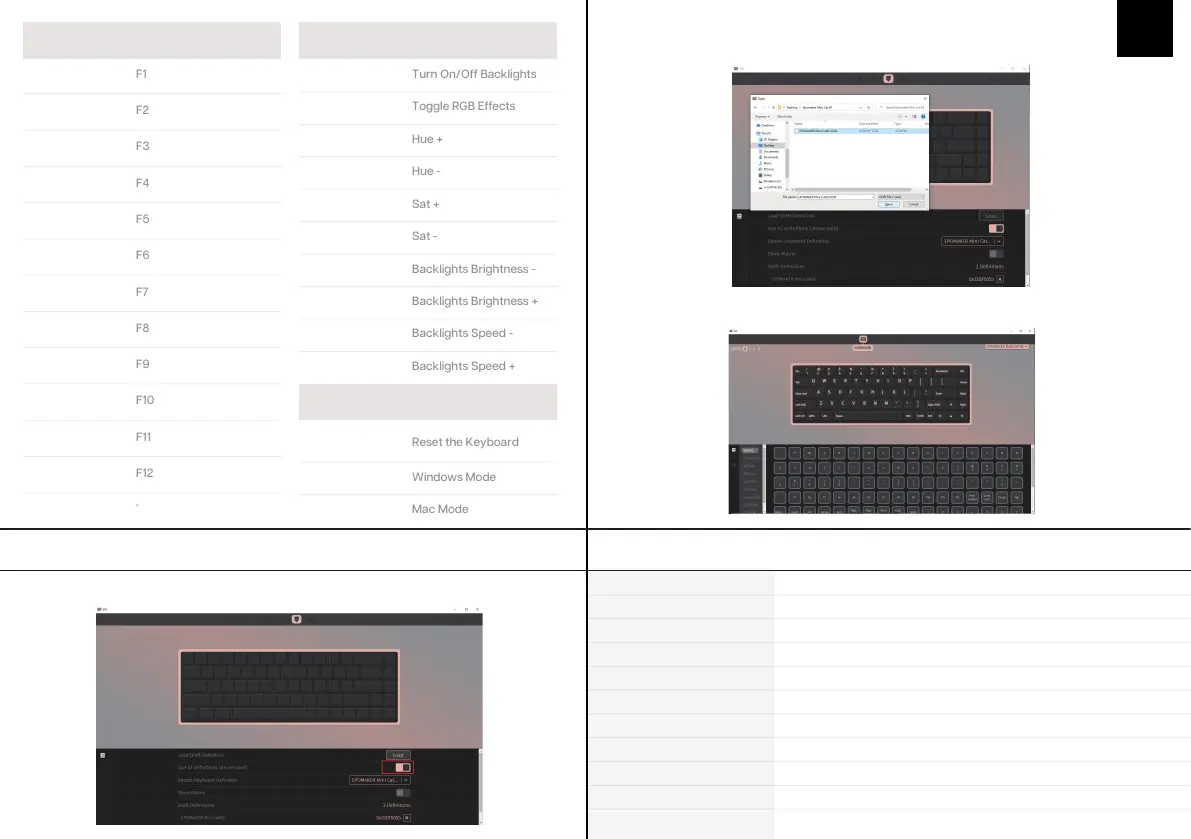
1. Unzip the file to find the .exe and .json files.
2. Install the .exe file in your computer.
3. Run the VIA software once installed.
4. Import the JSON file to be able to edit the Mini Cat 68 settings inside VIA.
1. Unzip the file to find the .exe and .json files.
2. Unpack the .dmg file
3. Drag the VIA software to your applications folder to install it.
4. Authorize the VIA software in: System Preferences > Security & Privacy.
5. Import the JSON file to be able to edit the Mini Cat 68 settings inside VIA.
EN
KEYSAMOUNT: 68Keys
CASE MATERIAL: Acrylic
STABILIZERTYPE: Plate-mounted
MODEL: EPOMAKER Mini Cat 68
CONNECTIVITY: Type-CWired
ANTI-GHOSTKEY: NKRO
PCBTYPE: 3/5-pin HotswapPCB
POLLING RATE: 1000hz
COMPATIBILITY: WINDOWS/MAC
DIMENSION: 341x180 x38mm
WEIGHT: Around0.8kg
SPECS
SHORTCUTS
FN + 1
FN + 2
FN + 3
FN + 4
FN + 5
FN + 6
FN + 7
FN + 8
FN + 9
FN + 0
FN + -
FN + =
FN + Esc
Fn + \|
Fn + ]}
Fn + P
Fn + ;:
Fn + [{
F+’”
Fn + ↓
Fn + ↑
Fn + ←
Fn + →
FN+Backspace
(Hold 3s)
Fn + A
Fn + S
LIGHT EFFECTS
FUNCTION KEY COMBINATIONS
HOW TO USE VIA:
1.Pleasevisit"https://github.com/WestBerryVIA/via-releases/releases"todownloadthelatest
VIAapplicationforyourcomputer'sOS.Turnonthebuttonof"UseV2definitions(deprecated)"
2. Download Epomaker Mini Cat 68 json file via https://epomaker.com/blogs/qmk-via/epo-
maker-mini-cat-68-via-json and load the file.
3. When the loading is completed, the “Configure” Tab displays the layout and programmable
functions.



 To Next Page