Operation
Centrifuge 5418 / 5418 R
English (EN)
19
5 Operation
5.1 Overview of operating controls
Familiarize yourself with the operating controls and the display before using the Centrifuge 5418 / 5418 R
for the first time.
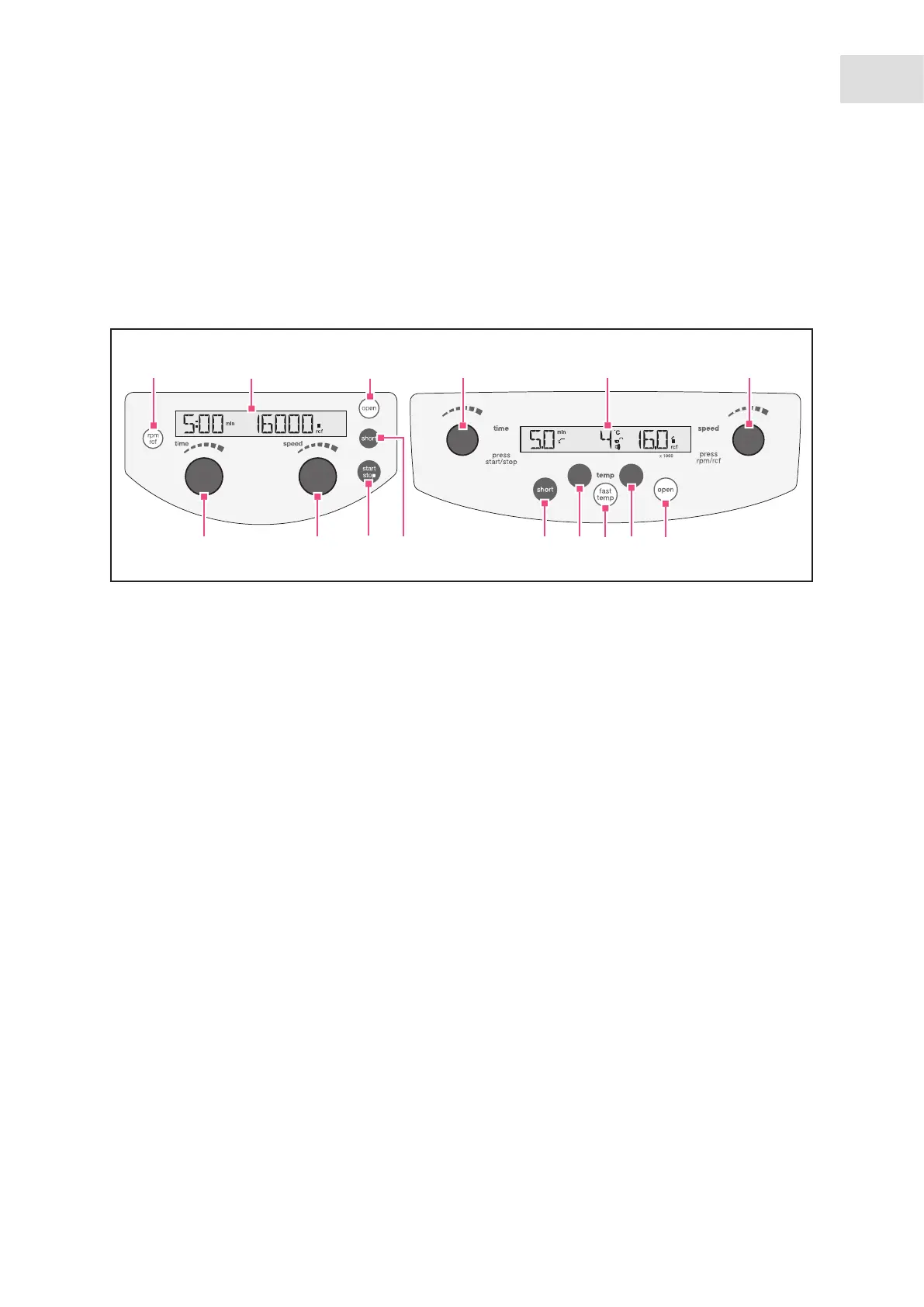
Abb. 5-1: Control panel of Centrifuge 5418 and Centrifuge 5418 R.
Fig. 5-1: Control panel of Centrifuge 5418 and Centrifuge 5418 R.
1 Switch the displayed speed of centrifugation
(rpm/rcf)
2 Display
3 Release lid
4 Set centrifugation time
Only 5418 R: Press the time dial to start and stop
centrifugation.
5 Set speed of centrifugation
Only 5418 R: Press the speed dial to switch the
displayed centrifugation speed (rpm/rcf).
6 Adjust temperature (only 5418 R)
7 Start the temperature control run fast temp
(only 5418 R)
8 Short-spin centrifugation
9 Start and stop centrifugation
4 5
9
8
8
5418 R
5418
6
7
6
1
2
3
4 (9)
2 5 (1)
3


 To Next Page
 Loading...