Controlling a Networked Projector Using a Web Browser
162
Remote (only in Content Playback mode)
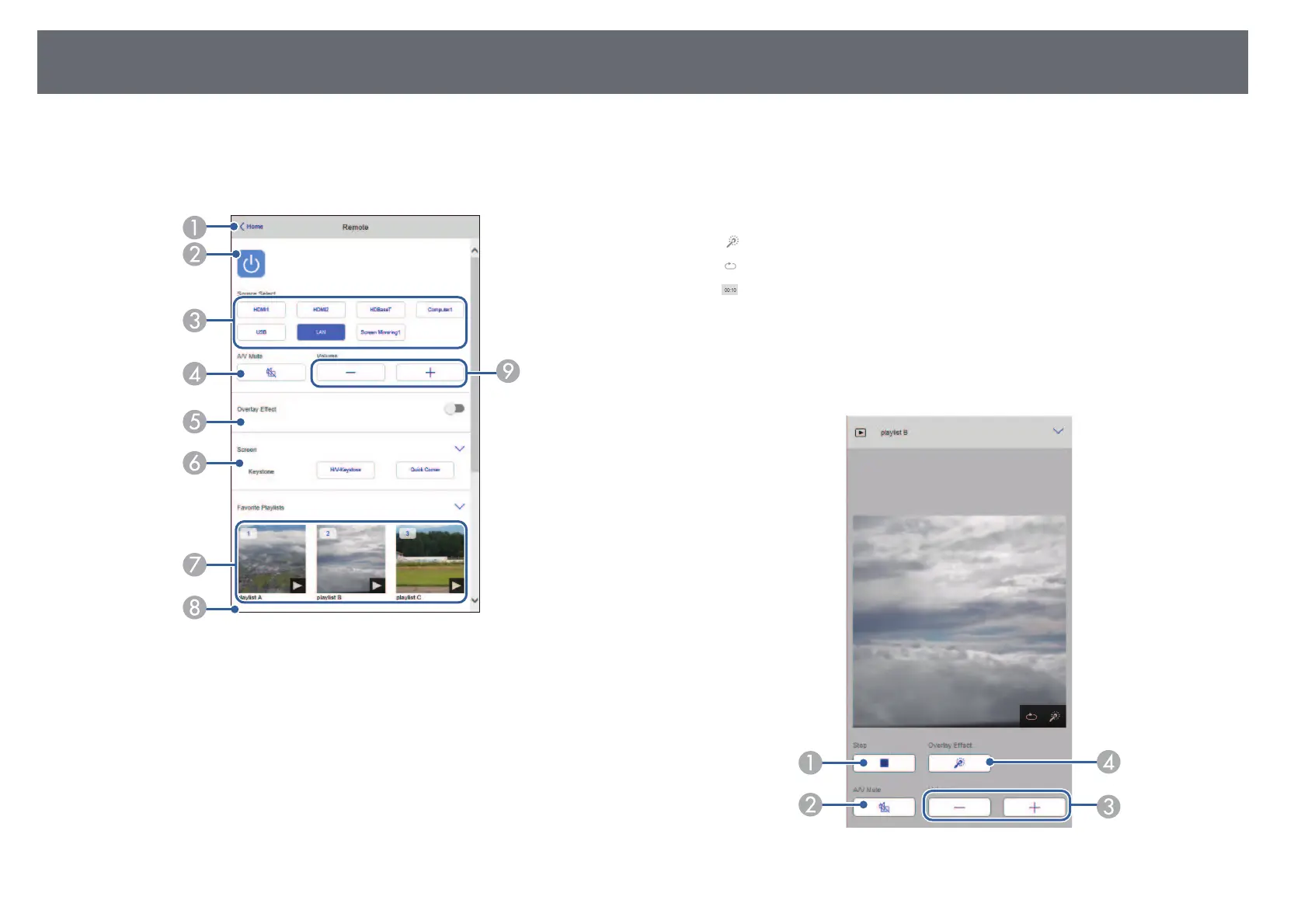
Options on the Remote screen allow you to select the input source, control
the projector, and start projecting playlists.
A
Returns to the Epson Web Control screen.
B
Turns the projector on or off.
C
Selects the input source. (The available sources vary depending on your
projector model.)
D
Turns the video and audio on or off temporarily.
E
Overlay Effect option is displayed when the current source is anything other
than USB.
Turns Overlay Effect on or off to add color and shape effects to a playlist.
When turning on, the Effects screen is displayed. You can add predefined color
and shape effect filters to a playlist. You can also create a customized effect.
F
Specifies the screen settings.
G
Displays your favorite playlists. Select a playlist to start projecting.
H
Displays information for the playlist being projected.
The icons indicate the playlist settings.
: Overlay effects have been applied
: Repeat playback has been applied
: Length of the playlist
Select the arrow at the bottom-left to display the following screen.
I
Adjusts the speaker volume.
Screen displayed while projecting playlist (only in Content Playback mode)



 To Next Page