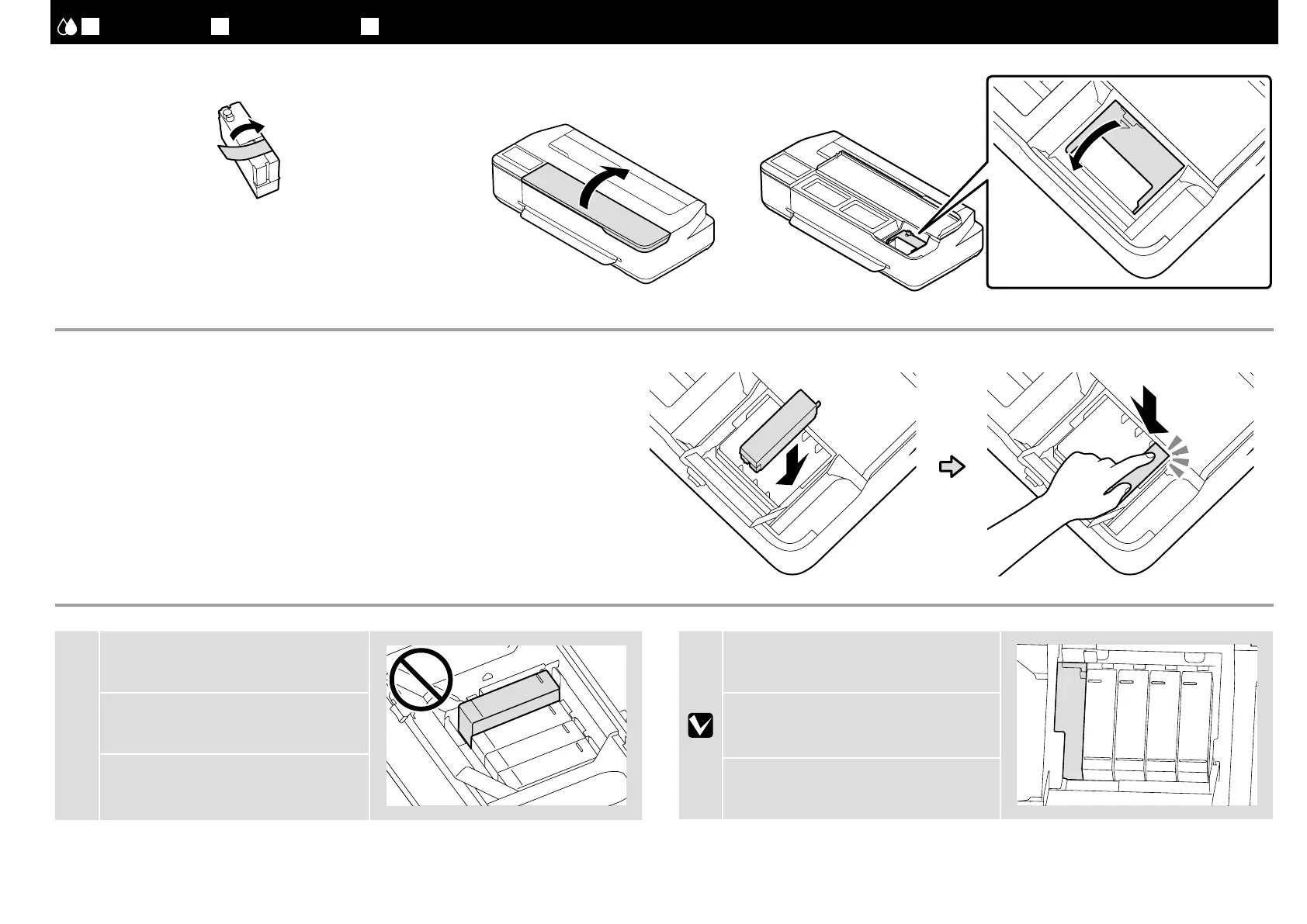
本機とインクカートリッジのラベルの色を合わせてまっすぐ挿入します。挿入後は、[ 押 ]
の部分をしっかり押し込んでください。
Insert the ink cartridge in the holder for the corresponding color. Fully push down the <PUSH>
portion.
將墨水匣插入相應顏色的支架內。將
<PUSH> 部分完全壓到底。
JA
初回インク充填
EN Initial Ink Charging TC
初始化導墨
[ 5 ] [ 6 ]
[ 7 ]
[ 4 ]
インクカートリッジのテープ(黄色)のみを剥がします。
Remove only the yellow tape from the ink cartridge.
僅取下墨水匣上的黃色膠帶。
c
インクカートリッジが浮いていないことを確
認します。
Make sure all cartridges are pushed down
into place.
務必將全部的墨匣都壓入就位。
50 ml のブラックのインクカートリッジを装
着したときは、左側に隙間が空きます。
There will be a gap on the left side of the ink
cartridge when a 50-ml black ink cartridge is
installed.
安裝
50 ml 黑色墨水匣後,墨水匣的左邊
會出現空隙。
16




 To Next Page