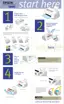
4.2.4.1 Removing the glass surface
1. Open the scanner cover.
2. Push out the two hooks securing the glass surface and carefully remove the glass.
3. Carefully lift up the glass to remove it.
4.2.4.2 Removing the lamp
1. Remove the scanner as described in “Removing the Scanner Mechanism” on page99.
2. Open the scanner unit and pull the cables free from the slot on the right side.
3. Fully open the scanner cover and remove the right and left cover projections. Then
remove two black screws (CBP 3x6) from the document path..
4. Lift up the document guide as shown below, and remove it.
Push out these two hooks.
Pull out these
cables from
the notch
here.
Remove the cover
and two screws.



 To Next Page
 Loading...