Need help?
Do you have a question about the EPYC NEON and is the answer not in the manual?
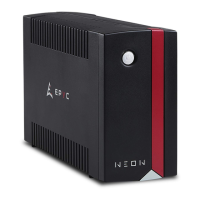
This document describes the NEON Line Interactive UPS (Uninterruptible Power Supply) from EPYC, available in 650 VA, 850 VA, and 1000 VA models. The manual provides comprehensive information on its function, technical specifications, usage, and maintenance.
The NEON Line Interactive UPS is designed to provide temporary uninterrupted power to connected equipment during power failures and protect against surges and spikes. It features microprocessor control for high reliability and includes built-in enhanced boost & buck AVR (Automatic Voltage Regulation) to stabilize input voltage without relying on battery power, thus extending battery life. The UPS also offers a DC start function, allowing it to power on even without AC input, and an auto-restart feature that automatically turns the unit back on after AC power recovery. For communication and control, it includes a built-in USB communication port, enabling remote monitoring and shutdown operations via management software. Additionally, it provides modem and phone line surge protection through RJ45/11 communication protection ports, which also support network cables, though with a 100 Mb/s speed limitation. The UPS is designed for indoor use in temperature and humidity controlled environments, free of conductive contaminants.
The NEON UPS series comes in three models: 650VA, 850VA, and 1000VA, with corresponding power ratings of 650/360W, 850/480W, and 1000/600W.
Input:
Output:
Physical:
Battery:
Environmental:
Management:
LED Indicators and Alarms:
Installation and Positioning: The UPS should be placed on a horizontal surface in an indoor area with an ambient temperature between 0°C and 40°C (25°C ideal) and humidity less than 90%. It must be kept at least 15 cm from walls for ventilation, away from direct sunlight, heat sources, dusty environments, and liquids. Users should avoid covering cooling vents or pouring liquids onto the unit.
Initial Setup: Upon receipt, it is recommended to recharge the battery for at least 8 hours by plugging the unit into an AC outlet, even if the UPS is off, to ensure maximum charge capacity. Connect computer, monitor, and data storage devices to the battery power supplied outlets. Crucially, do not plug laser printers, copiers, space heaters, vacuum cleaners, or other large electrical devices into the UPS outlets due to their high start-up current and potential to overload or damage the unit. Plug the UPS into a 2-pole, 3-wire grounded receptacle protected by a fuse or circuit breaker. Avoid extension cords.
Operation:
Management Software:
The UPS includes a USB COMM. Port for connecting to a computer. The Power Master management software, available for download from www.justepyc.com, provides a user-friendly interface for remote monitoring and shutdown operations. After installation, the software can be accessed via its icon or by navigating to http://localhost:3052 in a web browser.
Safety Precautions:
Cleaning: Before cleaning, ensure the AC input voltage is removed and the UPS is OFF. Use a cloth moistened only with water to clean the exterior. Ensure the UPS is completely dry before restarting. If the environment is unusually dusty, clean the ventilation holes. If any liquid enters the UPS, do not start the unit and contact Technical Service immediately.
Battery Care: To maintain optimal battery charge, keep the UPS plugged into an AC outlet at all times. For extended storage, cover the UPS and store it with a fully charged battery, recharging every three months to ensure battery life.
Troubleshooting: The manual includes a troubleshooting guide for common issues:
Warranty and Disposal: The standard warranty for EPYC UPS units is 24 months from the date of purchase, with 12 months for wear-and-tear parts like batteries and fuses. Repairs are performed by specialized technical personnel; unauthorized repairs void the warranty. EPYC's packaging materials are recyclable. The UPS contains circuit boards and batteries, which are considered toxic waste. At the end of its life, the UPS must be disposed of in compliance with WEEE (Waste of Electric and Electronic Equipment) regulations. Further details on disposal can be found at www.justepyc.com.

 To Next Page
 General