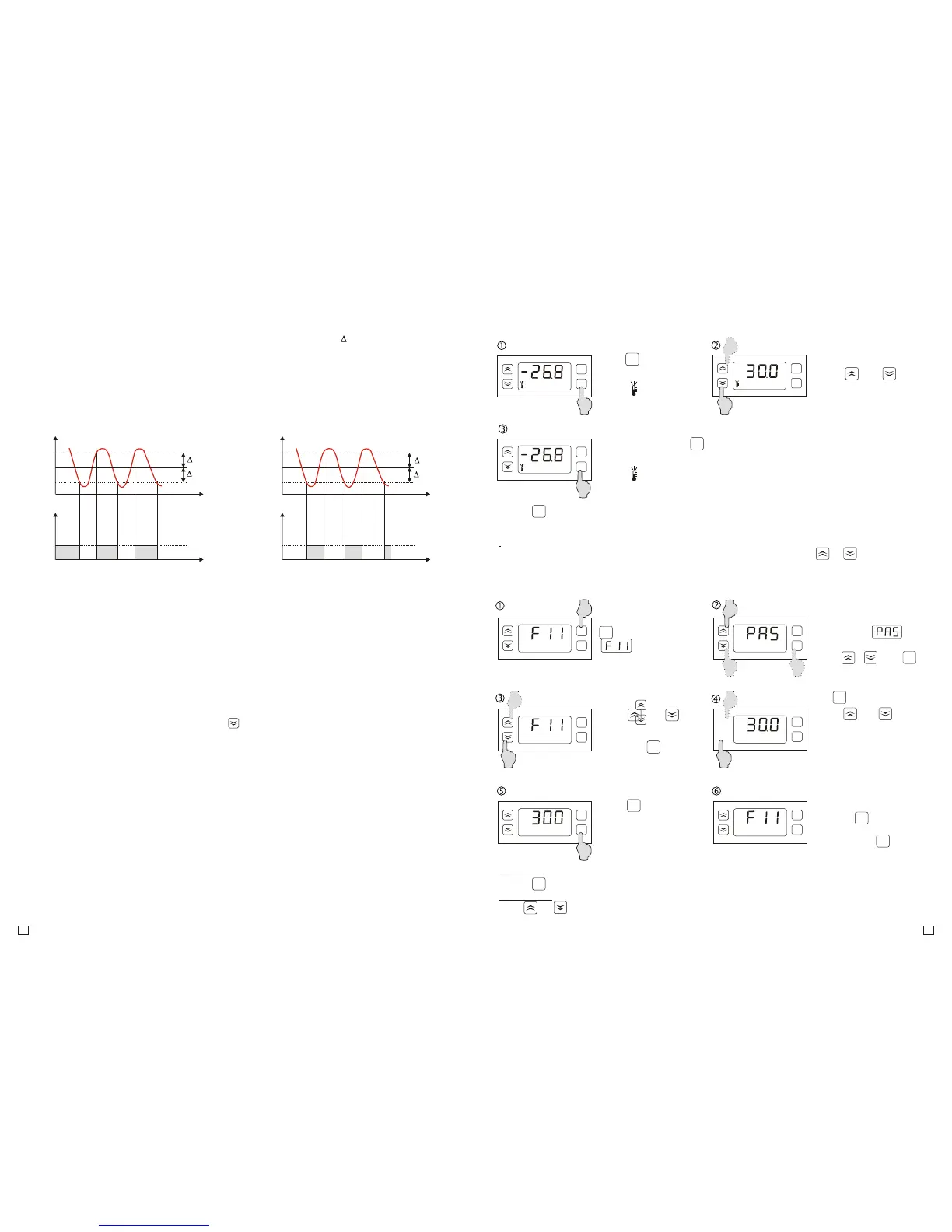
Enter the menu pressing
button for 5 sec., Until
command
displays.
4. CONTROLLER HANDLING.
4.1. TEMPERATURE SETTING.
Press button
for 2 seconds
Confirm the set with
Button.
Diode lights up.
Using:
or
set the desired
temperature.
Diode goes off.
4.2. PROGRAMMING OF PARAMETERS.
Using key confirm
the new parameter
value and return to the
parameter list.
Using or button
choose the parameter
you want to change and
enter with key.
Information:
To improve quick increasing or decreasing the settings values hold the or button
constantly for at least 1 sec.
set
set
set
set
set
set
set
°C
°C
°C
°C
M
set
M
set
M
set
M
set
°C
M
M
M
M
set
Remarks:
– press button in any time to cancel the setting
– the setting change can be limited by F13 and F14 parameters
M
set
M
M
set
set
If the access to the menu
is protected,
command displays.
Using , and
buttons enter the
password and confirm
with
M
set
Using or button
set the desired
parameter value.
Finish programming
pressing button or
enter the “End” command
and press the key
or wait 30 sec. without
pressing any button.
Information:
Hold or button for at least 1 sec. to improve quick increasing and decreasing of setting
values.
Controller is used to maintain T temperature with desired hysteresis T in cooling or heating
devices. Actuator control is carried out by the relay output and the temperature measurement is
made by the chamber temperature sensor. The second temperautre sensor is applied in cooling
applications and used to readt the temperature of the evaporator. It allows you to control the defrost
and the evaporator fan operation according to the indications. It improves the efficiency of the
control system significantly. The principle of operation of the temperature control when cooling and
heating:
5. GENERAL DESCRIPTION.
5.2 DEFROSTING.
5.3. EVAPORATOR FAN.
5.1. ADJUSTMENT.
Depending on the application, select the type of periodical defrosting of the evaporator:
- natural (F36=0; F37=0; F38=ON)
- due to electric heaters (F36=0 or 1; F37=0; F38=ON or OFF )
- due to hot gas (F36=0 or 1; F37=1; F38=ON or OFF)
Defrosting control is carried out automatically and turned on:
- periodically from time to time (F35=1)
- depending on the total operation time of the compressor (F35=2). (The lower capacity of the
cooling system, the less oftem defrosting cycles follow)
- at certain times during the day ( max 6 cycles per day).
The end of the defrosting cycle follows after lapse of time F33 or after exceeding evaporator sensor
temperature above F32 value - it is specified by F36 parameter.
In difficult operation conditions, when there is a need for additional defrosting of the evaporator, the
process can be started manually by pressing button for 5 seconds. Defrosting diode flashes
when defrosting manually.
Depending on the needs, evaporator fan can operate in one of the seven operation modes
described in the “fan” section in point 4.3. The fan operation is dependent from compressor
operation or the evaporator temperature sensor. Due to advanced settings you can choose the
optimal fan operation mode and get a high cooling efficiency. During defrosting, fans are operating
or are turned off. Parameter F38 specifies this mode. When natural defrosting, it is recommended
to turn on the fan to raise the efficiency of the operation.
5.4. BISTATE INPUT.
The controller has a bistate input D1 to indicate emergency states, e.g system failure, pressure
control or safety thermostat activation, etc. The type of the input (normally close/opened) is
programmed by F50 parameter. After bistate input activation, the controller turns off the outputs,
turns on the beeper and the display indicates A11 code. Emergency states signalling can be
maintained, until the alarm reset by using the buttons (F50=2 or 4).
6°C
4°C
Output
Time
Time
Temp.
0
1
T=1°C
T=1°C
T=1°C
T=1°C
COOLING HEATING
89°C
T=90°C
Output
Time
Time
Temp.
0
1
91°C
T=5°C
5
3
M
Remarks:
- press button to cancel the parameter setting


 To Next Page
 Loading...