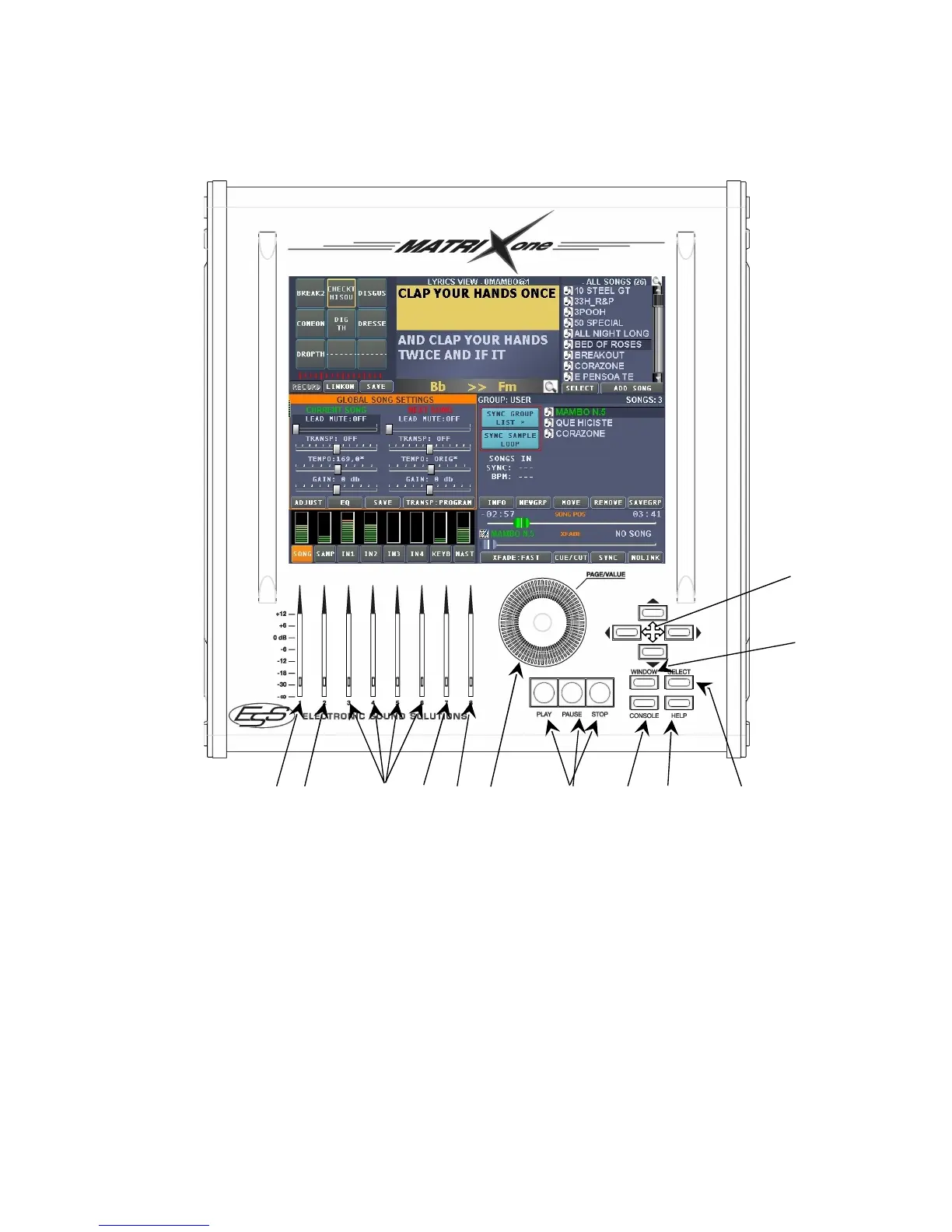
Front panel
12
11
1 2 3 4 5 6 7 8 9 10
1) MIDI player and Audio volume.
2) Samples' reproduction volume.
3) Independent volumes of 4 audio inputs.
4) Keyboard volume connected via MIDI.
5) Main volume. Operates on all volume levels 1/2/3/4.
6) Knob to modify values and to carry out changes according to the selected window.
7) Play/Pause/Stop Keys (by pressing the Stop and successively the Start key, the selected
song will be repeated from the beginning).
8) Push-button to accede the virtual keyboard and other functions such as Lyrics Editor, to
enter text of MIDI songs or Audio.
9) Help Push-button. By selecting this mode, a function description of the selected window will
be shown, integrated with film shots which may be reproduced by pressing the video
camera icon.
10) Select Push-button, which may be used in alternative to touch screen.
11) Window Push-button to select an available window, may be used in alternative to touch
screen.


 To Next Page