HOW TO FLY
REPLACEMENT BLADES
FLYING BASICS
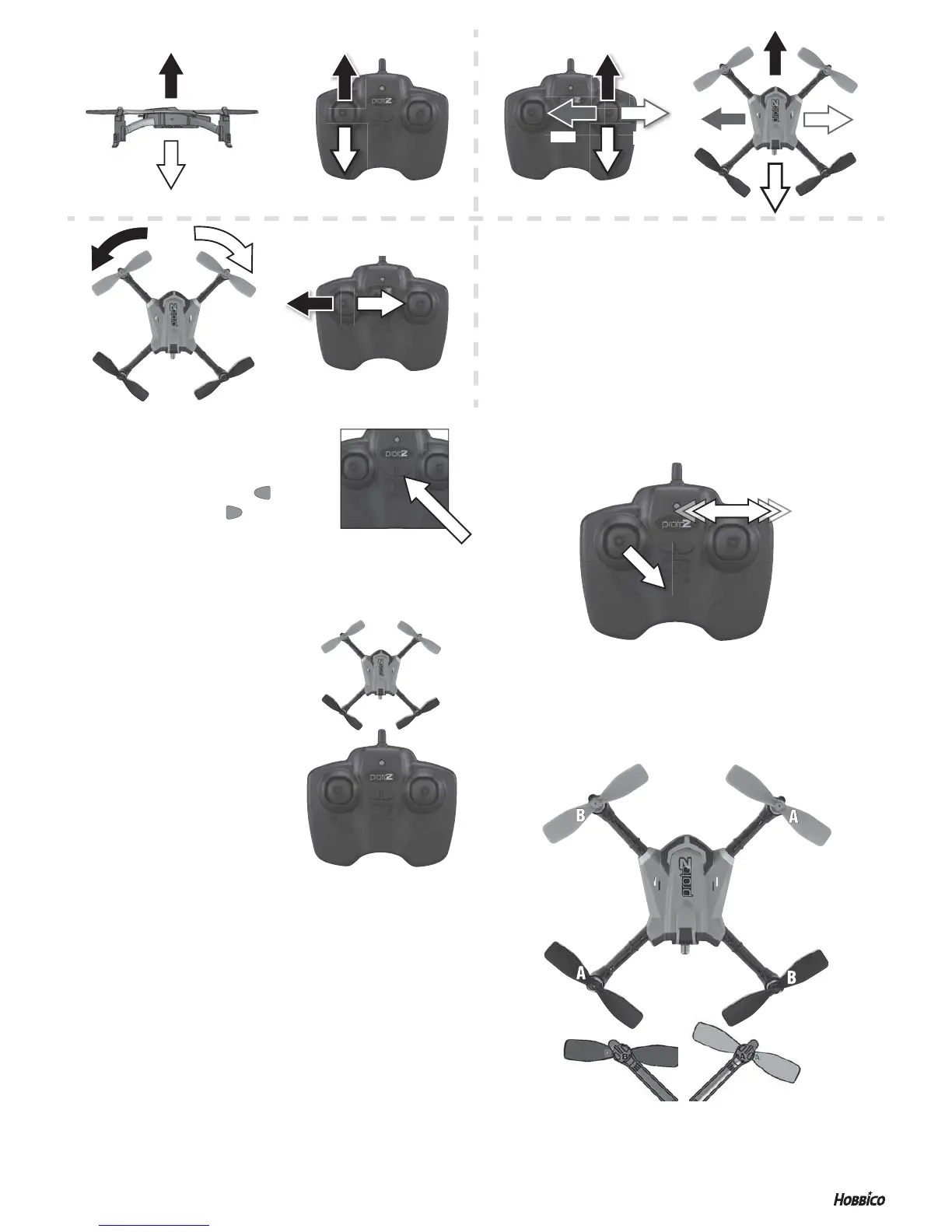
1. Take off by slowly advancing the left stick until the Proto-Z takes off.
2. Control altitude using the left stick.
3. Use the right stick to move left, right, forward, or backward.
4. Use the left stick (left/right) to rotate or spin left or right.
5. Always use small movements until you learn how the model behaves.
UP
FORWARD
FORWARD
DOWN
ROTATE LEFT
ROTATE LEFT
LEFT
LEFT
ROTATE RIGHT
ROTATE RIGHT
RIGHT
RIGHT
FRONT
Gray Blades
REAR
Black Blades
BACKWARD
BACKWARD
DOWN
UP
LANDING SAFELY
When the battery voltage begins to run low, the Proto-Z will start
to lose power. To avoid the Proto-Z crashing to the ground, you
need to land the Proto-Z immediately. Once the voltage reaches
its cutoff, it will lose all power and fall to the ground if you have
not landed.
TROUBLESHOOTING
PROBLEM: Controller LED fl ashing after binding.
SOLUTION: Replace batteries.
PROBLEM: Proto-Z shaking.
SOLUTION: Check if the canopy, chassis and rotors are damaged.
PROBLEM: Will not take off.
SOLUTION: Check that the rotor blades are properly installed.
EST 4814 © 2015 Estes-Cox Corp. A subsidiary of Hobbico, Inc.
CALIBRATING THE SENSORS
If the Proto-Z drifts, recalibrate the sensors.
1. Turn on the controller and the Proto-Z. Place the Proto-Z on a fl at surface.
2. Hold the left stick to the lower right. At the same time, quickly move the
right stick left and right several times until the blue LEDs fl ash.
FLIP MODE
The Proto-Z has a built-in fl ip function. To fl ip,
simply push one of the fl ip buttons on the
controller. To fl ip left, push the left button
and to fl ip right, push the right button.
TRUE DIRECTION MODE
True Direction mode is when the Proto-Z moves the direction of the input
given to the controller no matter what direction/orientation the Proto-Z is
in. True Direction mode is an easy mode for
beginners to fl y in.
IMPORTANT: When entering True Direction
mode, the Proto-Z must be pointing away
from you and the controller located directly
behind the Proto-Z with the antenna pointing
at the Proto-Z.
To toggle between normal and True Direction
mode, push both of the fl ip buttons at the
same time until the controller beep stops.
The LED on the back of the Proto-Z will fl ash
four times repeatedly to indicate when it is
in True Direction mode. Push the fl ip buttons
again until the controller beep stops and the
LED will stay on constantly to indicate you are
in normal mode. The default when you turn
the Proto-Z on is to be in normal mode. If you
have the Proto-Z in True Direction mode and turn it off, it will default back
to normal mode.
Match the blade to the motor.
B = B
A = A
FLIP BUTTONS


 To Previous Page
 Loading...