Selecting the Pet
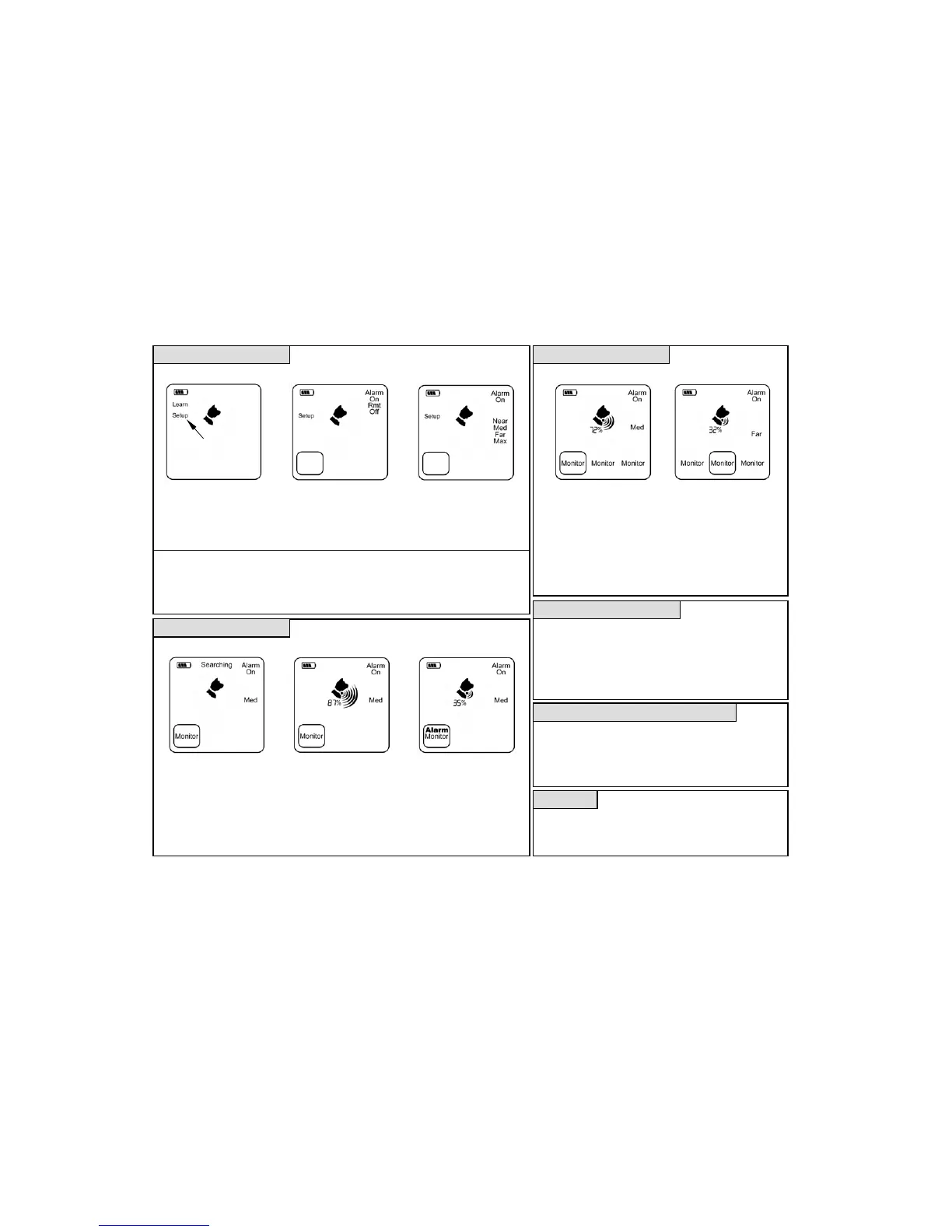
Entering Setup Selecting the Alarm Mode Selecting the Boundary Displaying Pet 1’s Status Displaying Pet 2’s Status
Monitoring Display Alarm Display
• Press and hold the Select
button until Setup is flashing.
• Press Select again to enter
setup, all 3 mode boxes will
now flash.
• Press the Pet button for the
pet you wish to setup.
• Press Down to select the
desired alarm mode and
then press select.
Press the Down button to
select the desired boundary
and press Select to exit
setup.
Alarm Modes:
• On - Beeper sounds
• Remote - Beeper sounds and the external
alarm output is activated.
• Off - No beeper, display only.
Boundary Settings:
• Near - Inside pets, small yard, RV, campsite.
• Med - Average backyard
• Far - Large property or many obstructions.
Max - Must lose contact to activate alarm.
The Marco Polo system can monitor up to 3 pets at one time.
• Simply repeat the process under “Monitoring a Single Pet”
for each pet to be monitored, wait for searching to complete
before going on to the next pet.
• Each pet’s location is checked once every 40 seconds.
• The display will switch once every 7 seconds to show the
most recent information for that pet.
• If any pet is outside its defined boundary an alarm will sound
and “Alarm” will be displayed for each wandering pet.
Switchin
Each of the 3 pet channels can be switched between track,
monitor or idle (blank) modes by pressing the Pet button until
the desired mode is flashing and then by pressing Select.
• Mode switching can take up to 40 seconds depending on the
current mode and the new selected mode.
• Only one pet may be in track mode at a time.
httime and Hands-Free Searchin
A short press of the locator’s power button will turn the
backlight on or off for searching at night.
• When searching while driving the locator can be set to search
mode and placed on the seat, when the locator begins beeping
once every 4 seconds the pet is within range.
Contact Us
Eureka Technology Partners, LLC
Toll Free: (866) 825-4208
www.eurekaproducts.com
Copyright © 2012 Eureka Technology Partners, LLC ALL RIGHTS RESERVED
Protected under the following US and Foreign Patents: US 6,788,199 US 7,148,801 CA 2438172 AU 2002255750
Flashing
If your pet is outside the
selected boundary on two
consecutive checks the
alarm is activated.
• Cancel by pressing the Pet
button to enter track or idle
or press Down to silence.
• Once every 40 seconds the
locator will compare your
pet’s location to the selected
boundary and update its
status on the display.
• Press the Pet button 1, 2 or 3
twice for the desired pet and
then press Select to enter
monitor mode.
• “Searching” will flash while
the locator establishes
communications with your
pet’s tag.



 To Previous Page
 Loading...