Further functions
Timer function
The timer function is selected with the timer-button
With this function a user-defined temperature for a program-
mable period can be entered. This can be very useful in case
of a party, for example. Press
First, the time for which
the time programme has been deactivated is shown.
Confirm with
OK
Now, the desired temperature
can be set. Confirm with
OK
. In the selected period it is
not possible to change the temperature manual, the wheel is
locked. Press Menu and unlock it.
Offset
If the perceived temperature significantly differs from the set
thermostat temperature a temperature set up can be execut-
ed. Press
MENU
Select the menu item with the selector
wheel. Confirm with
OK
.
The degree setting
will
flash on the display. Now, set up the desired adaptation for the
temperature (from -5 up to +5°C) with the selector wheel.
Confirm your entry with
OK
. The temperature display does
not change!
Windowfunction
If you open a window and consequently the temperature drops
signifi cantly, Comet Plus will automatically close the heating
valve in order to save energy. The display will show
.
Afterwards, Comet Plus will resume normal operation. For
the set up select
in the menu. Confirm with
OK
First,
the sensibility is selected with the selector wheel (
= high
sensibility,
= medium sensibility (factory preset), =
low sensibility). Confirm with
OK
. Now, you enter the time (10
min (factory preset) - 60 min) for which the valve should remain
closed. Confirm with
OK
.
Travel function
For the time you are absent you can select an individual tem-
perature. After this period the originally defined programme
becomes active again.
1. Press
MENU
.
2.Use tuning wheel to select the menu item
. Confirm
with
OK
.
3. Select with the selector wheel the date and the start time
of vacation (= date of the recommencement of the regular hea-
ting times). Confirm with
OK
.
4. Select end of vacation. Date and the start time. Confirm
with
OK
.
5. Set temperature and confirm with the button
OK
.
Symbol
appears on the display, when selected holiday
time begins. The symbol disappears auzomatically when the
time ends. The symbol disapears also by pressing
MENU
.
Child lock
You can lock Comet Plus to protect the device from unautho-
rized activation. Press the buttons
OK
+ at the same
time for about 2 seconds until the signal
appears on the
display in order to lock the device. By using this button combi-
nation again the symbol disappears and you release the lock.
Heating pause – Closing the Comet Plus
Press
MENU
.
Select the menu item
with the selector-
wheel. Confirm with
OK
. Select and confirm with
OK
. Set the temperature on the display to .
The valve is now closed and will work without a time pro-
gramme. The calcification protection function remains active
once a week. After the heating pause you switch in the menu
to the AUTO mode and the personally set programme will be
executed again.
Daylight saving time
Press
MENU
. Select with the selector wheel. Confirm with
the
OK
button and select with the selector wheel.
SPARmatic comet switches automaticly from summer to winter
time.
LCD standby indicator
Press
MENU
. the menu item with the selector wheel.
Confirm with the
OK
button and select / with the
selector wheel. After about 30 seconds, the LCD indicator swit-
ches into standby mode. By pressing any button, the display
will be activated again. (by removing the battery, standby
mode will be reseted). Increases the battery life time.
Going back to factory preset/All reset
Press
MENU
. Select the menu item with the selector wheel.
Confirm with
OK
. flashes, confirm with
OK
. Comet Plus
is reset again. Now, proceed as described for the initial
operation.
Freeze protection and calcifi cation protection
function are active automatically:
Freeze protection function
If the temperature drops below 6°C, Comet Plus opens the val-
ve until the temperature again rises above 8°C. This prevents
the radiators from freezing.
Calcification protection function
To prevent radiator valves from calcifying Comet Plus is sub-
mitted to a calcifi cation protection programme once a week
on Friday mornings.
Cleaning and used devices
Cleaning
To clean the Comet Plus use only a dry or lightly
wet cloth. Avoid chemical solvent – it can probably
damage the device.
Used devices
Do not throw old devices and packaging into the household
waste. They can be recycled. You receive further information
at your local government.
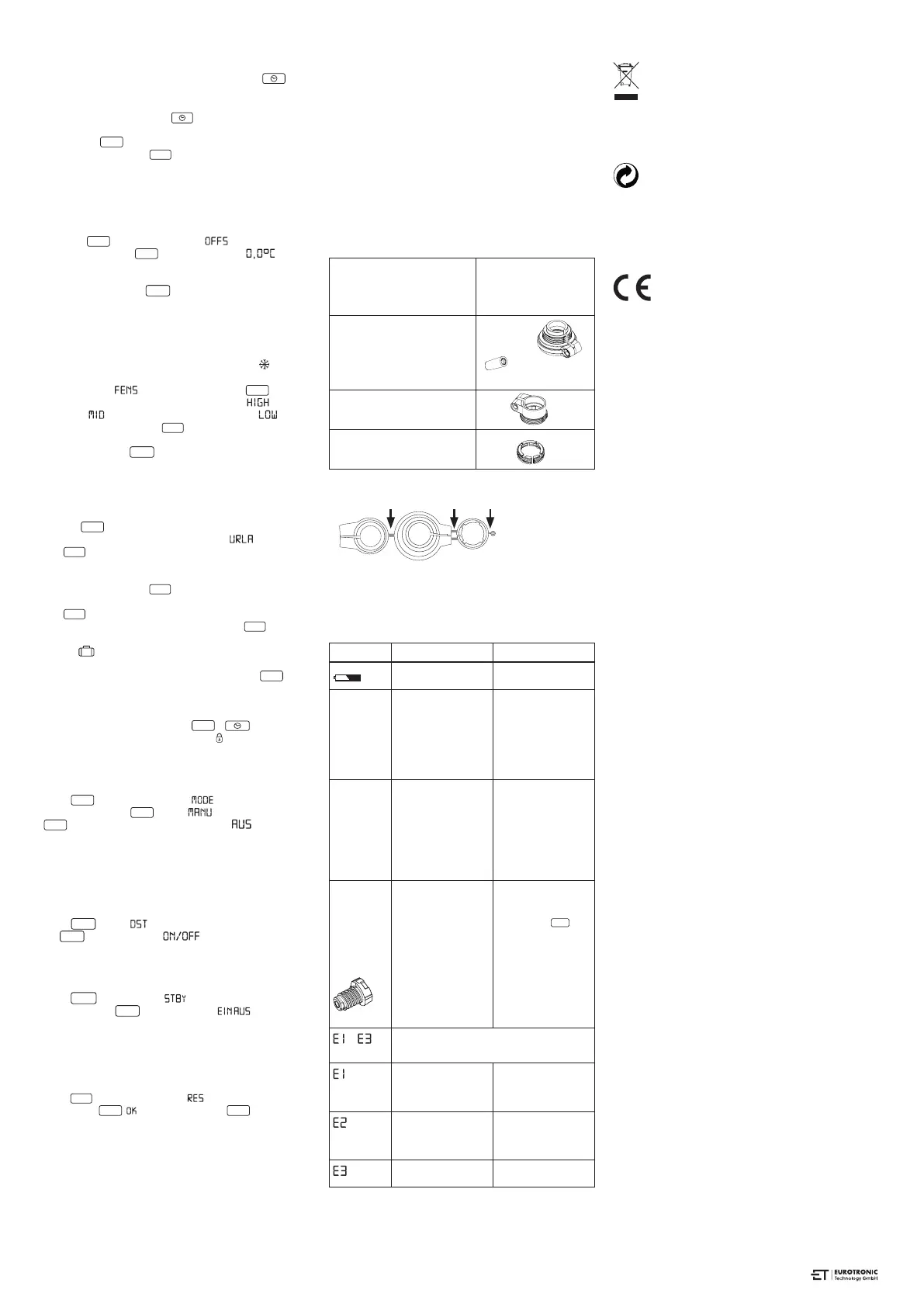
Adapter
Heimeier, Junkers Landys+Gyr,
MNG, Honeywell, Braukmann
threadmeasure dimension of
M 30x1,5
no adapter
required
Danfoss RAV (accompanying
pin must be plugged on the
valve tapped)
Danfoss RA
Danfoss RAVL
Please remove all the connection pieces of the plastic
adapters before you use one of the attached adapters!
Please completely remove the connection rods highlighted
in grey prior to assembly the adapter. You can find additional
brass adapter models that are subject to a charge:
www.eurotronic.org
Hilfe
Problem Cause Solution
Batteries do not have
enough power.
Replace batteries.
Heating
element
does not
warm up.
Is the boiler water
temperature O.K.?
Valve does not open,
is it calcifi ed after
the summer pause /
heating pause?
Adjust the temperature
of the boiler water.
Remove the Comet
Plus, move the valve
stem back and forth
per hand or with a tool.
Heating
element
does
not cool
down.
Valve does not close
completely. It may be
that the closing point
of your valve seat has
shifted.
Adapt again (see
“Adapting”) Move the
valve stem several
times by hand, it may
be that adaptation is
impossible because
your valve is calcifi ed
or the seat no longer
performs its function.
Pressure
piece falls
out (This
can
also cause
an E1-error)
Due to an end-
lessthread the
pressure piece, which
is situated at the bot-
tom, can fall out if the
device has not been
affixed on the valve.
Put in the pressure
piece. The device
can beadapted by
pressing the
MEN
-
point or by removing
and inserting the
batteries. The end-
lessthread is rotating
now and fixes the
pressure piece again.
Just install it to the
radiator and adapt
it once again.
-
By pressing any key the error message will
be deleted in the display and the adapter is
re-started.
No adaptation pos-
sible.
Comet Plus is not
installed to the heater.
Is the installation OK?
Install Comet Plus to
the heater.
Valve stroke is too
short.
Open and close the
valve several times
manually or replace
the batteries.
Motor movement is
not possible.
Does the valve stem
move freely?
ENVIROMENT PROTECTION
From the date of transposition of the European Directives
2012/19/EU into national law, the following shall apply:
Electrical and electronic devices as well as batteries
must not be disposed with household waste. The
customer is legally obliged to return electrical and electronic
equipment and batteries at the end of their service life to the
public collection points set up for this purpose or the point of
sail. Details are regulated by the respective national law.
®
Dispose of packaging sorted by type. Add paperboard
and cardbord to the waste paper, foils to the recyclables
collection. The symbols on the product, the instruction
manual or the packaging refer to these regulations. By
recycling, material utilisation or other forms of utilisation of old
devices/batteries, you make an important contibution to the
protection of our enviroment.
Declaration of Conformity
The Declaration of Conformity is provided at:
https://eurotronic.org/produkte/elektronische-
heizkoerperthermostate/comet-plus/
Guarantee
The three-year warranty begins on the day ofpurchase. Please
keep the receipt as evidence of purchase in the future. During
the guarantee period, defective radiator thermostats may be
sent to the service address below. Please ensure sufficient
postage is paid. A new or repaired device will then be sent to
you free of charge. Following expiry of the guarantee, you may
still send the defective device to the address below for repairs.
Please ensure suffi cient postage is paid. Repairs carried out
after the guarantee period are subject to a charge. Your legal
rights are not affected by this guarantee. There is no new
warranty period starting when repairing or replacing the device.
Please note that we only grant warranty on the function of the
device. We will not grant warranty for the interaction between
the thermostat and the bottom part of the valve. The technical
data is only valid for the use of the following valves: Heimeier,
Junkers Landys + Gyr, MNG, Honeywell, Braukmann (measure
of thread M30 x 1,5), Oventrop (M30 x 1,5) Danfoss RA, RAV
and RAVL. Please see the combinations of the devices on our
website (www.eurotronic.org/ Adapter list) EUROtronic does
not issue a guarantee when using the thermostat with valves
which are not mentioned above.
Eurotronic Technology GmbH
Südweg 1
36396 Steinau-Ulmbach
Telefon: 0 66 67 / 9 18 47-0
Servicehotline: 0 66 67 / 9 18 47-17
eMail: info@eurotronic.org
web: www.eurotronic.org
*
subject to a charge
pack.-no. 900 000 415 | stand: 17/11/2022
+ accompanying
pin, only for RAV!
www.eurotronic.org


 To Previous Page
 Loading...