This document describes the Evatronic Wireless 2-in-1 Adapter, model ET-BA007, which functions as both a Bluetooth transmitter (TX) and receiver (RX).
Package Contents
The product package includes:
- 1 x Wireless Adapter
- 1 x 3.5mm Audio Cable
- 1 x 3.5mm Female to RCA Male Cable
- 1 x USB Charging Cable
- 1 x Optical Cable
- 1 x User Manual
Product Diagram
The device features several key components:
- Power Button: Used for turning the device on/off and for play/pause functions.
- Indicators: LEDs that provide visual feedback on the device's status, pairing mode, battery level, and active codec.
- Pairing Button: Initiates pairing mode and manages paired devices.
- Transmitter (TX) / Receiver (RX) Mode Switch: A slide switch to select between TX and RX modes.
- Charging Port: For connecting the USB charging cable.
- Optical Audio Output Port (RX Mode): Used for audio output when the device is in RX mode.
- Optical Audio Input Port (TX Mode): Used for audio input when the device is in TX mode.
- 3.5mm Audio Port: A versatile port for both audio input and output, depending on the mode.
Control Functions
The device offers straightforward controls:
- Power On/Off: Hold the Power Button.
- Pairing:
- When powered on, press the Pairing Button once to enter pairing mode.
- Hold for 3 seconds to disconnect the existing paired Bluetooth device and re-enter pairing mode.
- Hold for 8 seconds until the "TX" or "RX" indicator flashes twice to clear the pairing history.
- Mode Switch: Slide to select between TX and RX modes.
- Play / Pause: Press the Power Button once to play or pause music.
Indicators
The device uses various LED indicators to communicate its status:
General Indicators (A, B, ⚡)
- A (Solid on): Connected with the 1st Bluetooth® Device.
- B (Solid on): Connected with the 2nd Bluetooth® Device.
- ⚡ (Flashing slowly): Battery Low.
- ⚡ (Solid on): Charging.
- ⚡ (Off): Fully Charged.
TX Mode Indicators
- TX (Flashing quickly): Pairing in TX Mode.
- TX (Flashing slowly): Exceed the effective Bluetooth range.
- TX (Flashing slowly): Re-connect in TX Mode.
RX Mode Indicators
- RX (Flashing quickly): Pairing in RX Mode.
- RX (Flashing quickly): Exceed the effective Bluetooth range.
- RX (Flashing slowly): Re-connect in RX Mode.
Codec/Mode Indicators
- OPT (Solid on): SPDIF mode.
- SBC (Solid on): Connected using the SBC codec.
- AAC (Solid on): Connected using the AAC codec.
- FS (Solid on): Connected using the FastStream codec.
- AUX (Solid on): AUX mode.
- APTX (Solid on): Connected using the Apt-X® codec.
- LL (Solid on): Connected using the Apt-X Low Latency® codec.
How to Use
Charging
- Charge the adapter via a DC 5V USB charging cable.
- The ⚡ indicator will stay solid on during charging. Once fully charged, it will turn off.
- Note: It is recommended to charge the unit for at least 2 hours before using it for the first time.
Use in RX Mode (Receiver Mode)
In RX mode, the adapter receives Bluetooth audio from a source device (e.g., smartphone, tablet) and outputs it to a non-Bluetooth audio receiving device (e.g., wired headphones, speakers).
Use in TX Mode (Transmitter Mode)
In TX mode, the adapter transmits audio from a non-Bluetooth audio transmitting device (e.g., TV, PC) via Bluetooth to a Bluetooth audio receiving device (e.g., Bluetooth headphones, speakers).
-
Pair with the 1st Bluetooth® Device:
- Slide the Mode switch to “TX" mode and connect the adapter to your non-Bluetooth audio transmitting device.
- Turn on the adapter and press the Pairing Button once to enter pairing mode; the "TX" indicator will flash quickly.
- Turn on your Bluetooth audio receiving device (e.g., earphones or speakers) and place it within a 3 feet / 1 meter range. Pairing will complete automatically. Once successfully paired, the "A" indicator will turn solid on, and the Codec indicator for the current streaming codec will light up.
- Note: The default input mode is SPDIF. When an AUX cable is plugged in, it will automatically switch to AUX mode.
-
Pair with the 2nd Bluetooth® Device:
- After connecting with the 1st Bluetooth® device, press the Pairing Button once; the "TX" indicator will flash quickly.
- Turn on your 2nd Bluetooth® device and place it close to the adapter (within 3 feet / 1 meter). Pairing will complete automatically. Once successfully paired, the "B" indicator will turn solid on, and the Codec indicator for the current streaming codec will light up.
-
When connected with two Bluetooth® devices, the Codec indicator for the lowest codec supported by both devices will light up.
-
If one device disconnects, the Codec indicator for the highest codec supported by the remaining device will stay on.
-
Ensure your optical cable is plugged into the SPDIF IN port/AUX in TX mode.
Additional Features
Automatic Power Off
- If the adapter is not connected to any devices, it will automatically power off in 10 minutes.
- In a Bluetooth connection state, if the device exceeds the effective Bluetooth range, it will disconnect and automatically power off in 10 minutes.
Compliance and Support
Bluetooth® Compliance
The Bluetooth® word mark and logos are registered trademarks owned by the Bluetooth SIG, Inc. and used by Sunvalleytek International Inc. under license.
FCC Compliance
This device complies with Part 15 of the FCC Rules. Operation is subject to the following two conditions:
- This device may not cause harmful interference.
- This device must accept any interference received, including interference that may cause undesired operation.
Any changes or modifications not expressly approved by the party responsible for compliance could void the user's authority to operate the equipment.
This equipment has been tested and found to comply with the limits for a Class B digital device, pursuant to part 15 of the FCC Rules. These limits are designed to provide reasonable protection against harmful interference in a residential installation. This equipment generates uses and can radiate radio frequency energy and, if not installed and used in accordance with the instructions, may cause harmful interference to radio communications. However, there is no guarantee that interference will not occur in a particular installation. If this equipment does cause harmful interference to radio or television reception, which can be determined by turning the equipment off and on, the user is encouraged to try to correct the interference by one or more of the following measures:
- Reorient or relocate the receiving antenna.
- Increase the separation between the equipment and receiver.
- Connect the equipment into an outlet on a circuit different from that to which the receiver is connected.
- Consult the dealer or an experienced radio/TV technician for help.
WEEE Compliance (Waste Electrical & Electronic Equipment)
Correct Disposal of This Product (Applicable in countries with separate collection systems).
This marking on the product, accessories or literature indicates that the product and its electronic accessories should not be disposed of with other household waste at the end of their working life. To prevent possible harm to the environment or human health from uncontrolled waste disposal, please separate these items from other types of waste and recycle them responsibly to promote the sustainable reuse of material resources. Household users should contact either the retailer where they purchased this product, or their local government office, for details of where and how they can take these items for environmentally safe recycling. Business users should contact their supplier and check the terms and conditions of the purchase contract. This product and its electronic accessories should not be mixed with other commercial wastes for disposal.
Contact Information
- Email: support@evatronic.co
- Website: www.evatronic.co
- Manufacturer: Shenzhen Danya Technology Co.,Ltd.
- Address: Room 3323, Building C, Galaxy World Phase II, Minle Community, Minzhi Street, Longhua District, Shenzhen
- Made in China

 Need help?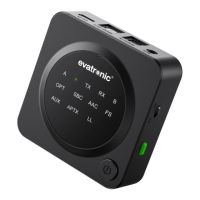

 To Next Page
 General