9. Main/Sub stream setting
(1)
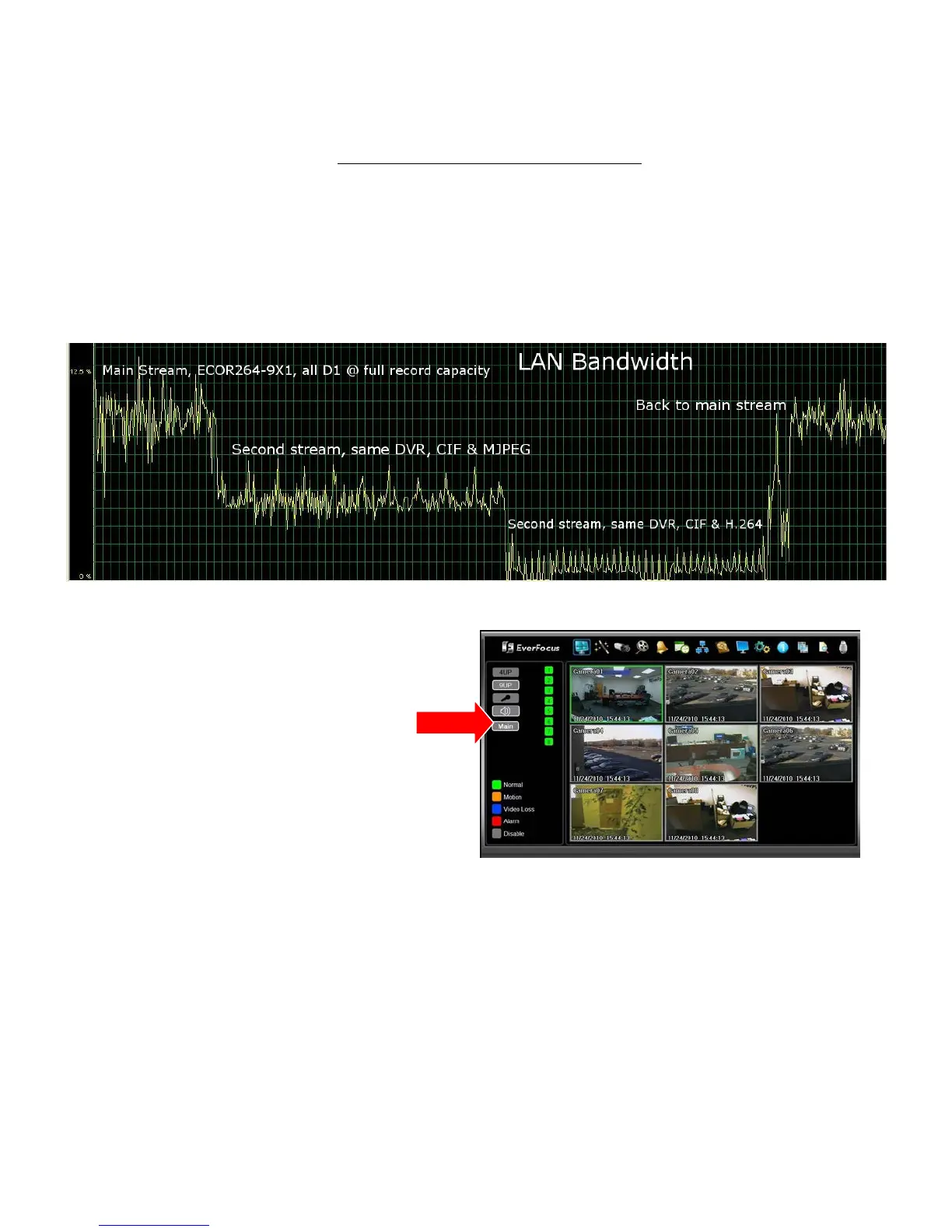
– Improve network transmission speed by switching the web
interface to display a lower bandwidth subsidiary stream. The Main stream will attempt to transmit
to the web interface the video in the format recorded to the hard drive according to the settings in
the DVR’s camera menu and other record configuration parameters. The second or ‘sub’ stream
always transmits a CIF image; if the DVR is recording D1/4CIF or 2CIF images, this can reduce the
bandwidth used. Another option allows the choice of either an H.264 or MJPEG format for the ‘sub’
stream. Please see graph and stream format selection below.
The selected stream being viewed by the web
interface (Main/Sub) is displayed and selected
by a button to the left of the live view window.
10. Sub Stream format setting
(3)
option. The compression format used for the ‘sub’ stream may
be selected as:
a. H.264 which is compatible with the iPhone and Android MobileFocus apps and the
standard IE PC web interface.
b. MJPEG which is compatible with general web browser viewing on many smart phones and
other web browsers (FireFox, MAC Safari, Opera, etc.)
The stream type selection is made in the Network Menu on the Remote/Mobile screen.












 To Next Page