22
ENGLISH
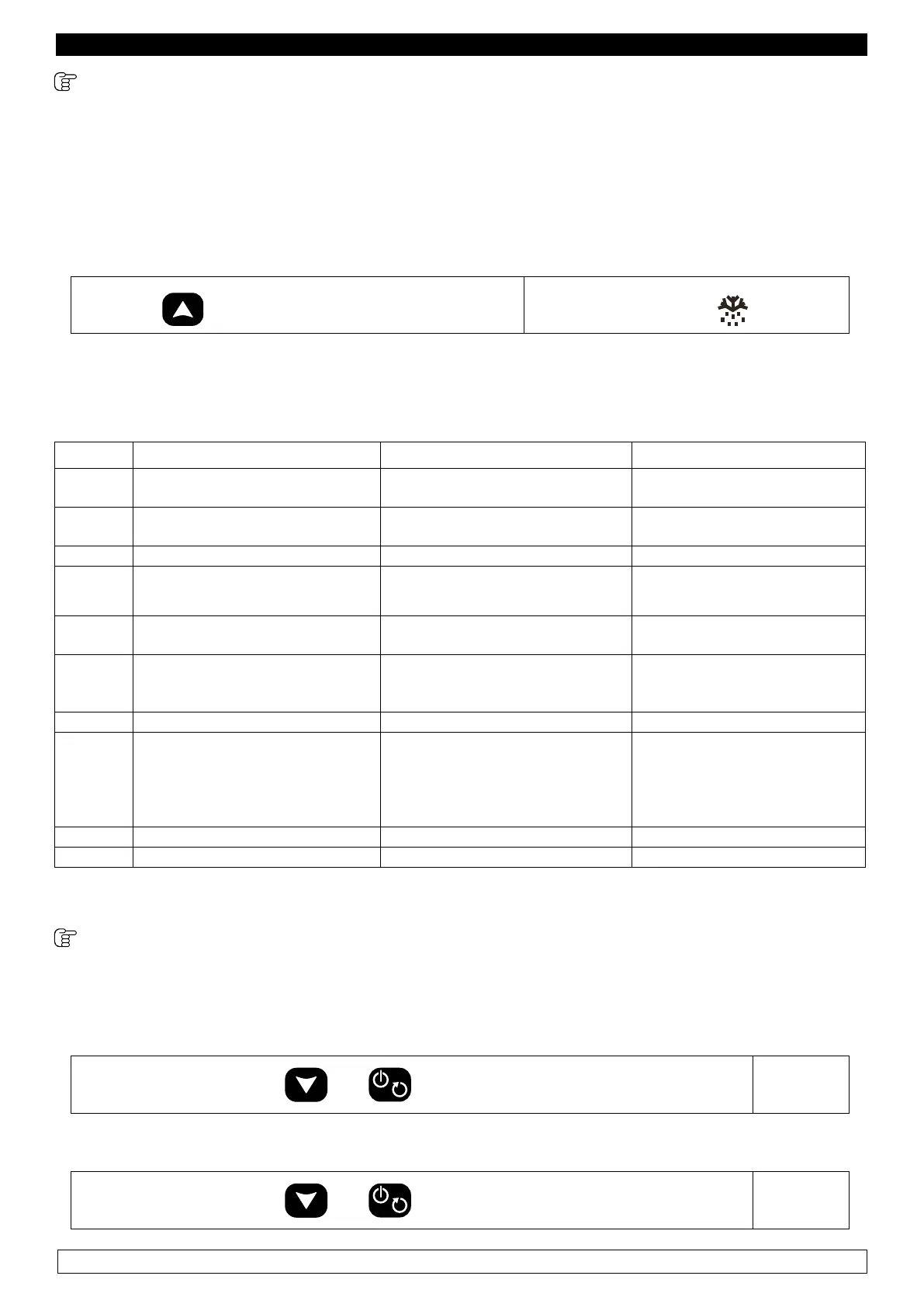
9.2.13 Activation of a MANUAL DEFROSTING cycle
Defrosting is activated manually, and lasts no longer than 30 minutes.
The cycle ends when the evaporator probe detects a temperature of 8°C.
- Make sure the blast chiller is in “ON” mode, that the keyboard is not locked (chapter 11) and that
no procedures are being carried out.
- Air defrosting is carried out: the chiller’s door must therefore be left open during the whole duration of the cycle.
► Press the
key for 4 seconds to start the defrosting
The display shows the
icon.
NB: It is advisable to perform a defrosting cycle daily, if possible at the end of the working day
CHAPTER 10 ALARMS
ALLARM DESCRIPTION CAUSE SOLUTION
Pr1
Room probe error (all cycles are
blocked)
► Room probe failure ► Replace probe
Pr2
Core probe error (you can not run
cycles to core probe)
► Core probe failure ► Replace probe
Pr3 Evaporator probe error
► Evaporator probe failure ► Replace probe
HP
Only for
ABF 05 E/C
models
High pressure alarm
(all cycles are blocked)
► Dirty condenser
► This product was added too hot
► Condenser cleaning
► Cool Down product
AL Minimum temperature alarm
► Cell probe fails
► Unit fails
► Service
► Service
AH Maximum temperature alarm
► Cell probe fails
► Unit fails
► Refrigeration system failure
► Service
► Service
► Service
PF Interruption of electrical power
► Electrical power failure occurred ►
Press any key to clear the alarm
TIME +
Acoustic
bleep
Acoustic
bleep
The chilling / freezing cycles with
core probe have not been carried
out within the scheduled time
► This product was added too hot
► Refrigeration system failure
► Repeat cycle
► Service
Loc keyboard locked
► The keyboard is locked ► See cap. 11
UnL keyboard unlocked
► The keyboard is unlocked ► See cap. 11
CAPITOLO 11 KEYBOARD LOCK
11.1 Lock / unlock keyboard
- Make sure the keyboard is not locked and that no procedures are being carried out
Lock keyboard
► Press simultaneously the
and keys until the label is displayed.
“Loc”
Unlock keyboard
► Press simultaneously the
and keys until the label is displayed.
“UnL”


 To Next Page
 Loading...