Need help?
Do you have a question about the eversolo DMP-A6 and is the answer not in the manual?
Installation process for the NVMe M.2 2280 SSD up to 2TB.
Details on all ports and connectors on the rear panel of the device.
Explanation of the knob functionality for volume and power/reboot operations.
Overview of the device's main interface and status bar elements.
How to add and manage local music files from various sources.
Instructions for installing and managing third-party applications.
Choosing different DAC filter characteristics for audio output preferences.
Guide to connecting and using the mobile app for device control.
Changing language and managing files via USB-OTG port.
Connecting the device's USB audio output to an external DAC.
Connecting the device's HDMI output to an AV receiver.
Important safety precautions for using the device properly and safely.
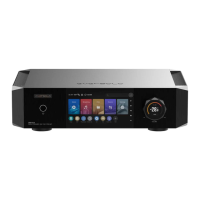
The Eversolo DMP-A6 is a high-fidelity music streamer designed to provide an exceptional audio experience. It functions as an all-in-one DAC streamer, capable of playing and managing various high-resolution local music files, as well as integrating with numerous third-party high-resolution music streaming services.
The core function of the DMP-A6 is to stream and decode high-fidelity audio. It supports a wide array of music file formats, ensuring compatibility with most audiophile-grade recordings. The device is equipped with a sophisticated decoding architecture, featuring two ES9038 Q2M DAC chips and an XMOS 316 audio processor. This setup allows for independent two-channel decoding, effectively minimizing interference between the left and right channels and ensuring a pristine audio signal. The use of high-precision resistance and a fully balanced circuit further guarantees lossless amplification of the XLR and RCA output signals, leading to significant improvements in audio indicators such as crosstalk, dynamic range, and signal-to-noise ratio.
Beyond local file playback, the DMP-A6 seamlessly integrates with popular music streaming services like Tidal, Qobuz, Highresaudio, and Amazon Music. It also supports network streaming protocols such as Roon Ready, Spotify Connect, Tidal Connect, Airplay, WebDAV, UPnP, and DLNA, offering a versatile range of options for accessing and enjoying digital music.
The device also serves as a high-definition Bluetooth decoder, supporting Bluetooth 5.0 with advanced protocols like APTXHD and LDAC. This allows for high-quality wireless audio streaming from mobile devices.
For physical connections, the DMP-A6 offers a comprehensive suite of input and output ports. USB-C audio input enables connection to PCs, streamers, mobile phones, and tablets. Optical and Coaxial inputs are available for connecting to CD players and other streamers. On the output side, it provides digital, optical, coaxial, HDMI DSD multi-channel, and USB audio outputs, catering to diverse audio setups. Analogue audio outputs include both balanced XLR and single-ended RCA pre-outputs, allowing connection to pure preamps, active speakers, or power amplifiers.
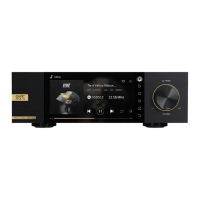
The DMP-A6 is designed for intuitive and flexible operation. It features a 6.0-inch LCD touchscreen for direct on-device control. Alternatively, users can control the device via an Android/iPhone/iPad APP, offering convenience and remote management.
SSD Installation and File Management: The device supports the installation of an NVMe M.2 2280 protocol SSD (up to 2TB) for local music storage. The installation process is straightforward: users lay the device upside down, remove screws to access the SSD slot, install the SSD by pulling open and pressing a fastening clip, and then restore the cover and screws. It is crucial to install the SSD while the device is powered off to prevent damage. The SSD supports NTFS, EXFAT, and FAT32 file systems. If a new SSD isn't recognized, it can be formatted directly through the device's "Home Screen > Files" menu. For optimal song transferring, users can designate an external storage device as the music directory via "Settings > Transfer," which automatically creates an "EversoloMusic" folder for organized file storage.
Music Library: The music library feature allows for comprehensive management and categorization of local music. Users can add music from local SSDs, external storage devices, SMB, and NFS sources. The system automatically categorizes added music files by track, artist, and album. A "My" section provides quick access to recently played records, personalized playlists, favorite tracks, artists, and albums.
Music Services: The device provides access to various streaming services, music apps, music cloud drivers, and music connect features. Users can log into their accounts for third-party apps to play music. Additional music apps can be downloaded, with updates available via the official website.
File Manager: The File Manager facilitates easy management of files across local storage, SSD, removable storage devices, NFS, and SMB within the same network. Users can copy, paste, and delete files. A convenient feature allows copying music files from an external storage device directly to the SSD.
Inputs/Outputs Selection: Users can select inputs and outputs based on their connected devices. It's important to note that all digital input connections only support audio output via the analogue output, not digital output.
Apps Management: The device allows users to view, install, and uninstall third-party apps. APK files can be downloaded to a removable hard drive, inserted into the device, and installed via the File Manager. It is recommended to install tablet-optimized apps for the best experience.
CD Playback and Ripping: By connecting a USB CD-ROM drive, the DMP-A6 can play music directly from CDs and rip music files. The ripping function is accessible through the "Apps > CD" menu, allowing users to save ripped music to local storage, internal SSD, or network devices.
System Settings: The system settings offer extensive customization options, including audio settings, display settings, network settings, general settings, song transfer, and system upgrade.
MQA (Master Quality Authenticated): The DMP-A6 incorporates MQA technology, allowing playback of MQA audio files and streams. The device's LED indicator changes color to signify MQA decoding: green for a standard MQA stream or file, and blue for an MQA Studio file (approved by the artist/producer or verified by the copyright owner), ensuring the sound is identical to the original source material.
System Upgrade: The DMP-A6 supports both online and USB system upgrades.
 General
| Ethernet | Yes |
|---|---|
| PCM Decoding | Up to 32-bit/768kHz |
| Operating System | Android |
| Audio Formats | MP3, WMA, AAC, WAV, FLAC, APE, ALAC, AIFF, DSD |
| Display | 6-inch Full HD touchscreen |
| Connectivity | Ethernet, Wi-Fi, Bluetooth |
| Output | RCA, XLR, Optical, Coaxial, USB |
| Wi-Fi | 802.11 b/g/n/ac |
| Bluetooth | Bluetooth 5.0 |
| Internal Storage | 32GB |
| DSD Decoding | DSD512 |
| Inputs | USB |
| Storage Expansion | USB |
| USB Ports | 2x USB 3.0, 1x USB Type-C |

 To Next Page