
 Need help?
Do you have a question about the Evo 16 and is the answer not in the manual?
Connect the EVO 16 to your computer via USB and to mains power via the IEC cable for initial setup.
Download and install the latest drivers from evo.audio/evo16/downloads to use the EVO 16.
Automatically sets microphone levels for optimal recording.
Press the Smartgain button to start the automatic gain adjustment process.
Choose one or two input channels for Smartgain adjustment.
Press the Smartgain button again to initiate listening and level setting.
Play or sing into the microphone to allow Smartgain to set levels.
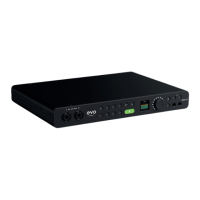
The EVO 16 is a 24-input/24-output audio interface designed for recording and audio production. It serves as a central hub for connecting microphones, instruments, and other audio equipment to a computer, allowing users to capture high-quality audio and monitor their recordings. The device is designed to be user-friendly, with features aimed at simplifying the setup and recording process, making it suitable for both beginners and experienced audio professionals.
The primary function of the EVO 16 is to convert analog audio signals from microphones and instruments into digital signals that can be processed and recorded by a computer, and vice versa. It features eight EVO mic preamps, known for their clean and transparent sound, which provide ample gain for a wide range of microphones. Additionally, it includes two JFET instrument inputs, optimized for direct connection of guitars, basses, and other high-impedance instruments, delivering a rich and detailed tone.
For monitoring, the EVO 16 offers two independent headphone outputs, allowing multiple users or performers to monitor their audio simultaneously with separate mixes. It also provides eight line outputs, which can be used to connect to studio monitors, external effects processors, or other audio equipment. The inclusion of two optical inputs and outputs (ADAT) expands the interface's capabilities, allowing for the connection of additional preamps or converters, effectively increasing the total number of available inputs and outputs.
A standout feature of the EVO 16 is "Smartgain," an intelligent automatic gain setting function. This feature simplifies the process of setting input levels by automatically adjusting microphone gain, ensuring optimal recording levels without clipping or excessive noise. This is particularly beneficial for users who may be new to audio recording or those who want to quickly set up and start recording without manual gain adjustments.
The interface also incorporates phantom power (48V), essential for powering condenser microphones. Dedicated buttons and controls on the front panel allow for easy activation of phantom power for individual channels. A main volume control knob provides precise adjustment of the main output level, while a main output select button allows users to choose which outputs are controlled by the main volume knob.
For advanced control and customization, the EVO 16 includes a programmable function button, which can be assigned to various tasks within the EVO Control software. This allows users to tailor the interface to their specific workflow. Independent headphone output select buttons enable users to route different mixes to each headphone output, providing flexibility for monitoring during recording sessions.
The device features a high-resolution LCD screen, which displays important information such as input levels, output levels, and settings, providing clear visual feedback to the user. For synchronization with other digital audio equipment, the EVO 16 includes a Word Clock output, ensuring precise timing in complex studio setups. Connectivity to a computer is established via a USB2.0 connection, utilizing a USB-C port for reliable and high-speed data transfer. The unit is powered by an external power supply, ensuring stable operation.
Getting started with the EVO 16 is designed to be straightforward. Users first connect the interface to their computer using the provided USB cable and then connect the unit to mains power using the included IEC power cable. Upon successful connection, the onboard LED screen illuminates, and a short start-up animation plays, accompanied by the main volume LED ring illuminating, indicating the device is ready for use.
Before full operation, users need to download and install the latest drivers from the EVO website. These drivers ensure proper communication between the EVO 16 and the computer's operating system. During the driver installation process, users may be prompted to update the unit's firmware, which helps ensure optimal performance and access to the latest features. A comprehensive user manual, available for download, provides detailed installation instructions and operational guidance.
The Smartgain feature is a key usage highlight. To activate it, users press the Smartgain button, which illuminates green, and the input channel LEDs begin to flash, prompting the selection of channels. Users then press one or two input channel buttons (for stereo pairs) to select the channels for adjustment. Pressing the Smartgain button again initiates the process. The Smartgain LED flashes red, and the volume wheel LEDs illuminate, indicating that the system is listening. Users then perform or play into the microphone, and Smartgain automatically dials in the correct levels. Once complete, the Smartgain button flashes green twice, confirming successful level setting. This feature significantly reduces the time and effort required for gain staging, allowing users to focus more on their performance.
The EVO 16's physical layout is intuitive, with clearly labeled inputs and outputs on the rear panel, including MIC/LINE/INSTRUMENT inputs, optical I/O, line outputs, and Word Clock output. The front panel houses the instrument inputs, headphone outputs, and main controls, making them easily accessible during a recording session. The combination of physical controls and the LCD screen provides a comprehensive and user-friendly interface for managing all aspects of the audio signal flow.
While the manual does not explicitly detail maintenance features, the design of the EVO 16 suggests a focus on durability and long-term reliability. The robust construction, typical of professional audio equipment, is intended to withstand the rigors of studio use and occasional transport.
Software and firmware updates, which are part of the initial setup and ongoing support, contribute to the device's longevity by addressing potential bugs, improving performance, and introducing new functionalities. Users are encouraged to regularly check the EVO website for the latest drivers and firmware to ensure their device is always up-to-date.
The "ARC" program (Audient Registered Content) is a valuable resource for users, offering free software and plugins upon product registration. This not only enhances the user's creative toolkit but also implies ongoing support and a community around the EVO product line. Registering the product is a simple step that connects users to potential future updates and resources.
General maintenance would involve keeping the unit clean and free from dust, especially around the ventilation areas, to ensure proper heat dissipation. Using the device within recommended environmental conditions (temperature, humidity) will also contribute to its operational lifespan. The use of a high-quality USB cable and power supply, as provided, is important for stable and reliable operation, and replacing them with equivalent quality components if damaged would be a standard maintenance practice. The modular nature of modern audio interfaces, with external power supplies, also means that if a power supply fails, it can often be replaced without needing to service the entire unit.
 General
| Type | Audio Interface |
|---|---|
| Number of Preamps | 8 |
| Phantom Power | Yes |
| Bit Depth | 24-bit |
| A/D Resolution | 24-bit |
| Headphones | 2 |

 To Next Page