eX-Mars Quick Manual
Ver. 1.43
GETTING STARTED
About eX-Mars
eX-Mars is the world's first and only intelligent robot with
features including auto-scrambling, time-recording, solution-
recording, and step-by-step solving instruction for 3x3x3
cube.
Device layout
Turning eX-Mars on and off
Press the power button briefly to turn on eX-Mars.
Press and hold the power button for 4 seconds to turn off
eX-Mars.
Battery indicator
When the power is turned on by pressing the power button,
the battery level of 0 (low) to 4 (high) is displayed on all six
faces of the cube.
Charging the battery
Plug the small end of the charging cable (included in the
box) into the charger port of eX-Mars and plug the large end
of the cable into a power outlet.
Selecting a mode
Users can play eX-Mars without a mobile device.
When you turn on eX-Mars and press the power button
briefly (less than 4 seconds), the cube turns to the home
menu state.
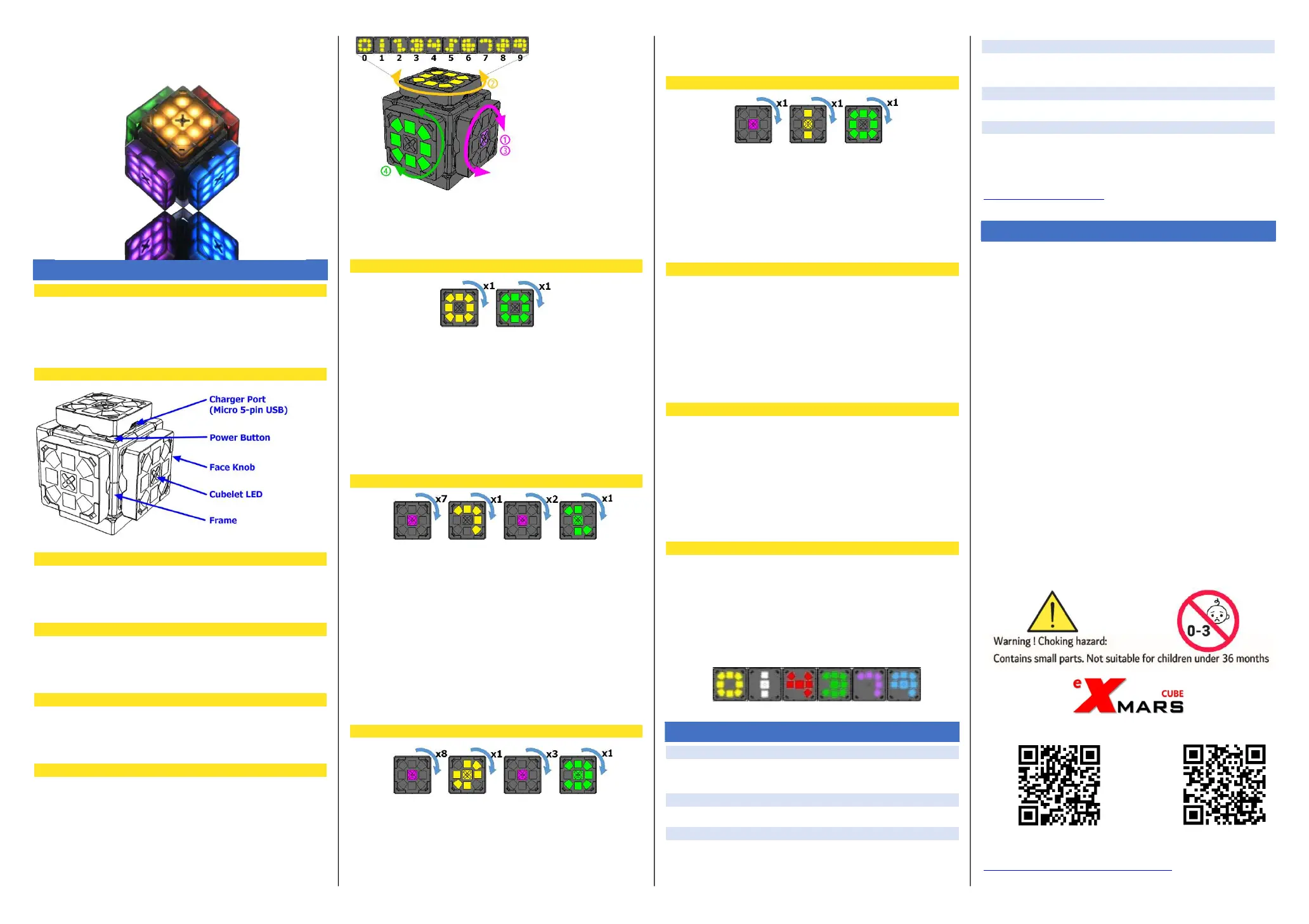
① Turn the purple face knob to change the number on the
yellow face ② then rotate the yellow face knob 90 degrees
to select the upper digit of the mode, and ③ turn the purple
face to change the
number on green
face ④ then rotate
the green face knob
to select the lower
digit of the mode
If you press and hold the power button for 1 second and
then release it, it will be in a state where you can select
another mode just like when you turned on the power.
Let's run mode 00. (acts like a normal cube)
1) When the power is turned on, or in a state where
you can select another mode by pressing and
releasing the power button for 1 second, rotate the
yellow face (0) 90 degrees and the green face (0)
90 degrees to activate mode 00.
2) Turning one face 90 degrees rotates the color
pattern 90 degrees like a normal cube.
3) If you press and hold the power button for 0.5
seconds and then release it, the color of all 6 faces
will be matched.
Let's run mode 72. (If the user scrambles, AI solves it)
1) When the power is turned on, or in a state where
you can select another mode by pressing and
releasing the power button for 1 second, rotate the
purple face clockwise 90 degrees 7 times so that
the yellow face becomes 7.
2) Rotate the yellow face (7) 90 degrees.
3) Rotate the purple face 90 degrees clockwise twice
so that the number on the green face becomes 2.
4) Rotating the green face (2) 90 degrees activates
mode 72.
5) In mode 72, after scrambling the cubes as much as
the user wants, wait for more than 5 seconds and
the AI will solve it by itself.
Let's run mode 83. (playing jingle bells)
1) Rotate the purple face so that the number on the
yellow face is 8.
2) Rotate the yellow face (8) 90 degrees.
3) Rotate the purple face to change the number on
the green face to 3.
4) Rotate the green face (3) 90 degrees to activate
mode 83.
5) In Mode 83, eX-Mars solves while playing Jingle
Bells.
Let's run mode 10. (shows how to solve Stage 1)
1) Rotate the purple face so that the number on the
yellow face changes to 1.
2) Rotate the yellow face (1) 90 degrees.
3) Rotate the green face (0) 90 degrees.
4) Mode 10 automatically scrambles to become stage
1.
5) With the purple face facing you, follow the
instructions of eX-Mars.
App installation
For android device
: Google Playstore searching keyword is ‘ex-mars’
For iOS device
: App Store searching keyword is ‘ex-mars’
Note: The Bluetooth function must be turned on in your
mobile device.
Connecting eX-Mars to a mobile device
eX-Mars
Turn on eX-Mars
Mobile device
1) Launch the eX-Mars application
2) Tap the ‘Disconnected’ button
3) Press the same SSID with eX-Mars serial number
How to read the time record
Yellow ten digits of minutes
White unit of minutes
Red ten digits of seconds
Green unit of seconds
Purple hundred digits of milliseconds
Blue ten digits of milliseconds
For example, ‘01:43.79’ means ‘1 minutes and 43.79 seconds’
TROUBLE SHOOTING
1. LED lights don't work perfectly.
Try setting mode03 (LED Lights Auto Tuning mode)
and leave it for an hour -
New Features of the 2022 model
2. Auto snapping function is not working.
Try setting mode 93. ( Brake Mode Active )
3. There is no sound when rotating any face.
Try setting mode 96. ( Sound On )
4. It doesn't work well when you rotate a face
After selecting the mode, turn any face after the beep sound
comes out.
5. It does not respond to any input and cannot be charged
Wait at least 3 minutes and try again.
6. Motor does not move when jingle bell is executed
Try setting mode 98. ( Replay Motor On )
If the above method does not work, please contact us via
the email below;
contact@exmarscube.com
SAFETY PRECAUTIONS
Protect against electric shock, water, high humidity, fire, and
explosion.
Prevent small children from playing with this device.
Do not throw. Do not throw it at people or animals.
Do not drop your device or impact it with sharp or heavy objects.
Do not disassemble it.
Do not place heavy objects.
Protect outer surface from any damage or contact with liquid.
Prevent small objects and liquid from falling into holes.
Do not place on soil or sand.
Do not change the battery yourself. Use authorized service if
needed.
Never dispose of batteries or devices in fire.
Follow all local regulations when disposing of used batteries or
devices.
Never place devices on or in heating devices, such as microwave
ovens, stoves, radiators or on an extremely hot surface. Batteries
may explode when overheated.
Avoid exposing the device to high external pressure, which can
lead to an internal short circuit and overheating.
Avoid exposing your device to very cold or very hot temperatures.
Extreme temperatures can cause the deformation of the device and
reduce the charging capacity and life of your device and batteries.
Turn off your device where its use is prohibited.
Turn off your device when in an aircraft.
Humidity and all types of liquids may damage device parts or
electronic circuits.
Your device can explode if left inside a closed vehicle, as the inside
temperature can go up very high.
Do not bite or put any part of device in your mouth.
Do not use if you are visually uncomfortable.
Any changes or modifications to your device can void your
manufacturer’s warranty.
www.exmarscube.com
Support Web page YOUTUBE
(download video manual and others)
http://www.exmarscube.com/main.php?m1=27



 To Next Page
 Loading...