7
2.
3.
4.
1.
DE
Eingabe der persönlichen
Daten
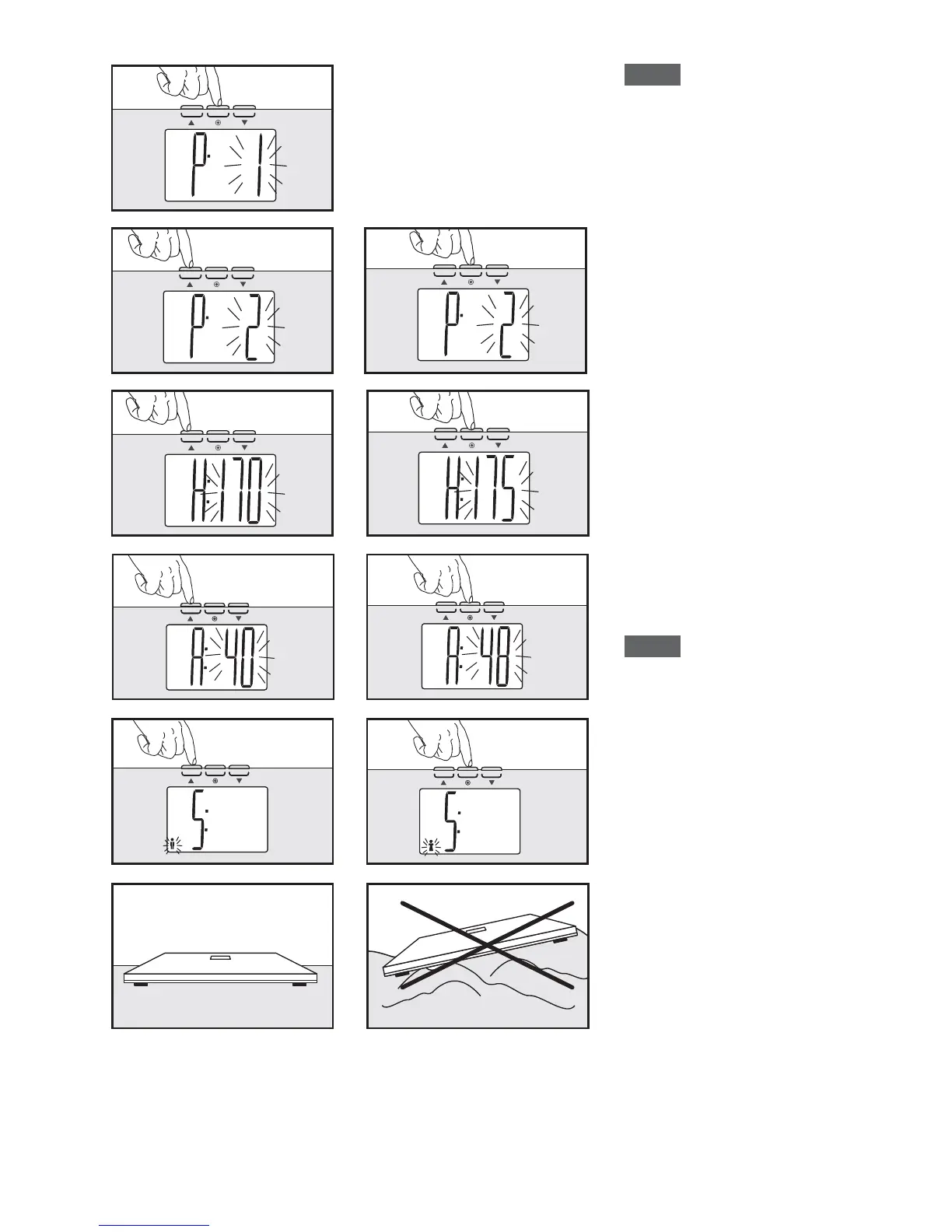
1. SET-Taste drücken.
2. Mit den V/W-Tasten
Speicherplatz auswählen
und bestätigen (SET).
3. Mit den V/W-Tasten
Körpergröße einstellen und
bestätigen (SET).
4. Im nächsten Schritt das
Alter einstellen und bestäti-
gen.
5. Abschließend das
Geschlecht einstellen und
be stätigen.
6. Waage auf festen ebenen
Untergrund aufstellen und
abwarten bis Waage selbst-
ständig ausschaltet.
Hinweis: Das Ändern oder
Löschen von Daten erfolgt
durch Über schrei ben der
vorhandenen Daten.
EN
Entry of personal data
1. Push SET key.
2. Use V/Wkeys to select
memory slot and confirm
(SET).
3. Then use V/W keys enter
body height.
Use SET to confirm.
4. In the next step enter the
age and confirm.
5. Finally select sex and con-
firm.
6. Place scale on hard, level
surface and wait until the
scale switches off automa-
tically.
Note: Changing or deleting
data is done by overwriting
existing data.
5.
6.


 To Next Page