Key Description
1) Press key to turn on. 2) When the weigh pan is empty (free of load) and the display is not
showing zero, press this key to zero the scale. “0”indicator is on. 3) Turn off scale by
holding this key
Press this key to switch weight units; the icons will indicate the active units.
Switch between Net weight and the Gross weight. Only work in Tare mode where “Net” is on.
Tare key; after placing a container, press this key to tare and “Net” is on. To cancel tare,
empty the weight pan and press this key again and “Net” is off.
In the weighing mode, press and keys
at the same time to enter the Advanced Function
setting mode and display shows 01 FnC. Press key to enter and shows FnC 00. Use up and
down keys to select and use key to move to the right. Then press key to enter and
change function setting.
FnC 00 Back to the previous level
FnC 01 Automatic Backlight
on-> always on, AT-> auto backlight, off->backlight off. Use
key to select brightness of backlight for “on” and “AT” setting
FnC 02 Automatic Power-off
0->disable, 1~9-> Time in mintues to auto power off
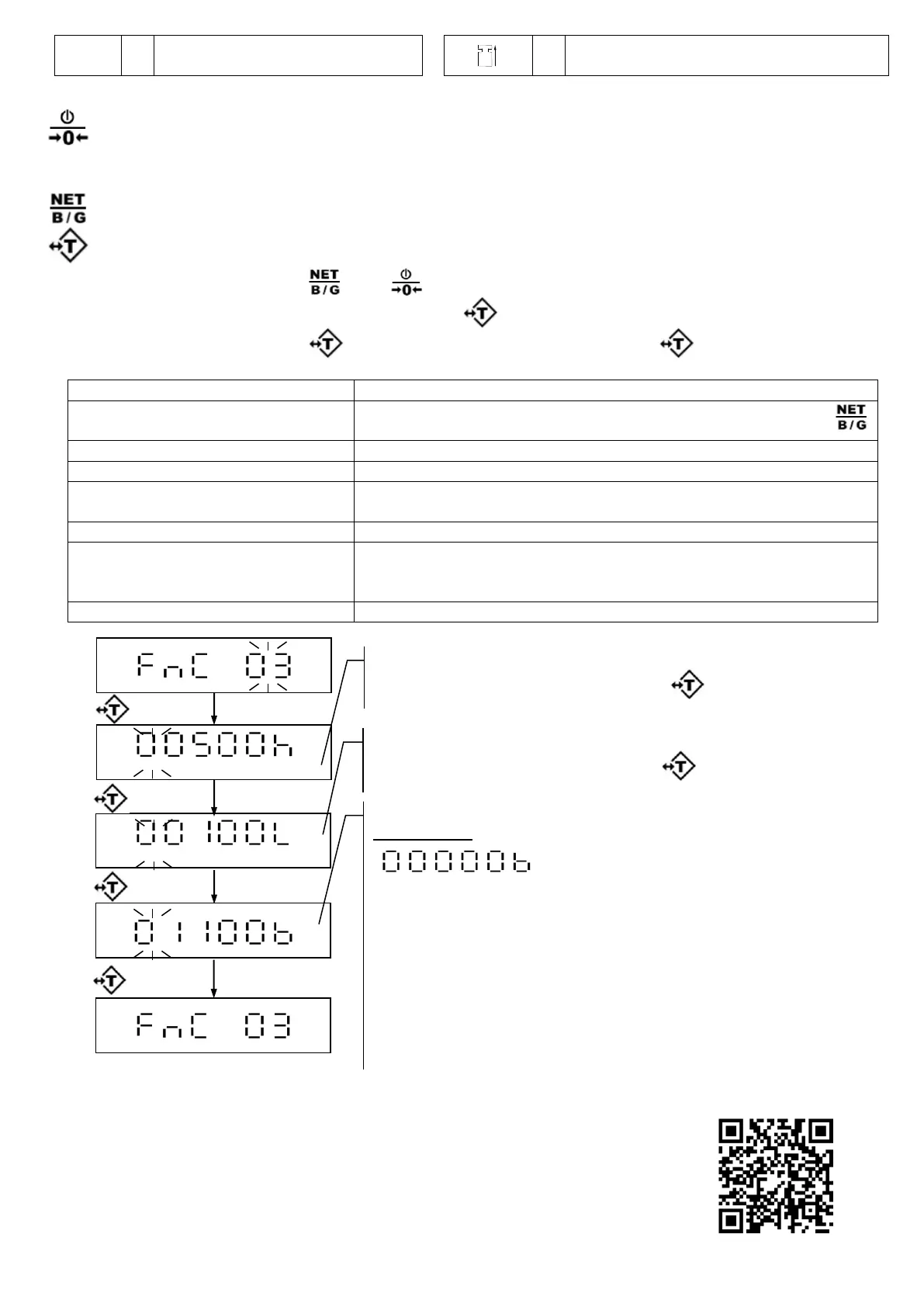
See below. To disable, set both high limit and low limit to “0”,
0: disable, 1: Peak Hold (press key to exit) 2: Stable Hold 1 (press
key to exit) 3: Stable Hold 2 (weight returns to 0 to exit)
FnC 07 Auto Unit Weight Averaging
FnC 08 Two Weighing Units
0: disable only 2 weight units;
To set 2
nd
weight unit to => 1:2
nd
unit in CSP 01
2: 3rd unit in CSP 01 3: 4
th
unit in CSP 01
0: disable 1: enable tare operation while unstable
EXCELL Precision Co., Ltd.
6F, No. 127, Lane 235, Baoqiao Rd.,
Xindian District, New Taipei City 23145
TEL:886-2-8919-1000
Fax:886-2-8919-2209
E-mail:pm-all@excell.com.tw
www.excell-scale.com
FCC Statement: This device complies
with Part 15 of the FCC Rules.
Operation is subject to the following two
conditions: (1) This device may not
cause harmful interference, and (2) This
device must accept any interference
received, including interference that may
cause undesired operation.
FCC ID for charging pad: 2BFJV000001
V24. 0514
The single weight of the sample is < 0.2d
(d=increment)
LCD displays the last saved status. Key in the
desired high limit value, then press key.
LCD displays the last saved status. Key in the
desired low limit value, then press key.
LCD displays the last saved status.
Alarm setting
(a) (b) (c)
(a)
1 = beep sound on
1 = beep sound on when stable
0 = beep sound on when unstable
(c)
1 = beep sound on when the weight is between high and
low limits
0 = beep sound on when the weight is not between high
and low limits and higher than 10d


 To Previous Page
 Loading...