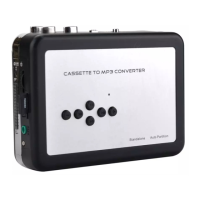
5, Small watch window----To check if cassette is running.
6, Cassette operate buttons-----See following details.
PLAY---press to play cassette.
STOP---press to stop play cassette.
F.F---Fast forward.
REW---Rewind.
DIR---Change the direction of cassette playing.
Auto reverse switch---Slide to is auto reverse mode.
7, DC port----5V DC.
8, Convert operate buttons-----See following details.
LED indicator:
Keep on ---- Standby.
Quick flash (2 times per second) --- Recording.
Slow flash (1 time per second) ---Playback.
Green ---- Manual mode.
Blue ---- Automatic mode.
Operations Cassette:
Power supply:
1, You can simply use the USB cable in the package to power supply this device.
2, Or you can also use 2 AA batteries----Open the lid of the deck, and put batteries in the groove.
Operate:
3, Put a cassette in.
4, Connect a speaker or earphone to “AUX” of the device.
5, Connect an USB disk to “OTG”, you will see green indicator lights.
NOTE: For save energy, the convert circuit only work when an USB disk be connected. You
can still play cassette even without USB disk.
6, Press “PLAY” button of the top, you should hear the sound from the cassette playing.
7, Turn the volume switch to a level you favor (usually be max is ok)
Convert and Playback:
1, Record in manually mode:
When the cassette playing and an USB flash is connecting, and the device is under standby
mode (indicator keep on), and the color of indicator is green shows it at default manually mode. Just
simply press the recording button then the device will start to recording (converting) the
playing music to MP3 format, the green indicator will be quick flashing (if not, means not recording,
re-plug your USB flash and try again) . Press the recording button again to stop recording and save a


 To Next Page
 Loading...