EasyManua.ls Logo

Ezviz C2 Cube - Device Setup; Install the microSD Card; Power On and Initial Connection

Ezviz C2 Cube
64 pages
To Next Page IconTo Next Page
To Previous Page IconTo Previous Page
Loading...
1
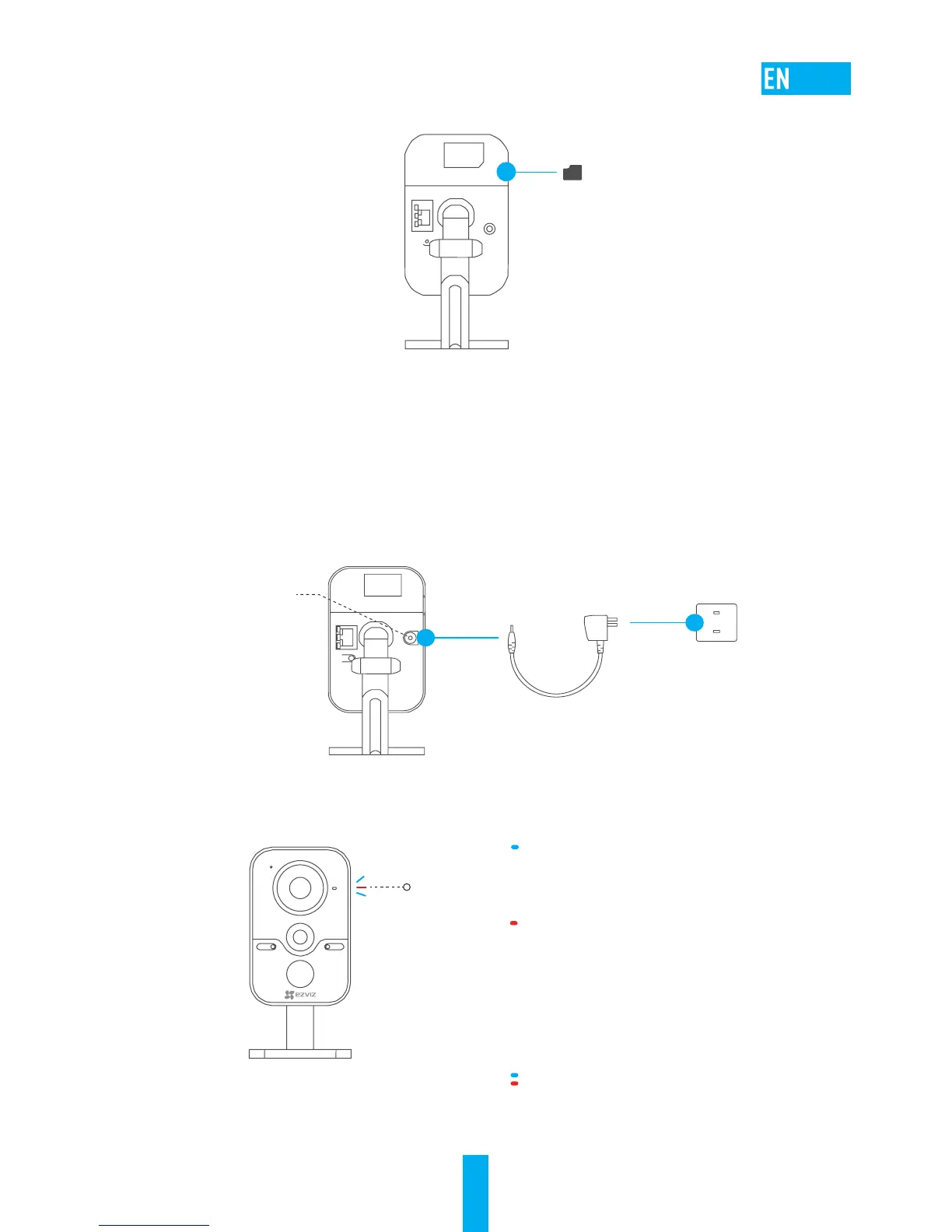
(Optional) Install the microSD Card
Step
Insert the microSD card.
Setup
Step 1 Power-on
Connect the cube camera and the power outlet with the power cable, see the figure
below. The LED indicator will flicker red and blue when the camera is ready for setup.
-"/
%$7
345
LED Indicator Status
Power Interface
Power Cable
Power Outlet
LED Indicator
Flicker Blue: The network is properly
connected.
Steady Red: The device is activating.
Slowly Flicker in Red: Invalid network
connection.
Fast Flicker in Red: microSD card error or
other exception occured.
Blue and Red Alternately: Camera is ready
for Wi-Fi setup.
microSD Card

Related product manuals