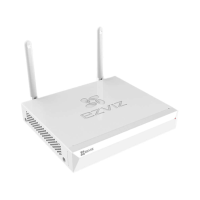
The EZVIZ NVR (Network Video Recorder) is a device designed for video surveillance, allowing users to record and manage video feeds from connected cameras. It supports both wired and wireless network connections, making it versatile for various installation environments. The NVR is typically sold as part of a kit that includes the NVR unit itself, a power adapter, a screw kit (unless equipped with a pre-installed Hard Disk Drive), a mouse, and a Quick Start Guide.
Function Description:
The EZVIZ NVR serves as the central hub for a surveillance system. It receives video data from connected cameras, stores it (either on an internal HDD or other storage solutions), and allows users to view live feeds, playback recorded footage, and manage camera settings. The device is designed for easy setup and integration with the EZVIZ app, offering remote access and additional smart functions. It supports both local monitoring via a connected display (VGA or HDMI) and remote access through the EZVIZ mobile application. The NVR also features a reset hole for restoring factory defaults, a power button for easy on/off control, and various interfaces for connectivity.
Important Technical Specifications:
While specific model numbers and detailed technical specifications are not fully provided in the excerpt, the manual indicates the following:
- Power Input: 12V (via the included power adapter).
- Connectivity: LAN interface for router connection, VGA interface for monitor, HDMI interface for monitor, USB interface for mouse.
- Storage: Supports internal Hard Disk Drive (HDD) installation (screw kit provided for self-installation, not included if HDD is pre-installed).
- Wireless Communication: The NVR can connect to wireless cameras, with a recommended distance of up to 10 meters (32.8 feet) between the NVR and wireless cameras for optimal signal.
- Regulatory Compliance: The device complies with FCC Part 15 rules, Industry Canada licence-exempt RSS standards (CAN ICES-3 (B)/NMB-3(B)), and EU conformity standards (Radio Equipment Directive 2014/53/EU, EMC Directive 2014/30/EU, RoHS Directive 2011/65/EU). It also adheres to WEEE directive 2012/19/EU and battery directive 2006/66/EC (amended 2013/56/EU).
- Model Type (Example): The EC DECLARATION OF CONFORMITY mentions "CS-X5S-16H" as an example of a radio equipment type.
Usage Features:
- Easy Setup: The NVR is designed for a straightforward setup process. Users connect it to a power outlet, a monitor (VGA or HDMI), and a router (via LAN cable). A mouse is connected to the USB interface for local control.
- First-Time Access Wizard: Upon initial power-on, a wizard guides the user through setting up a password for the NVR, enhancing security. The admin password is typically the verification code found on the device's label.
- Camera Management: Through the NVR's menu interface (accessed via a connected monitor), users can manage cameras, including searching for and adding wireless cameras to the system's Wi-Fi network. Cameras should be within 10 meters of the NVR for optimal wireless connection.
- Local Monitoring: Live video feeds and recorded playback can be viewed directly on a monitor connected to the NVR via VGA or HDMI.
- EZVIZ App Integration: The NVR can be linked to the EZVIZ mobile application, allowing for remote access, viewing, and management of the surveillance system from a smartphone. This involves downloading the EZVIZ app, creating an account, and scanning a QR code on the NVR to add the device.
- LED Indicator Status: The NVR features an LED indicator that provides visual feedback on its operational status:
- Steady Green: Working Properly
- Steady Red: Device Exceptions or Alarm
- Flashing Red: Restore Factory Defaults
- Shutdown Procedure: For device protection, a proper shutdown procedure is available via the NVR's menu (Menu → Shutdown), emphasizing the importance of not disconnecting power while the device is operating.
- HDD Installation (Optional): Users can install an HDD themselves by following detailed instructions involving loosening screws, connecting data and power cables, and securing the HDD within the NVR chassis.
Maintenance Features:
- Firmware Updates: The manual states that information is subject to change due to firmware updates, implying that the device receives updates to improve functionality and security. Users are directed to the EZVIZ website for the latest version of the manual, suggesting ongoing support and information.
- Factory Reset: The NVR includes a reset hole, allowing users to restore the device to its factory default settings by inserting and holding a pin for 7 seconds until the LED indicator flashes red. This can be useful for troubleshooting or reconfiguring the device.
- Stable Power Supply: The manual advises using a stable power supply to prevent device exceptions or damage, which is a key maintenance recommendation for ensuring longevity and reliable operation.
- Environmental Considerations: Users are advised to keep the NVR and wireless cameras within a 10-meter range and away from other wireless devices or barriers to avoid signal degradation, contributing to optimal system performance and reducing potential issues.
- Customer Service and Support: EZVIZ provides customer service and technical support via telephone and email, indicating a commitment to assisting users with any questions or issues they may encounter. The manual also encourages users to check relevant laws in their jurisdiction regarding surveillance and data protection.
- Warranty: The product comes with a two-year limited warranty covering defects in materials and workmanship, with options for repair, replacement, or refund, ensuring support in case of manufacturing faults. The warranty also outlines conditions under which it may be void, such as unauthorized repairs or physical damage.

 Need help?

 To Next Page
 General