FUNCTION
7.Taillight: The battery taillight needs to be turned on and off
manually.(Optional)
8.Zero speed booting: When the E-bike on standby mode,
you can accelerate with speeding bar.
9.Speed up: Please accelerate the Ebike slowly, do not
twist the throttle bar too hard, in case of broken.
10.Cruise control: While riding,press and release the cruise
button into cruise mode.If press the button again or
accelerate again or brake will cancel the cruise function.
11.Electric mode and Assisting mode: the default of the
Ebike is assisting mode, only one gear. While it is assisting
mode, also can use the electric mode.
12 Before riding, seat post clamp must be locked tightly,
take care of the seat tube safe line,don't beyond it.
1.Installation: After unpacking, loosen the handle bar &
quick release, adjust the horizontal handle to the right
direction, lock the horizontal handle, and gently hold the
brake lever several times, adjust the brake lines to the best
condition.
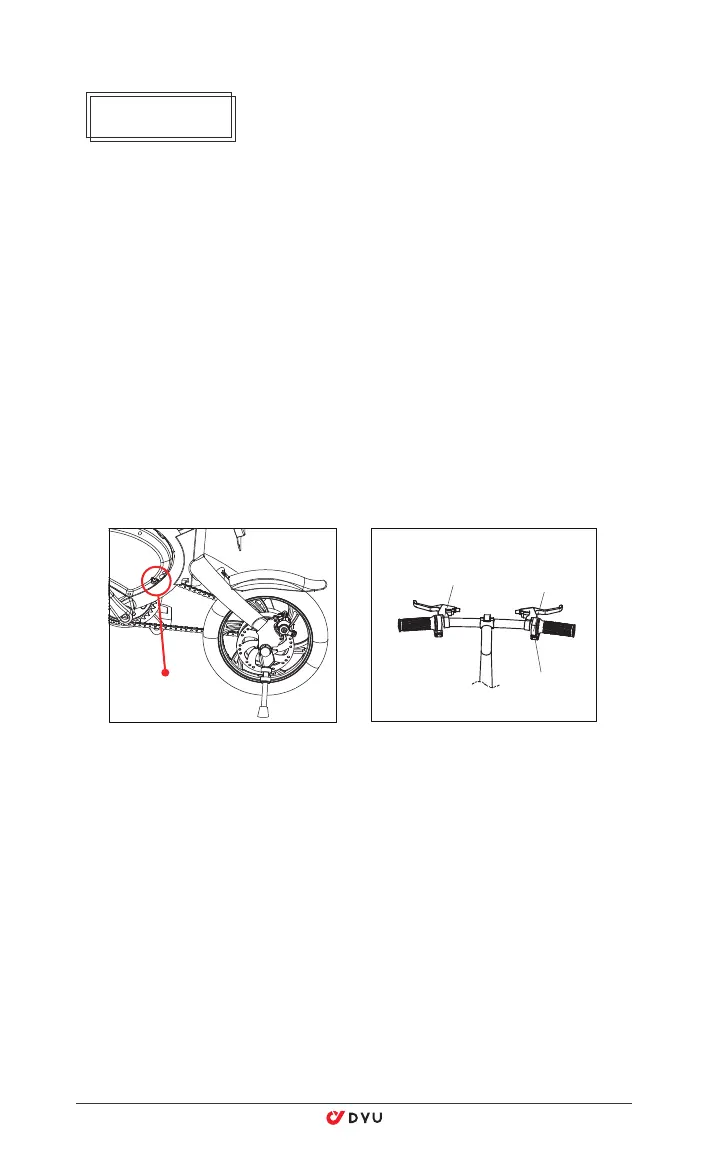
2.On/off: Press the switch button on left handle bar to turn
on the E-bike, the dash board will light up; Press the switch
button again to turn off the E-bike.
3.Charging: Connect the charger to the power plug and then
to the E-bike. When the charger indicator turns green from
red, it shows full power.
4.Battery status: After booting,the dash board lights up and
the electricity shows up, it has four grids, Corresponding to
high power, medium power and low power respectively
5.Braking: Use disc brakes, you can not speed up before
fully loosed.
6.Headlight: Keep pressing the cruise button for 3 seconds
to turn on/off the light.
Switch Button
DC2.1 charge port
Dash Board
Cruise Button


 To Next Page
 Loading...