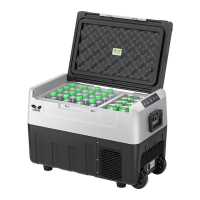
▲ Operation Method
① Long press the " " button for 3 seconds, the refrigerator is turned on/standby.
② Press the " " / " "button to adjust the temperature.
③ Long press the " " / " " buttonto increase or decrease the temperature at a rate of4°Cper
second. The number will not flash during the process of adjustment.
④ After setting the temperature, if there is no further operation on the panel within 3 seconds, the
temperature display will stop flashing and save the currently set temperature.
⑤ The temperature display shows the actual temperature inside the box.
⑥ Under the standby mode, buttons will light up while the digital display will not.
⑦ Under the working status, press " "button to switch MAX / ECO mode.
⑧ Temperature can be adjusted between -7.6°F to 50°F (-22°C to +10°C).
⑨ Temperature unit conversion: Press " "and " "for 3 seconds at the same time to switch
Celsius (°C) and Fahrenheit (°F).
⑩ Car battery protection mode: During the working state, press the " "button for 3 seconds to enter
the battery protection setting. Then press the " "buttonto switch H / M / L. After selecting a level, the
display panel will flash for 5 seconds, and then it will automatically save and exit the setting.
*Generally speaking, when connectingtothe car power, we recommend using the H level. Whenconnect-
ing to the portable power station, it is recommend to selectM / L level.
6
_ _


 To Next Page