8
4. Function overview and functional area layout
4.1 Function overview
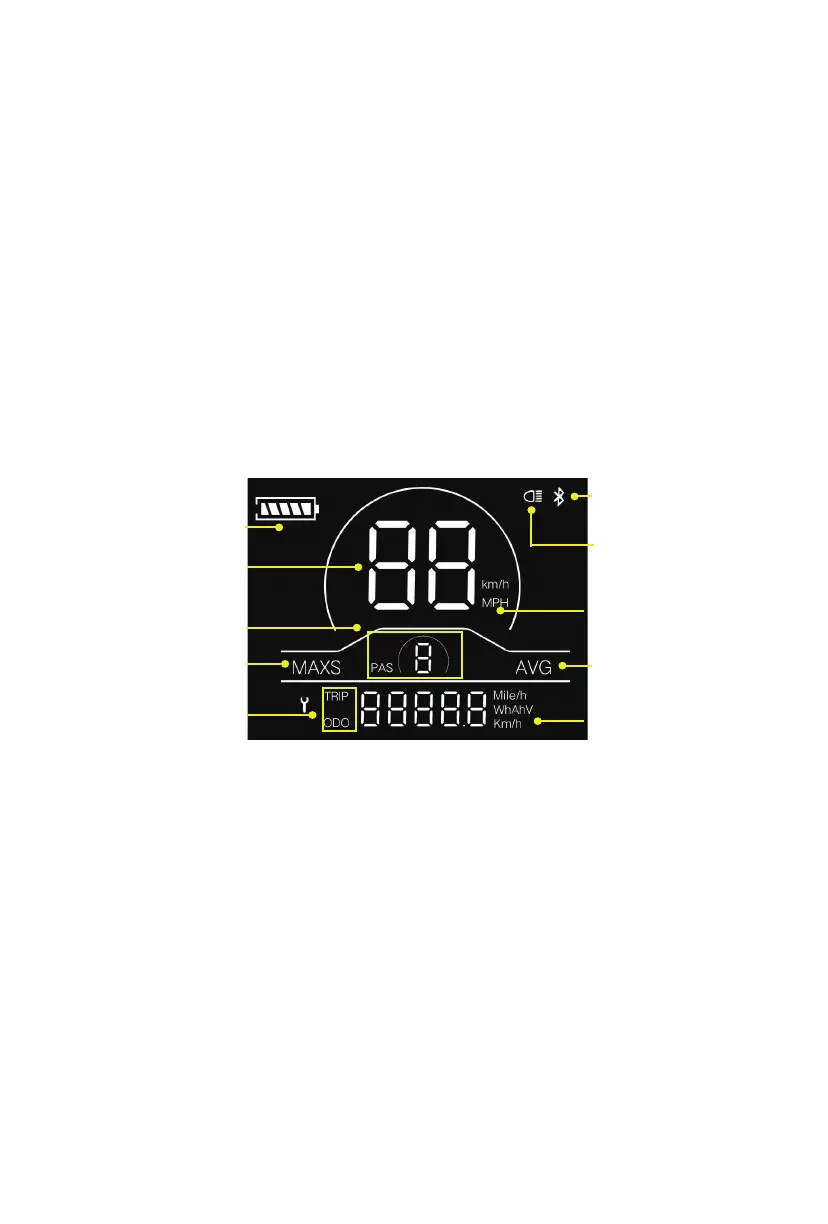
Display YL81C provides a variety of functions to meet the riding needs of users,
including:
● Battery level indicator
● Assist level adjustment and indication
● Headlight indicator
● Speed indicator (including real-time speed, maximum speed (MAXS) and
average speed (AVG))
● Distance indicator (including ODO and trip distance (Trip))
● Error code indicator
● Bluetooth connection indicator (reserved)
● Parameter setting function
4.2 Functional area layout
6
7
8
9
10
1
2
3
4
5
Fig. 4-1 Functional Area Layout Interface of Display YL81C
1. Battery level indicator
2. Speed indicator
3. Pedal assist level indicator
4. Maximum speed
5. Trip distance indicator ODO
6. Bluetooth indicator
7. Headlight indicator
8. Speed unit Metric system: km/h Imperial system: MPH
9. Average speed indicator
10. Distance/speed unit Metric system: km, km/h Imperial system: mile, mile/h


 To Next Page