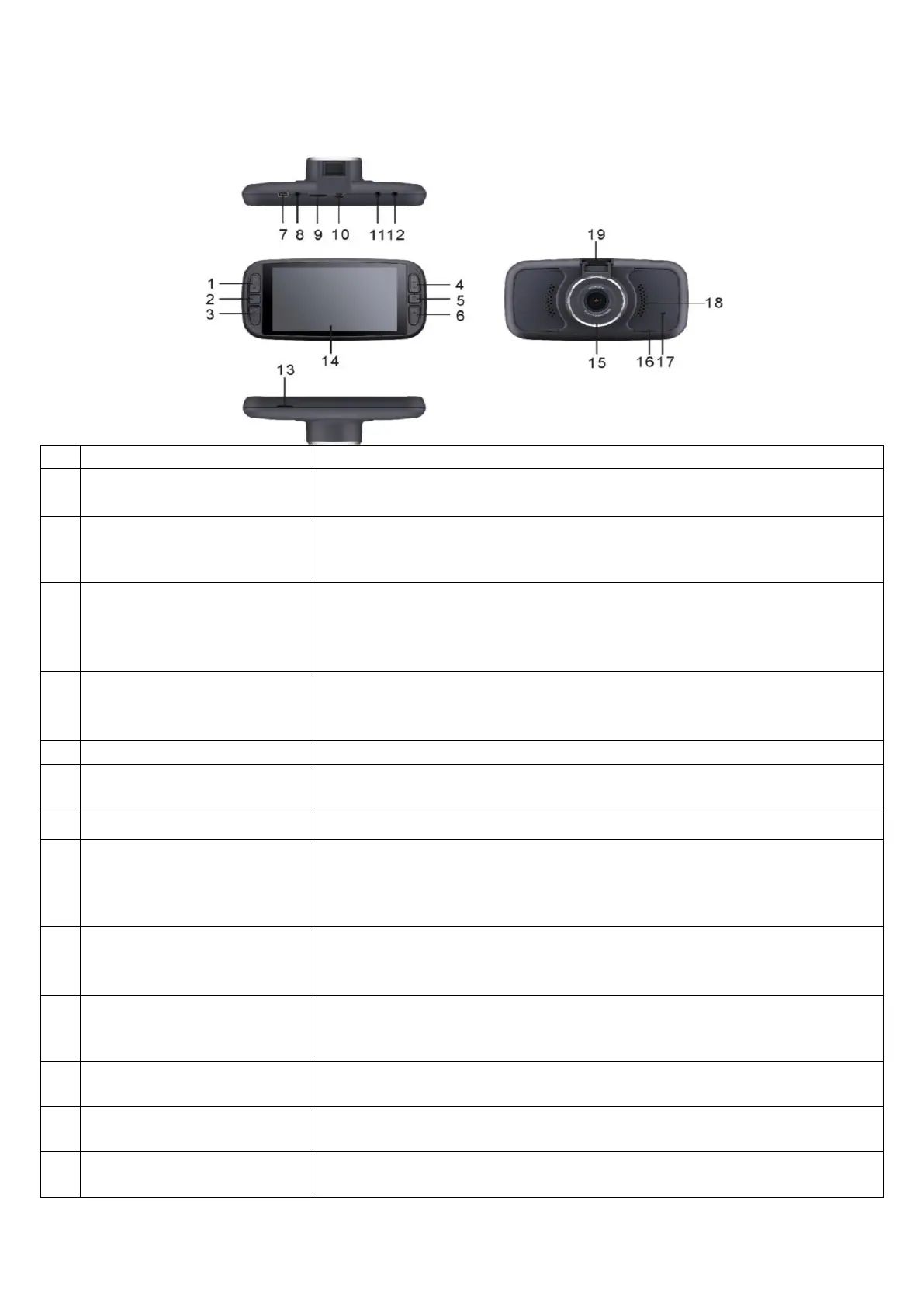
Button and interface function description:
Long press on / off
short press to switch camera views
Mode Button (M)
Middle left button
A mode button for switching between recording / photo / playback function,
short press this button in the recording mode to lock the current video file, not
being overwritten
Recording / photo / confirmation button, short press this button to start
recording in shooting mode, short press again to stop shooting.
In the recording mode, press this button to take picture, and it is the
confirmation button in menu mode.
Function buttons upward in menu options,
Insert the 2-4 cameras, toggle between cameras when in standby or video
recording mode
Menu button Middle right button
Short press to enter the setup menu when under Standby
select the function buttons down in menu options,
shortcut button of turning on / off the recording sound.
Use to power on device using CLA
This port is limited to access VGA rear camera, there are 4-night vision white
light displayed on the camera as VGA rear camera; the video recorded by this
camera is saved in the memory card of SD card slot 1 – 4
th
VGA CAM IS NOT
INCLUDED, MUST BE PURCHASED SEPERATELY as ACCESSORY
Video files of Main camera and VGA rear camera will be saved in memory card
of this TF slot, it is recommended to use Class 10 or higher SD card.
Dash cam will automatically shut down when plugging in or out SD cards.
This jack is to access the external GPS module, real-time positioning,
automatically update the local date and time, and users can clearly view the
driving track in a dedicated player. GPS ONLY WORKS for FRONT MAINCAM
720P interface AHD cameras. Videos recorded by this camera are saved in the
memory card of TF card slot 2.
720P interface AHD cameras. Videos recorded by this camera are saved in the
memory card of TF card slot 2.
Video files of rear 720P cameras will be saved in memory card of this SD slot, it is
recommended to use Class 10 or higher SD card.


 To Next Page
 Loading...