Need help?
Do you have a question about the F&D T-400U and is the answer not in the manual?
Crucial safety guidelines for system operation, handling, and environment to prevent damage and ensure user safety.
Inventory of all items included in the product package, such as speakers, cables, and manuals.
Detailed technical data including output power, speaker units, frequency response, separation, and power requirements.
Identification and explanation of the front panel indicator lights for various operational modes and functions.
Overview of front panel buttons, ports, and their specific operational functions for user interaction.
Diagram and identification of all input/output ports and power connections located on the rear of the unit.
Comprehensive guide to all buttons on the remote control and their corresponding functions for system operation.
Specific instructions for using numeric keys for selection and other special function keys on the remote.
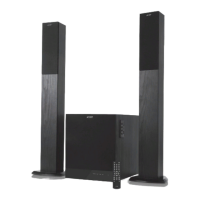
The F&D T-400U is a 2.1 computer multimedia speaker system designed to enhance your audio experience. This system includes a wooden cabinet for the subwoofer and two satellite speakers, providing a comprehensive sound setup for various multimedia needs.
The T-400U functions as a versatile audio output device, capable of connecting to multiple sources such as computers, DVDs/CDs, iPods/MP3 players, and notebooks. It delivers a 2.1 channel sound experience, meaning it has two main satellite speakers for stereo sound and a dedicated subwoofer for deep bass. The system is equipped with various input options, including a 3.5mm jack, RCA jacks, and a USB/SD card port, allowing for flexible connectivity. It also features an FM radio function, enabling users to tune into their favorite stations. The system is controlled via a front panel on the subwoofer and a full-function remote control, offering convenience and ease of use.
The T-400U offers a range of features to enhance its usability. The front panel of the subwoofer includes several buttons and indicators:
The front panel also features physical buttons for:
The rear panel of the subwoofer provides essential connections:
The full-function remote control offers comprehensive command over the system:
To ensure the longevity and optimal performance of your T-400U speaker system, several maintenance guidelines are provided:
 General
| Configuration | 2.1 |
|---|---|
| Subwoofer | Yes |
| Frequency Response | 20Hz - 20kHz |
| Bluetooth | Yes |
| USB Playback/Reader | Yes |
| FM Radio | Yes |
| Remote Control | Yes |
| Signal-to-Noise Ratio | ≥ 70dB |
| Input Sensitivity | 500mV |
| Audio Input | RCA |
| Type | 2.1 Speaker |
| Connectivity | USB |
| Controls | Volume, Bass, Treble |
| Power Supply | AC 220-240V~50/60Hz |
| Input Impedance | 10k Ohms |

 To Next Page