FAO Schwarz Bling Tunes Headphones
The FAO Schwarz Bling Tunes Headphones are a versatile audio device designed for an immersive listening experience. These headphones offer both wired and wireless connectivity options, making them suitable for various uses, from casual listening to more active scenarios.
Function Description
The Bling Tunes Headphones function primarily as a personal audio output device, allowing users to listen to music, podcasts, and other audio content from their connected devices. They support both Bluetooth wireless technology and a traditional 3.5mm auxiliary cable connection. The headphones feature integrated controls for playback, volume adjustment, and track selection, providing a seamless user experience without needing to interact directly with the source device. An LED indicator provides visual feedback on the device's status, including charging, pairing, and power. The earloop design, which includes the Bling Tunes feature, adds a unique aesthetic element to the headphones.
Important Technical Specifications
- Connectivity: Bluetooth wireless technology and 3.5mm auxiliary input.
- Charging: Micro USB charging cable.
- Power Source: Internal rechargeable battery.
- Indicators: 3 LED battery indicator lights, Bluetooth indicator light.
- Controls: Power button, Play/Pause button, Track Select/Volume Up/Down buttons.
- Audio Output: Stereo sound.
- Compatibility: Compatible with devices supporting Bluetooth audio profiles or a 3.5mm audio output.
- Regulatory Compliance: This device complies with Part 15 of the FCC Rules. Operation is subject to the following two conditions: (1) this device may not cause harmful interference, and (2) this device must accept any interference received, including interference that may cause undesired operation.
- RF Exposure: The device has been evaluated to meet general RF exposure requirement. The device can be used in portable exposure conditions without restriction.
Usage Features
Getting Started:
- Charging: Insert the Micro USB end of the charging cable into the charging port on the headphones. Connect the other end to a USB port on a standard 5V USB adapter or a computer. The 3 LED battery indicator lights will flash while charging. Once fully charged, all 3 LED battery indicator lights will turn off.
- Power On/Off: Press and hold the power button for 3 seconds to turn the headphones ON. A sound will play indicating power is on. To turn OFF, press and hold the power button for 3 seconds. A sound will play indicating power is off.
Bluetooth Connectivity:
- Ensure Bluetooth is enabled on your device.
- Turn the headphones ON. The Bluetooth indicator will flash rapidly, indicating they are in pairing mode.
- On your device, select "FAO Bling" from the list of available Bluetooth devices.
- Once connected, the Bluetooth indicator light will remain on.
- To disconnect Bluetooth and connect to another device, press and hold the play/pause button for 3 seconds. The Bluetooth LED indicator will begin to flash, indicating it's ready to connect to a different Bluetooth enabled device.
Auxiliary Connectivity:
- Insert the auxiliary cable (included) into the auxiliary port on the headphones.
- Insert the other side of the cable into the auxiliary port of the headphones.
- Turn headphones ON.
Playback Controls:
- Play/Pause: Press the play/pause button to play or pause audio.
- Track Selection: Press the arrow keys to skip forward or backward on your playlist.
- Volume Adjustment: Press and hold the arrow keys to raise or lower the volume.
- Answering Calls: When a call comes in, press the play/pause button to answer. Press again to end the call. To reject a call, press and hold the play/pause button for 3 seconds.
How to Accessorize Your Headphone:
- Open the loop found on the included earring accessories.
- Attach the loop on the earring accessory to the loop on the headphones.
- Close the loop to secure the earring accessory, and you're ready to go!
Maintenance Features
Care and Cleaning:
- Spot clean only with a dry cloth.
- Store in a cool, dry location.
- Do not expose to extreme temperatures.
- Keep all straps clean.
Battery Care:
- The rechargeable battery is only to be charged by an adult.
- Do not attempt to open the battery compartment.
- Do not dispose of the battery in a fire, as it may explode.
- Allow battery to cool to room temperature before charging.
- Dispose of battery according to federal, state, and local laws.
General Maintenance:
- This product contains batteries that are non-replaceable.
- There is a risk of fire and personal injury if the battery is punctured, damaged, or misused.
- Do not dismantle, crush, incinerate or short-circuit battery.
- Never expose battery to extreme temperatures or moisture.
- Keep away from flammable products.
- Only charge using the provided charger, cable, and/or adapter.
- If the product becomes hot, swells, smokes, or gives off a strong odor, stop using it immediately.
- The cord, plug, enclosure, and other parts should be regularly examined for damage. If damage is found, the product must not be used until the damage has been repaired.
- Keep these instructions for future reference.
Safety Warnings:
- Adult setup and supervision required.
- Not for children under 3 years of age.
- Listening to loud music for extended periods of time may damage your hearing.
- Do not use while driving.
- Remove all packaging before giving this product to a child.
- Only use the include power cable for operation.
- Do not immerse in water or other liquids.
- Do not expose to extreme temperatures or moisture.
- Periodically examine this product for damage. If the product appears worn, frayed/splintered, cracked, or broken in any manner, discontinue use and discard immediately.

 Need help?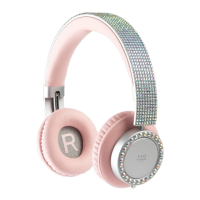

 To Next Page
 General