Need help?
Do you have a question about the FAQ 201 and is the answer not in the manual?
Device emits RGB light for skin revitalization; intended for wrinkles/blemishes.
Details power button, eye design, silicone fit, headband, charging, and light technology.
Do not use on wounds, sensitive skin, or if light-sensitive. Avoid direct light.
Do not use while driving, disassemble, or insert objects. Avoid extreme heat.
Use approved adapters, keep dry, do not use while charging.
Max 15 mins use, do not share, keep out of sunlight.
Download app, log in, add device, connect to app, fill info to activate warranty.
Apply primer, place mask, turn on, change colors, enjoy up to 15 mins.
Spray with cleaning spray, wipe with damp lint-free cloth. Avoid alcohol/petrol.
Solutions for low battery, unresponsive button, and app sync problems.
Activate 2-Year Limited Warranty via FAQ™ Swiss app or website.
Covers defects due to workmanship/materials for 2 years. Excludes cosmetic damage.
Dispose of electronic waste at appropriate collection points, not household waste.
Step-by-step guide to safely remove the battery for disposal. Voids warranty.
Users use the device at their own risk; FAQ GmbH is not liable for injuries.
Answers on what's included, how to turn the mask on and off.
Advice on starting treatment, using own skincare, and usage frequency.
Skincare treatment using varying light wavelengths, developed from NASA experiments.
LEDs are safe for regular use, do not contain UV rays, and don't cause burns.
Mask flashes red 3 times for low battery; recharge for up to 2 hours.
Detailed steps for cleaning the mask after use to maintain hygiene.
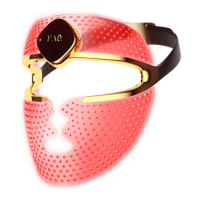
The FAQ™ 201 Silicone LED Mask is an innovative, over-the-counter anti-aging device designed to provide professional skincare technology in the comfort of your home. This ultra-light and wireless mask utilizes red, green, and blue LED light therapy to revitalize the complexion, treat facial wrinkles, and address blemishes. Its flexi-fit silicone construction ensures even light coverage by molding to your facial contours, allowing for free movement during use.
The FAQ™ 201 mask employs LED (light-emitting diode) therapy, a skincare treatment that uses varying wavelengths of light. Unlike other forms of light therapy, LEDs do not emit ultraviolet rays, making them safe for regular use without causing burns, unlike chemical peels, dermabrasion, or laser therapy. The mask features 600 points of light that pulse 1000 times per second, optimized to ensure LED wavelengths penetrate evenly across all areas of the face. The red, green, and blue LED lights target different skin concerns: red light is typically used for anti-aging and wrinkle treatment, green light for improving skin tone and reducing hyperpigmentation, and blue light for addressing blemishes and acne. The device is intended to be a comfortable and effective solution for improving skin health and appearance.
To begin using the FAQ™ 201, users must first register their device through the FAQ™ Swiss mobile app. This involves scanning a QR code, logging into an account, adding the device, selecting the device series, and connecting the device to the app by pressing and holding the universal button. Once registered, the device is ready for use.
Before starting a treatment, ensure your face and neck are clean and dry. An FAQ™ primer can be applied if desired. The silicone LED mask is then placed over the face and secured with the non-slip headband, which is designed for ultimate comfort and prevents hair pulling, keeping the mask securely in place.
The mask is operated via a universal power button. A single press turns the mask on, and subsequent quick presses allow users to switch between the red, green, and blue LED colors. To turn the mask off, the universal power button should be pressed and held for 3 seconds. The device also features an automatic shut-off after 15 minutes. The recommended usage is 5-15 minutes, 3-5 times per week, for optimal results.
The FAQ™ 201 is designed with an open eye design, which protects the eyes from powerful LED wavelengths while allowing users to see clearly and move around freely, enabling multitasking during treatments. The flexi-fit silicone material ensures the mask molds to the face like a transparent second skin, enhancing comfort and light distribution.
The device is powered by a rechargeable battery, offering up to 2 hours of use per USB charge. When the battery is low, the mask will flash red 3 times to indicate the need for recharging. The USB charging cable is included and comes in an accessory pouch, allowing for convenient charging anytime, anywhere. It is recommended to use IEC60950 standard power suppliers for charging. The device should not be used while charging, and the plug and socket must be completely dry before charging to prevent electric shock or fire.
For storage, a display case is provided, allowing users to either store the mask away in the box or proudly display it on the stand.
Maintaining the FAQ™ 201 LED Mask is straightforward to ensure maximum hygiene and longevity. After each use, the mask should be thoroughly cleaned. For optimal results, it is recommended to spray the mask with the FAQ™ Silicone Cleaning Spray. Following this, a lint-free cloth or towel dampened with warm water should be used to thoroughly wipe off all remaining residue.
It is crucial to avoid using cleaning products that contain alcohol, petrol, or acetone, as these can irritate the skin and potentially damage the silicone material of the mask.
The device is designed to be durable, but certain precautions should be observed. The silicone strap should not be pulled too tight to prevent damage to the mask. The device should not be left in direct sunlight or exposed to extreme heat or boiling water. If the product appears damaged in any way, its use should be discontinued. The FAQ™ 201 contains no serviceable parts, and users should not attempt to tamper with or disassemble the product, as this may cause damage and void the warranty.
In case of troubleshooting, if the mask is not activated when pressing the universal button, it may indicate an empty battery, requiring up to 2 hours of charging. If the mask cannot be switched off or the universal button does not respond, the microprocessor may be temporarily malfunctioning, and pressing and holding the universal button to restart the device is recommended. If the device fails to sync with the FAQ™ Swiss app, users should try switching Bluetooth off and on again, closing and reopening the app, or checking for app updates.
The battery is designed for safe disposal. When the device is ready to be disposed of, the lithium-ion battery must be removed. This process is irreversible and voids the warranty, so it should only be undertaken when the device is being discarded. Detailed visual instructions are provided for safely removing the battery by cutting and removing the silicone outer layer, cutting the plastic shell, and then cutting the battery cable. Gloves should be worn during this process for safety, and the battery should be disposed of according to local environmental regulations.
 General
| Target Audience | Unknown |
|---|---|
| Keywords | Unknown |
| Applicable Regions | Unknown |
| Date Created | Unknown |
| Last Updated | Unknown |
| Author | Unknown |
| Status | Unknown |
| Approval Status | Unknown |


 To Next Page