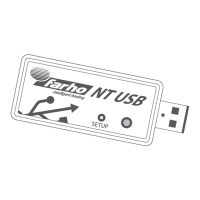
To change the WiFi network (SSID) or password, the WiFi connect
mode must be forced.
To force the WiFi connect mode, disconnect the NT USB from the
power supply and connect it again while holding down the button.
The module will initially show a red light, press and hold the button
until the light changes to solid purple. At this point the module will
be in WiFi connect mode generating the corresponding network
(MIFarho_xxxx).
Then follow the instructions in section "1.2 WiFi connect mode".
If the NT USB is in No remote mode [steady orange light] check that
the router has access to the Internet, for example by accessing the
Google search engine website with a web browser from a device
connected to the same WiFi network as the NT USB. In case of
problems with Internet access, contact your provider.
If there is no problem with the Internet connection try disconnecting
the NT USB from the power supply, wait a few seconds and recon-
nect it.
Check for a rmware update by following the steps described in "2.
Firmware update".
4.2 What to do if the NT USB does not connect to
the servers?
4.1 What to do if you change the router or the
WiFi password?
4. Troubleshooting
If the problems persist, it may be that the servers are under mainte-
nance or it is a one-o problem.
In this case only the remote access will be interrupted, the rest of the
NT USB functionalities will remain operational.
The service will be restored automatically without any action from
the user.
5. Light codes
Normal operating mode Steady green light Normal operation
WiFi connect mode Steady violet light The NT USB is waiting for the WiFi
network and password to be set
up.
See section:
"1.2 WiFi connect mode".
Conguration mode Flashing red light NT USB is waiting to check for
updates or reset to factory
defaults.
Oine mode Steady red light The NT USB cannot connect to a
WiFi network that has been
previously congured for it.
See section:
"4.1 What to do if you change your
router or WiFi password".
No remote mode Steady orange light The NT USB is not receiving a
response from the remote access
servers.
See section:
"4.2 What to do if the NT USB does
not connect to the servers".
Power supply: 5V 1A
6. Notes
©2023 Farho Domotica S.L.
www.farho.com
Made in EU
Polígono Industrial Tabaza II, Parcelas 9 – 13
33439 Carreño, Principado de Asturias (Spain)
(+34) 985 514 082
info@farho.com


 To Previous Page
 Loading...