INSTALLATION of PLAY20-V and PLAY20-C
OPERATION of PLAY20-V
ON 2nd F
+1
2nd F
SETS
EXCHANGE
EXCHANGE
2nd F
2nd F –1
2nd F START
2nd F TEST
2nd F OFF
OPERATION of PLAY20-C
ON/OFF
PROG PRESET
+1 –1
<–
–>
PROG PRESET
PRESET XX:XX
START/STOP
PRESET 00:00
START/STOP
2nd F SOUND ON/OFF
SOUND
2nd F TEST
Power supply:
Fuse:
-
-
PLAY20-V
PLAY20-C
230V (art.344), 115V (art.344/115), 30VA MAX,
230V (art.350), 115V (art.350/115), 40VA MAX,
T 500 mA (art.344 - art.350), T 1A (art.344/115 - art.350/115)
Insert the plug in an outlet provided with a grounding system. The
producer declines all responsibility if the equipment is tampered with.
The power outlet must be near the appliance and easily accessible. If
the appliance has to be connected to the power supply permanently, its
connection must be carried out by qualified personnel who must install
an external cutoff device in an easily accessible position.
Eventual lenthening of the keyboard cable may be achieved simply with
a two-wire cable (PLAY20-V) or three-wire cable (PLAY20-C).
Turn the scoreboard on and off with the ( ) button.
The keys ( ) increase the respective displays.
The scoreboard can function in two ways:
WAY1: when a score is inserted, it is immediately calculated;
WAY2: when one or more scores are inserted, these flash for 2 seconds
and then they are calculated.
To pass from WAY1 to WAY2 and viceversa, you must keep the key
pressed ( ) for approx. 10 seconds. The WAY2 can be useful to
point out the assignation of the scores.
The keys increase the relative indicators of the Set/Bonus. The
key turns on if it is off or exchanges if it is already turned
on, the Ball-Possession/Priority/Turn indicator. To turn it off again, keep
the key pressed for at least 2 seconds.
The key ( ) allows you to have access to the "red functions" of the
keys:
– by pressing ( ) and then ( ) the score of the corresponding
display is decreased;
– by pressing ( ) and then the scores are set to zero and
the indicator Possession-Ball/Priority/Turn is turned off;
– by pressing ( ) and then all the leds of the scoreboard turn
on for an eventual control; to exit from the test press any key;
– by pressing ( ) and then the scoreboard turns off.
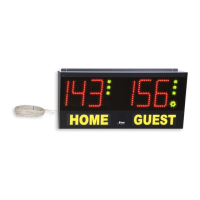
The PLAY 20-C carries out the functions of a scoreboard and
chronometer.
It is controled by the lower section of the keyboard and its functioning is
the same as the one of the PLAY 20-V model. See: “OPERATION of
PLAY20-V”.
It is controled by the upper section of the keyboard.
Turn the chronometer on and off with the key.
To programme the desired limited time, press the key.
The programming is possible only when the counting is stopped.
The flashing number can be modified with the ( ) and ( ) keys. Press
the ( ) key to change the number.
Press again at the end of the programming.
The key arranges the chronometer with the
programmed limited time.
The key starts or stops the backward counting.
The counting or stop situation of the chronometer is indicated by the
green or red colour of the two central light points.
The key sets the chronometer to zero.
In this case the key starts or stops the forward counting.
In both situations (forward or backward counting) an acoustic signal
warns you that the programmed time has expired.
The acoustic signal can be activated or disactivated whenever you
press the ( ) and keys in succession. When the
signal is activated, it can be manually operated with the key.
By pressing ( ) and then all the leds of the chronometer turn
on for an eventual control; to exit from the test press any key.
Scoreboard part:
Chronometer part:
ARTICLE CODES
PLAY20-V.
PLAY20-V
PLAY20-C.
PLAY20-C
Art. 344
Art. 344T with infrared telecontrol.
Art. 350
Art. 350T with infrared telecontrol.
INSTALLATION PLAY20-V und PLAY20-C
FUNKTIONSABLAUF PLAY20-V
2nd F
+1
2nd F
SETS
EXCHANGE
EXCHANGE
2nd F
2nd F –1
2nd F START
2nd F TEST
2nd F OFF
FUNKTIONSABLAUF PLAY20-C
ON/OFF
PROG
PRESET
+1 –1
<–
–>
PROG PRESET
PRESET XX:XX
START/STOP
PRESET 00:00
START/STOP
2nd F SOUND ON/OFF
SOUND
2nd F TEST
Versorgung:
Sicherung:
-
-
PLAY20-V
PLAY20-C
230V (art.344), 115V (art.344/115), 30VA MAX,
230V (art.350), 115V (art.350/115), 40VA MAX,
T 500 mA (art.344 - art.350), T 1A (art.344/115 - art.350/115)
Stecken Sie den Stromstecker in eine geerdete Steckdose. Der Hersteller
lehnt jede Verantwortung im Falle einer Abänderung seiner Geräte ab. Der
Stromanschluß sollte sich in der Nähe des Apparates befinden und leicht
zugänglich sein. Falls ein fester Anschluß an das Stromversorgungsnetz
erforderlich ist, muß dieser von Fachpersonal ausgeführt werden, das eine
Trennbuchse leicht zugänglich anbringen sollte.
Die eventuelle Verlängerung des Tastaturkabels kann einfach mit einem
Kabel mit 2 Leitern (PLAY20-V) oder mit 3 Leitern (PLAY20-C)
durchgeführt werden.
Ein- und Ausschalten mit der Taste On ( ).
Die Tasten ( ) erhöhen die Punktezahl auf dem entsprechenden Display.
Der Punkteanzeiger kann auf zwei verschiedene Weisen funktionieren:
MODUS 1) Bei Eingabe eines Punktes wird dieser sofort summiert;
MODUS 2) Bei Eingabe eines oder mehrerer Punkte blinken diese für 2
Sekunden und werden dann summiert.
Um vom MODUS 1 zum MODUS 2 oder umgekehrt zu wechseln, muss
die Taste ( ) für zirka 10 Sekunden gedrückt werden. Der MODUS 2
kann zur Hervorhebung der Punktezuteilung sinnvoll sein.
Die Tasten erhöhen die entsprechende Anzeige von Set/Bonus. Die
Taste schaltet die Anzeige von Ballbesitz/Priorität/Runde an,
falls diese ausgeschaltet ist, oder läßt sie wechseln, wenn sie schon
angeschaltet sein sollte. Zum Ausschalten sollte die Taste für
mindestens 2 Sekunden gedrückt werden.
Die Taste ( ) ermöglicht den Zugriff zu den "Roten Funktionen" der
Tasten:
– durch Drücken von ( ) und dann von ( ) wird die Punktezahl des
entsprechenden Displays herabgesetzt;
– durch Drücken von ( ) und dann von werden die
P u n k t e z a h l e n a u f N u l l ge b r a c h t u n d d i e A n z e i g e v o n
Ballbesitz/Priorität/Runde erlischt;
– durch Drücken von ( ) und dann von leuchten alle LED des
Punktezählers zu dessen Kontrolle auf; zur Beendigung des Tests kann
eine beliebige Taste gedrückt werden;
– durch Drücken von ( ) und dann von erlischt der Punktezähler.
Das Modell PLAY20-C funktioniert als Punktezähler und Chronometer.
Wird vom unteren Teil der Tastatur bedient und funktioniert wie bei
Modell20-V. Siehe "FUNKTIONSABLAUF PLAY20-V".
Wird vom oberen Teil der Tastatur bedient.
Das Chronometer mit der Taste an- und ausschalten.
Um die gewünschte Zeitgrenze zu programmieren, die Taste
drücken. Die Programmierung ist nur bei angehaltener
Zeitzählung möglich.
Die blinkende Zahl kann mit den Tasten ( ) und ( ) geändert werden.
Die Taste ( ) drücken, um eine andere Zahl einzustellen.
Nach Beendigung der Programmierung erneut die Taste
drücken.
Die Taste stellt das Chronometer mit der programmierten
Zeitgrenze ein. Die Taste beginnt oder stoppt die
rückwärtslaufende Zeitzählung.
Ob das Chronometer läuft oder steht, wird von der grünen oder roten
Farbe der zwei zentralen Leuchtpunkte angezeigt.
Die Taste stellt das Chronometer auf Null. In diesem Fall
beginnt oder stoppt die Taste die vorwärtslaufende
Zeitzählung.
Sowohl bei der vorwärtslaufenden als auch rückwärtslaufenden
Zeitzählung meldet ein akustisches Signal das Ablaufen der
programmierten Zeit.
Der akustische Melder kann jedesmal, wenn der Reihenfolge nach die
Tasten ( ) und gedrückt werden, in oder außer
Betrieb gesetzt werden.
Wenn der akustische Melder in Betrieb ist, kann er manuell mit der Taste
betätigt werden.
Durch Drücken von ( ) und dann von leuchten alle LED des
Chronometers zu dessen Kontrolle auf; zur Beendigung des Tests kann
eine beliebige Taste gedrückt werden.
Punktezähler:
Chronometer:
ARTIKELKODES
PLAY20-V.
PLAY20-V
PLAY20-C.
PLAY20-C
Art. 344
Art. 344T mit Infrarotfernbedienung.
Art. 350
Art. 350T mit Infrarotfernbedienung.


 To Next Page
 Loading...