Chapter Five: Using FSMS Utilities
FedEx Ship Manager
®
Server User Guide, Version 7.6 169
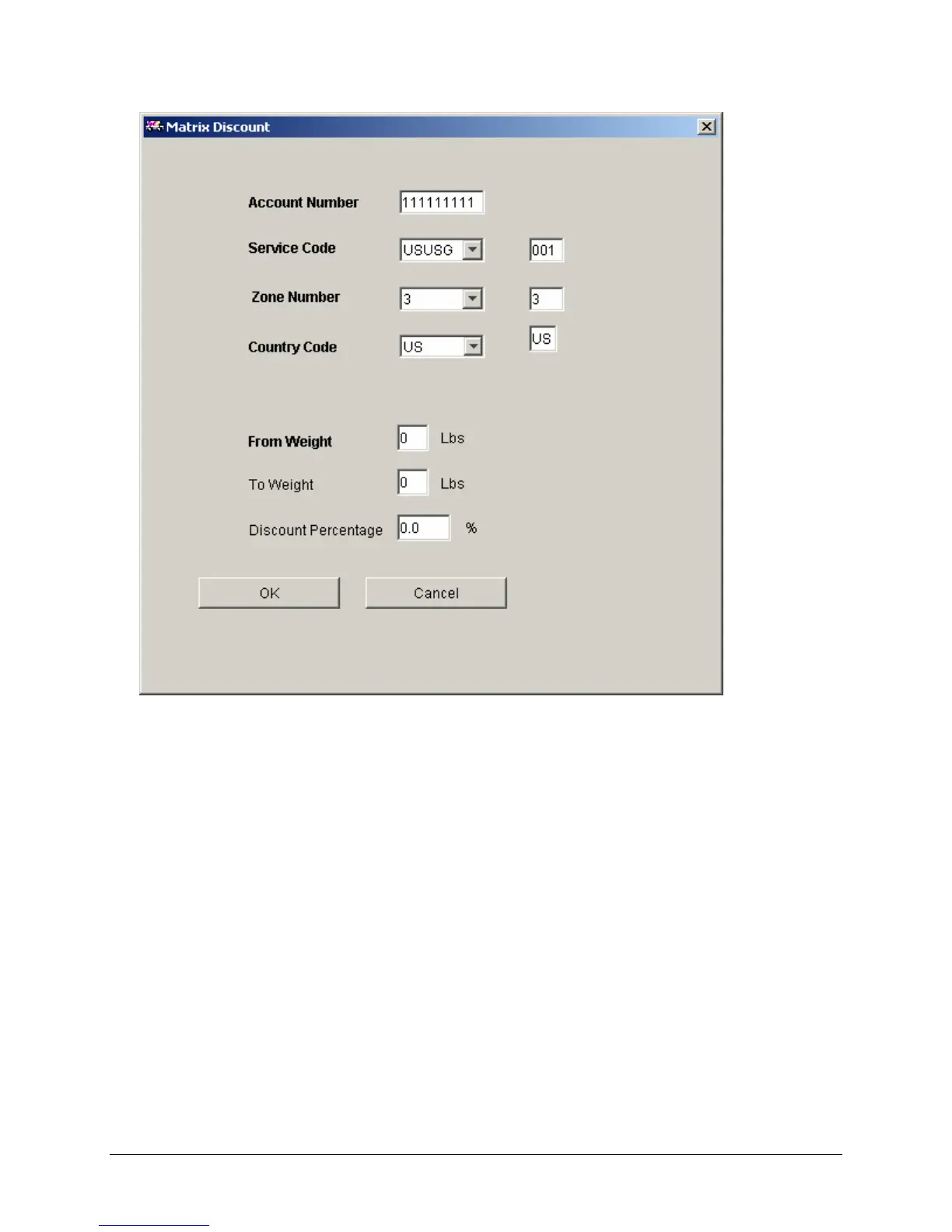
2. Configuring the Matrix Discount
• Account Number – The account number displayed is the account number for which discounts
are configured. This is not an editable field.
• Service Code – The service code for which discounts are configured. This code is composed of
three parts: the origin, the destination, and the service.
• Valid origin and destinations are US, CA, MX, PR, HI, and AK.
• Valid services are G(round) and H(ome Delivery).
• Zone – The zone for which the discount applies.
• Country Code – The origin country code. This defaults to the country code of the meter and does
not need to be changed.
• From Weight and To Weight – Matrix discounts are applied across weight bands (e.g. From 0
pounds To 10 pounds, From 11 pounds To 20 pounds, etc.) Different discount percentages may
be configured for a single zone for each From/To pair.
• Discount Percentage – Enter the discount percentage for the weight band. The percentage can
have a single decimal place, e.g. 10.5%.
Click OK to accept and exit or Cancel to cancel and exit.


 To Next Page
 Loading...