
 Need help?
Do you have a question about the FEELLE EN2053 and is the answer not in the manual?
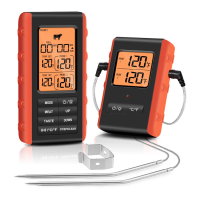
Choose probe 1 or probe 2 using the MODE button.
Select meat type from 8 options using the MEAT button.
Set taste level from RARE to WELL using the TASTE button.
Turn on the alarm function by pressing the /°C/°F button.
Select probe and meat type for custom temperature programming using MODE and MEAT.
Set desired temperature using MODE, UP/Down, and confirm with MODE button.
Activate the alarm function by pressing the /°C/°F button.
Adjust minute and second settings for the timer using UP/Down buttons.
Start the timer with ST/SP/CLEAR, and stop it by pressing any button.
Clear the timer settings by holding ST/SP/CLEAR for 2 seconds after stopping.
 General
| Measurement Time | 1 second |
|---|---|
| Battery | 2 x AAA batteries |
| Measurement Range | 32°C to 42.9°C (89.6°F to 109.2°F) |
| Display | LCD |
| Fever Alarm | Yes |
| Accuracy | ±0.2°C (±0.4°F) between 35.5°C to 42°C (±0.3°C/±0.5°F outside this range) |

 To Next Page