1 Introduction
Pos: 8 /I DP/M anu als /Üb ers chri fte n/1/I ntr od ucti on @ 0\mod_1526993216125_10021.docx @ 15697 @ 1 @ 1
1 Introduction
Introduction
Pos: 9 /I DP/Ma nuals /Intr oduct ion/I ntrod uctio n ECCO+ @ 3\mod_1542013202968_10021.docx @ 55611 @ @ 1
The ID PM ECCO+ captures and stores barcodes and RFID data for a variety of uses and transmits those to
a host via USB connection, Bluetooth or WiFi. This document provides a basic instruction for using the ID
PM ECCO+ device.
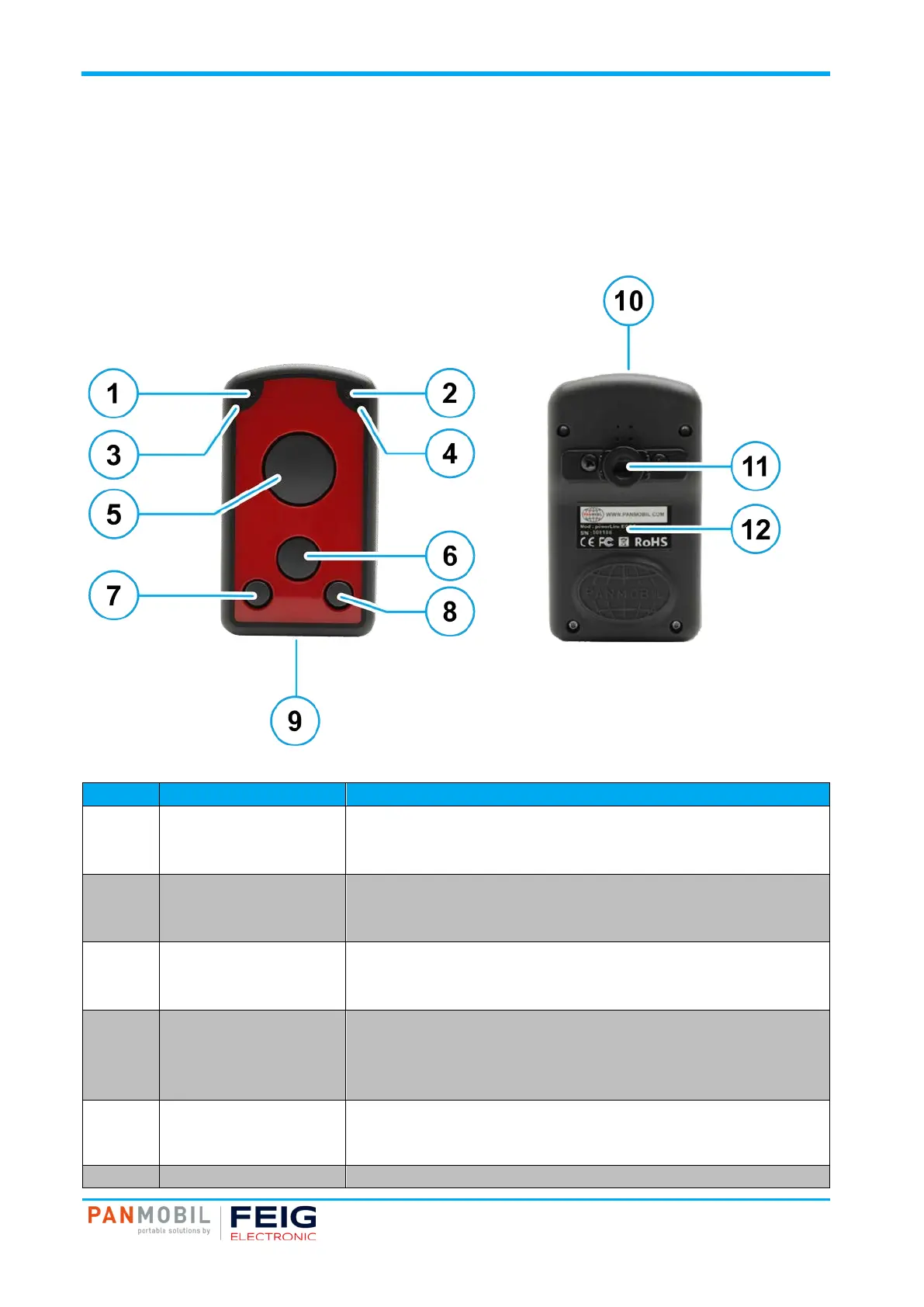
Fig. 1: ID PM ECCO+ device overview
Label Description Function
1 Green LED Lights up green when ECCO+ is turned ON.
When the battery level is empty, it flashes every 2 sec.
(Further function can be user defined with the programming interface)
2 Yellow LED Lights up yellow if a barcode or RFID tag was read successfully.
Is flashing yellow (500ms) when connected to USB.
(Further function can be user defined with the programming interface)
3 Red LED Lights up red if connected to a battery charger (USB or power adapter).
Red = Battery charging
Off = Battery fully charged
4 Blue LED Lights up blue when ECCO+ is connected to Bluetooth.
Is flashing fast (500ms) while Wi-Fi is associated.
Is flashing blue (3 sec.) when Wi-Fi is connected.
(Further function can be user defined with the programming interface)
5 Key 1 (trigger button) Triggers the barcode and/or the RFID reader.
(Further function can be user defined by Master Setup or with the
programming interface)
6 Key 2 (custom) (This function can be configured by using Master Setup or with the


 To Next Page