EasyManua.ls Logo

FEKER Alice 98 - User Manual

FEKER Alice 98
4 pages
Print Icon
To Next Page IconTo Next Page
Loading...
Swtich & USB Function
Alice-98LCD键盘中英文说明书
128g铜板纸 双面单色印刷 四折全尺寸:594* 210 mm 折后尺寸:148.5*210 mm
FN+ Keys Function
Battery status indicator Function
Device name description
Electrical Specifications (for reference only)
System Requirement
Interface Connected Function
For Mac system used , key-function switch to Mac computer or iPAD;
Fn+
For Windows system used , key-function switch to standard Windows computer;
For Wireless 2.4g version used, please insert the USB receiver to port of computer.
For Wireless bluetooth version used, please check the bluetooth state of computer.
Type-C cable insert here and USB connect to computer for connect to computer ;
Push the mode switch
1: Connect the USB-A port to computer USB port and Connect the Type-C port to keyboard;
1: Switch the device to 2.4G mode;
2: If your want used this 2.4g device , you need connect the receiver to USB port of
computer first, that’s important ;
1: Press the Fn and 1/2/3 key for enter to BT device Alice98 LCD-1/2/3 mode, one by one;
2: Long press 3 seconds for pairing to new device by bluetooth;
3: Press 1 time for re-connected to paired device by bluetooth ;
4: Press the Fn + 1/2/3 1 time, You can switch between Alice98 LCD-1/2/3 device;
2: Push the mode switch to state for enter to wired USB device mode.
to
to
2.4G
2.4G
state.
state.
to
Bt
Bt
state.
USB fast charge port.
Bt
2.4G
Bt
2.4G
Bt
2.4G
Bt
2.4G
Mac
Win
2.4G
Bt
Type-C
On keyboard , the right side of lighting bar is for indicator of battery status.
the right side of lighting bar's LED will lighting RED flash.
the right side of lighting bar's LED will ligthing orange flash.
FEKER Alice98 LCD
Wireless Gaming Keyboard
Compatible with Windows 2000 and above and Mac system.
FEKER Alice98 LCD-1
FEKER Alice98 LCD-2
FEKER Alice98 LCD-3
FEKER Alice98 LCD
Wireless Gaming Keyboard
FEKER Alice98 LCD-1
FEKER Alice98 LCD-2
FEKER Alice98 LCD-3
the right side of lighting bar's LED will ligthing orange of full.
Press FN+Ctrl-R, the lighting bar will showing the battery status current.
Low battery
USB Version
2.4G Version
BT Version
Charging
Full charge
Battery data
电量低
充电中
充电完成
电量数据
USB模式
2.4G模式
蓝牙模式
Windows
Mac
USB Version
Wireless 2.4G Version
Wireless BT Version
USB 模式
无线 2.4G 模式
无线蓝牙模式
Windows
Function Key Function Function Key Function
Factory data reset (press 3S)
Open my computer
Open web home
calculator
Open default player
Previous track
Next track
Play/pause
Stop
Mute
Volume down
Volume up
Open mail box
ESC
F1
F2
F3
F4
F5
F6
F7
F8
F9
F10
F11
F12
Win-L
L
Volume key
Volume scroll to left
Volume scrollto right
Space
Page up
Page down State lighting increase
Speed up of backlight
Speed down of backlight
Backlight colour switch
Backlight direction switch
State lighting decrease
State lighting increase
Home
1
2@
3#
4
Del
(Num)
+ (Num)
Del
(Num)
+ (Num)
Backlight mode switch
FEKER Alice98 LCD-1device
FEKER Alice98 LCD-2device
FEKER Alice98 LCD-3device
2.4G device paired
Backlight mode switch
Backlight reduce of trim strip
Backlight lighten of trim strip
Backlight mode switch
Backlight reduce of trim strip
Backlight lighten of trim strip
FEKER Alice98 LCD-1device
FEKER Alice98 LCD-2device
FEKER Alice98 LCD-3device
2.4G device paired
Backlight mode switch
Backlight direction switch
State lighting decrease
State lighting increase
Backlight colour switch
Speed down of backlight
Speed up of backlight
Page down State lighting increase
Page upState lighting decrease
Backlight colour switch Space Backlight colour switch
State lighting decrease
Volume down
Volume up Volume scroll to right Volume up
Volume scroll to left Volume down
Mute Volume key Mute
L
Win function lock & unlock
Backlight on /off switch Backlight colour switch
ESC Factory data reset (press 3S)
Screen luminance decrease
Screen luminance increase
Multi-controler
Program listing
Previous track
Play/pause
Next track
Mute
Volume down
Volume up
F1
F2
F3
F4
F7
F8
F9
F10
F11
F12
Mac
Home
1
2@
3#
4
LCD Function
波动开关与USB接口功能
拨动此开关,实现苹果 MAC IOS 作系统功能;
键盘右边上角状态指示灯条,将作为电量状况指示灯使用;
当键盘的电量为低电量时,灯条将作红灯慢闪烁,提示需要充电;
当键盘正在充电时,灯条将闪/亮起橙色光,并展示充电进度条;
当键盘充电完毕,灯条全部亮起橙色光;
按压FN+CTRL-R,灯条将显示当前电量,每一个灯光代表20%电量,显亮3秒/次;
要求在Windows2000或以上的版本系统下工作
要求在 Mac 10.5.1 或以上的版本系统下工作
IOS 10.1 或以上的版本系统下工作效果会更佳
模式
USB
2.4G
蓝牙
充电
项目
≤350mA
≤10mA
≤320mA
≤0.03mA
≤320mA
≤0.03mA
≤450mA
≤350mA
≤10mA
≤320mA
≤0.03mA
≤320mA
≤0.03mA
≤450mA
Wired constant lighting mode
Wired constant Un-lighting
2.4G constant lighting mode
2.4G sleep mode
BT constantlighting mode
BT sleep mode
Recharging mode
USB亮灯工作模式下
USB关灯工作模式下
2.4G亮灯工作模式下
2.4G待机模式下
蓝牙亮灯工作模式下
蓝牙待机模式下
充电模式
电流(数据)
拨动此开关,实现 Windows 操作系统功能 ;
模式开关 拨动至 位置
Bt
2.4G
模式开关 拨动至 位置
Bt
2.4G
模式开关 拨动至 位置
拨动此开关,实现切换至无线2.4G工作模式,请注意此时需要插入USB接收器到USB端口;
拨动此开关,实现切换至无线蓝牙工作模式,请注意所用电脑是支持蓝牙联接的:
USB 线材正常的连接到键盘和电脑端,可以实现USB 键盘工作(波动开关至 位置)与仅给键盘
电池充电(波动开关至0N位置)功能
1、将USB线材的USB头插入到电脑端的USB接口上,同时,将Type-C插头插入到本键盘的Type-C接口上;
2、键盘USB接通后,将拨动开关至 位置,将键盘的工作模式切换至USB 模式下工作。
1、将键盘的工作模式切换至无线2.4G模式下工作:;
2、使用无线2.4G模式,首先需要将随机配送的USB接收器 正确的插入到电脑的USB接口上;
1、键盘USB接通后,同时按下FN和1/2/3键,将键盘的工作模式切换至无线蓝牙模式下的
ALICE 98 LCD -1/2/3三个频道下工作(最多可以同时蓝牙连接3台设备)﹔
2、长按3秒 FN 1/2/3 键,可以实现与新的设备间的蓝牙连接、配对;
3、按压一次 FN 1/2/3 键,可以实现与已蓝牙连接、配对的设备进行回联
4、按压 FN 1/2/3 键,可以实现与已蓝牙连接、配对的设备间进行来回切换;
USB 快充专用接口,请注意你的线材是否支持快充功能
Mac
Win
2.4G
Bt
Type-C
FN+复合键功能 电量状态指示功能
三种模式下设备名称
基本电性规格参数
工作系统要求
三种模式的连接功能
Fn+
Windows系统
功能键 实现功能
恢复出厂设置 (长按3S)
打开我的电脑
打开主页
计算器
播放器
上一曲
下一曲
播放/暂停
停止
静音
音量降低
音量增加
打开邮箱
Win 锁定与解锁
键盘背光开/关
静音
音量减小
音量增加
背光颜色切换
装饰条亮度增加
装饰条亮度降低
背光灯效速度加快
背光灯效速度降低
背光颜色调节
背光流动方向切换
背光亮度增加
背光亮度降低
背光模式切换
切换至蓝牙FEKER Alice98 LCD-1设备
切换至蓝牙FEKER Alice98 LCD-2设备
切换至蓝牙FEKER Alice98 LCD-3设备
切换至 无线2.4G 键盘
背光模式切换
饰条背光亮度降低
饰条背光亮度增加
恢复出厂设置 (长按3S)
屏幕亮度降低
屏幕亮度增加
多任务控制器
程序列表
上一曲目
播放与暂停
下一曲目
静音
音量降低
音量增加
键盘背光颜色切换
静音
音量减小
音量增加
背光颜色切换
装饰条亮度增加
装饰条亮度降低
背光灯效速度加快
背光灯效速度降低
背光颜色调节
背光流动方向切换
背光亮度增加
背光亮度降低
背光模式切换
切换至蓝牙FEKER Alice98 LCD-1设备
切换至蓝牙FEKER Alice98 LCD-2设备
切换至蓝牙FEKER Alice98 LCD-3设备
切换至 无线2.4G 键盘
背光模式切换
饰条背光亮度降低
饰条背光亮度增加
功能键 实现功能
ESC
F1
F2
F3
F4
F5
F6
F7
F8
F9
F10
F11
F12
Win-L
L
Space
Page up
Page down
Home
1
2@
3#
4
Home
Page down
Page up
Space
L
ESC
F1
F2
F3
F4
F7
F8
F9
F10
F11
F12
Mac系统
1
2@
3#
4
音量旋钮键
音量旋钮轮向左
音量旋钮轮向右
音量旋钮键
音量旋钮轮向左
音量旋钮轮向右
Alice-98 LCD
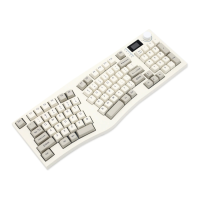
Alice Ergonomic Gasket Full Size Keyboard
Del
(Num)
+ (Num)
Del
(Num)
+ (Num)
Alice-98 LCD
Alice布局人体工程学Gasket键盘
Press the volume knob for 3 seconds to
switchthe LCD function mode, LCD
mode, left andright rotation knob, to
achieve Switch betweenthe Pre and next
of the display page.
LCD屏幕功能
长按3秒音量旋钮,可实现进入LCD功能切换
模式,LCD模式下,左、右旋转旋钮,实现显示
页面的上、下页面切换。
型号 ALICE 98 LCD
B-BT-CU-98LCD01
2023.3.27
Alice-98LCD键盘中英文说明书
料号
版本
材质
名称
128g铜板纸 双面单色印刷
四折全尺寸:594* 210 mm
折后尺寸:148.5*210 mm
Question and Answer IconNeed help?

Do you have a question about the FEKER Alice 98 and is the answer not in the manual?

Summary

Switch and USB Function

Mac Mode

Key-function switch for Mac system or iPad devices.

Windows Mode

Key-function switch for standard Windows computers.

2.4 G Wireless Mode

Insert USB receiver to computer port for wireless 2.4G connection.

Bluetooth Wireless Mode

Check Bluetooth state for wireless Bluetooth version.

Type-C Connection

Connect via Type-C cable for USB connection and fast charging.

Interface Connection

USB Version Connection

Connect USB-A to computer and Type-C to keyboard for wired USB mode.

Wireless 2.4 G Version Connection

Switch to 2.4G mode and connect receiver to computer USB port.

Wireless BT Version Connection

Switch to BT mode, use Fn+1/2/3 for pairing and switching devices.

FN+ Key Functions

Windows FN+ Key Functions

Details on FN+ key combinations for Windows system functions.

Mac FN+ Key Functions

Details on FN+ key combinations for Mac system functions.

Battery Status and LCD Functions

Battery Status Indicators

Indicator lights for battery status: low, charging, and full charge.

Device Name Description

Lists device names for USB, 2.4G, and BT versions.

LCD Screen Functionality

Using the volume knob to switch LCD functions and navigate display pages.

Electrical Specifications and System Requirements

Electrical Specifications

Current consumption details for different operating modes (USB, 2.4G, Bluetooth).

System Requirements

Compatible operating systems for the keyboard.

Overview

The FEKER Alice-98 LCD is an ergonomic full-size keyboard designed for versatile use across different operating systems and connection types. This user manual provides comprehensive instructions for its functionality, interface connections, key functions, battery status, and system requirements.

Function Description

The FEKER Alice-98 LCD keyboard offers a wide array of functions tailored for both Windows and Mac users, ensuring a seamless experience regardless of the operating environment. It supports multiple connection modes: wired USB, wireless 2.4G, and Bluetooth (BT), making it highly adaptable to various setups. The keyboard features an integrated LCD screen that provides real-time information and allows for mode switching and navigation through display pages using a dedicated volume knob.

For Windows users, the keyboard provides standard functionalities such as opening "My Computer," web home, calculator, and default media player. It also includes media control keys for previous track, next track, play/pause, stop, mute, volume up, and volume down. Additionally, it offers a "Win-L" key for locking and unlocking Windows functions. Backlight control is extensive, with options to turn the backlight on/off, change backlight color, adjust speed (up/down), and switch backlight direction. The keyboard also supports backlight mode switching and trim strip adjustments (reduce/lighten). Specific keys are dedicated to pairing with different FEKER Alice98 LCD devices (1, 2, and 3) and a 2.4G device.

Mac users benefit from similar core functionalities, including factory data reset, screen luminance adjustments (decrease/increase), multi-controller access, and program listing. Media controls for previous track, play/pause, next track, mute, volume down, and volume up are also available. Like the Windows mode, Mac mode includes backlight color switching, speed adjustments, and direction switching. Backlight mode switching and trim strip adjustments are also supported. The device pairing keys (1!, 2@, 3#, 4$) function identically for Mac users, allowing for easy switching between paired FEKER Alice98 LCD devices and the 2.4G device.

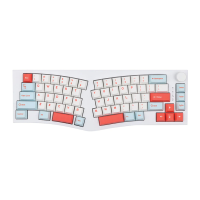
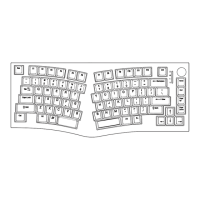
The keyboard's ergonomic gasket design aims to provide a comfortable typing experience, reducing strain during extended use. The full-size layout ensures that all essential keys, including a numeric keypad, are readily accessible.

Usage Features

The FEKER Alice-98 LCD is designed for ease of use with its multi-mode connectivity and intuitive controls.

Interface Connected Function:

The keyboard supports three primary connection methods:

  1. USB Version (Wired Mode): To use the keyboard in wired mode, push the mode switch to the "ψ" state. Connect the USB-A port of the cable to your computer's USB port and the Type-C port to the keyboard. This mode is ideal for stable, low-latency connections and ensures the keyboard is always powered.

  2. Wireless 2.4G Version: For wireless 2.4G connectivity, push the mode switch to the "2.4G" state. It is crucial to insert the USB receiver into a USB port on your computer first. This ensures that the computer recognizes the device. The 2.4G connection offers a reliable wireless experience with minimal lag, suitable for gaming and general use.

  3. Wireless BT Version (Bluetooth): To connect via Bluetooth, push the mode switch to the "Bt" state. The keyboard supports up to three Bluetooth devices (Alice98 LCD-1, Alice98 LCD-2, Alice98 LCD-3).

    • Pairing: Press the Fn key along with 1, 2, or 3 (e.g., Fn + 1) to enter the desired BT device mode. Long press the selected Fn + (1/2/3) key for 3 seconds to initiate pairing with a new Bluetooth device.
    • Reconnection: Press the selected Fn + (1/2/3) key once to reconnect to an already paired device.
    • Switching Devices: Press the Fn + (1/2/3) key once to switch between the three paired Alice98 LCD devices.
    • Before attempting to connect, ensure your computer's Bluetooth is enabled and discoverable.

FN+ Keys Function:

The Fn key acts as a modifier, unlocking a secondary layer of functions for many keys.

  • System Switching: The keyboard automatically adapts its key functions based on whether it's connected to a Mac or Windows system. The manual clearly outlines the specific functions for each operating system.
  • Media Controls: Dedicated Fn combinations allow for quick control over media playback, volume, and mute functions.
  • Backlight Customization: Extensive backlight controls are available through Fn key combinations, allowing users to personalize the keyboard's aesthetics. This includes changing colors, adjusting brightness, and modifying lighting effects.
  • Device Pairing/Switching: Fn + 1!, 2@, 3#, and 4$ are used for managing Bluetooth and 2.4G device connections, enabling quick switching between multiple paired devices.
  • Factory Reset: Pressing Fn + ESC for 3 seconds performs a factory data reset, restoring the keyboard to its default settings.

LCD Function:

The integrated LCD screen is a key feature, providing visual feedback and control.

  • Mode Switching: Press the volume knob for 3 seconds to switch between different LCD function modes.
  • Navigation: Rotate the volume knob left or right to navigate through various display pages on the LCD screen, allowing users to view different settings or information.

Battery Status Indicator Function:

The keyboard includes a lighting bar on the right side that serves as a battery status indicator, providing clear visual cues about the battery level.

  • Low Battery: The LED lights RED and flashes, indicating that the battery level is critically low and requires charging.
  • Charging: The LED lights ORANGE and flashes, signifying that the keyboard is currently being charged.
  • Full Charge: The LED lights ORANGE continuously, indicating that the battery is fully charged.
  • Battery Data Display: Pressing Fn + Ctrl-R will make the lighting bar display the current battery status, offering a more detailed view of the charge level.

USB Fast Charge Port:

The keyboard features a dedicated USB fast charge port, allowing for quicker recharging of the internal battery.

Maintenance Features

While the manual does not explicitly detail maintenance procedures, several aspects contribute to the device's longevity and user convenience.

  • Durable Design: The ergonomic gasket design not only enhances comfort but also contributes to the keyboard's overall durability by providing a more stable and resilient structure for the key switches.
  • Multi-Mode Connectivity: The ability to switch between wired and wireless modes provides flexibility. If the battery runs low or wireless interference occurs, users can easily switch to a wired connection without interrupting their workflow.
  • Factory Data Reset: The factory data reset function (Fn + ESC for 3 seconds) is a valuable maintenance feature. It allows users to troubleshoot issues by reverting all settings to their defaults, which can resolve software-related glitches or misconfigurations without requiring complex technical knowledge.
  • Battery Status Monitoring: The clear battery status indicators (RED for low, ORANGE for charging/full) help users manage power effectively, preventing unexpected shutdowns and ensuring the battery is maintained optimally. The fast charge port further aids in quick turnaround times for recharging.
  • System Compatibility: The broad compatibility with Windows 2000 and above, as well as Mac systems, ensures that the keyboard remains functional across a wide range of computing environments, reducing the need for frequent hardware upgrades due to system changes.

In summary, the FEKER Alice-98 LCD is a feature-rich, ergonomic keyboard designed for flexibility and user comfort. Its multi-mode connectivity, comprehensive key functions for both Windows and Mac, intuitive LCD display, and clear battery indicators make it a versatile tool for various computing needs. The design and built-in functions also contribute to its ease of use and long-term maintainability.

FEKER Alice 98 Specifications

General IconGeneral
LayoutAlice
Number of Keys98
BacklightRGB
Mounting StyleGasket Mount
TypeMechanical
Key Switch OptionsGateron
KeycapsPBT
ConnectivityWired (USB Type-C)

Related product manuals