EasyManua.ls Logo

Fellowes C-420 - Page 2

Fellowes C-420
2 pages
Print Icon
To Previous Page IconTo Previous Page
Loading...
ENGLISH
ENGLISH
ENGLISH
ENGLISH
ENGLISH
ENGLISH
ENGLISH
ENGLISH
ENGLISH
ENGLISH
NGLISH
NGLISH
NGLISH
GLISH
GLISH
GLISH
GLISH
LISH
LISH
ISH
SH
SH
SH
H
H
H
H
420/C-420C
M
Md
Md
Md
Mdl
Mdl
Models C
Models C
Models C 4
Models C 4
Models C 42
Models C 42
Models C-420
Models C-420/
Models C-420/
Models C-420/C
Models C-420/C
Models C-420/C-
Models C-420/C-4
Models C-420/C-4
Models C-420/C-420C
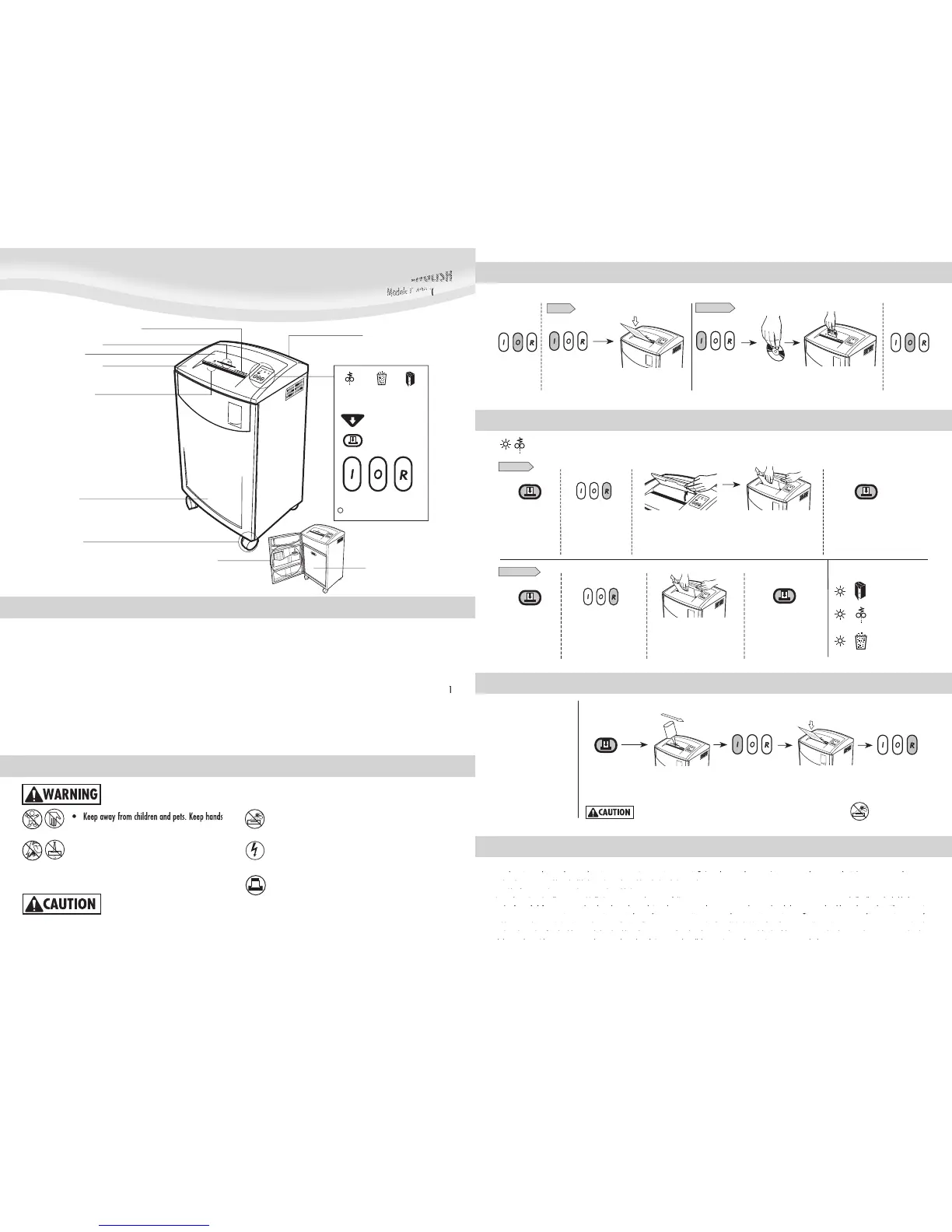
P
aper entr
y
Car
d/
CD entry
Bin
C
aster
s
Pocket
f
or manual and oi
l
S
hredder hea
d
CAPABILITIE
S
Wi
ll
s
h
re
d:
Pa
p
er, credit cards, CD/DVDs, sta
p
les and smal
l
p
a
p
er cli
ps
Will not shred
:
A
dh
esive
l
a
b
e
l
s, transparencies, newspaper,
c
ar
db
oar
d
,
l
arge paper c
l
ips,
l
aminates or p
l
astic ot
h
er t
h
an
note
d
a
b
ove
Pa
p
er s
h
re
d
size
:
S
trip-
C
ut ...................................................................
7
/32”
(
5.8mm
)
Con
f
etti-Cu
t
.......................................5/32” x 1-1/8”
(
3.9 x 30mm
)
M
aximum:
S
heets
p
er
p
ass (Stri
p
-Cut
)
......................................................
36
-
38
*
S
heets
p
er da
y
(Stri
p
-Cut
)
.......................................................
2
0,000
S
heets
p
er
p
ass (Confetti-Cut)
.................................................
22
-
24
*
S
heets
p
er da
y
(Confetti-Cut)
..................................................
1
0,000
Cards/CDs
p
er
p
ass
.........................................................................
1
Cards
p
er da
y
..............................................................................
400
CDs
p
er da
y
..................................................................................
10
P
a
p
er widt
h
..................................................................
12” (300mm
)
*
20
lb
s., 8.5”x11” paper at 120v, 60 Hz, 12 Amps;
h
eavier paper,
h
umi
d
ity
or ot
h
er t
h
an rate
d
vo
l
ta
g
e may re
d
uce capacity.
IMPORTANT SAFETY INSTRUCTIONS — Read Before Usin
g
!
away from paper entry. Always set to Off (O) or
u
nplu
g
when not in use.
• Keep forei
g
n objects –
g
loves, jewelry, clothin
g
,
h
air, etc.– away from shredder openin
g
s. If object
enters top openin
g
, switch to Reverse (R) to back
out ob
j
ect.
Never use aerosol,
p
etroleum-based or other flammable
p
ro
d
ucts on or near s
h
re
dd
er. Do not use canne
d
air
o
n
sh
r
edde
r
.
Do not use if dama
g
ed or defective. Do not open
s
h
re
dd
er
h
ea
d
. Do not
pl
ace near or over
h
eat or
w
a
t
e
r
sou
r
ce.
36-38 (C-420)
/
22-24 (C-420C) s
h
eets
p
er
p
ass to
a
voi
d
j
ams.
• Avoid touchin
g
exposed blades under Confetti-Cut shredder head
.
Use only desi
g
nated entry for cards/CDs. Keep fin
g
er away from
C
D hole
.
T
he
g
rounded socket-outlet shall be installed near the equipment
and shall be easil
y
accessible.
2
C
D
f
la
p
Door
o
n
T
ur
b
o Jam Re
l
ease Butt
o
S
tandby (
g
reen)
Reverse
(
R
)
Off (O
)
A
uto-On
(
I
)
D
oor o
p
en
(re
d
)
B
in full
(
red
)
P
a
p
er
j
am
(
re
d
)
Control pane
l
See safety instructions belo
w
Disconnect power switc
h
O
PERATI
O
N
*A
pp
l
y
oil
across en
t
r
y
Press Auto-On (I)
P
r
ess
a
n
d
h
o
l
d
*
On
l
y use a non-aeroso
l
ve
g
eta
bl
e oi
l
in
l
on
g
nozz
l
e container suc
h
a
s Fe
ll
owes #3525
0
S
hred one shee
t
P
r
ess
a
n
d
h
o
l
d
R
everse
(
R
)
2
-
3
secon
ds
C
on
f
etti-Cut and Stri
p
-Cut
:
Run re
g
ularly in reverse
f
or
o
n
e
m
i
n
u
t
e
C
on
f
etti-Cut onl
y
:
Lubricate when bin is
f
ull
,
or
immediately, if:
• Ca
p
acit
y
decreases
Motor sounds different, or
s
hredder stops running
S
hredder comes read
y
to use.
D
isconnect
p
ower switch must be in ON
p
osition to o
p
erate shredder.
I
nsert waste ba
g
(Fellowes #3605801) for easy disposal.
WARRANTY
O
ur
p
romise to
y
ou is
q
uite sim
pl
e. Fe
ll
owes s
h
re
dd
ers are
b
ui
l
t stron
g
er
,
engineered to run longer, resist jams and power through large jobs. The Fellowes
pyqp g,
yq p
worry free warranty described below covers the performance of the product,
gg,jpggj
g, j p g gj
provides for prompt service and support, plus a lifetime cutter warranty.
yy p
y
Limited Warranty: Fellowes, Inc. (“Fellowes”) warrants the parts of the machine
ppp pp,p y
pp pp,p
to be free of defects in material and workmanship and provides service and
y, p
y, p
support for 3 years from the date of purchase by the original consumer. Fellowes
pp
pp
warrants the cutting blades of the machine to be free from defects in material
pp y p y g
ypyg
and workmanship for the lifetime of the shredder. If any part is found to be
g
g
defective during the warranty period, your sole and exclusive remedy will be
pyp
pyp
r
e
p
air or re
p
lacement
,
at Fellowes’ o
p
tion and ex
p
ense
,
o
f
the de
f
ective
p
art. This
warranty does not apply in cases of abuse, mishandling, or unauthorized repair.
pp , p p, p
p, p p, p
ANY IMPLIED WARRANTY
,
IN
C
LUDIN
G
THAT
O
F MER
C
HANTABILITY
O
R FITNE
SS
F
O
R
A PARTI
C
ULAR PURP
OS
E
,
I
S
HEREBY LIMITED IN DURATI
O
N T
O
THE APPR
O
PRIATE
WARRANTY PERIOD SET FORTH ABOVE. In no event shall Fellowes be liable for any
,
consequential or incidental damages attributable to this product. This warranty
y
gives you specific legal rights. The duration, terms, and conditions of this warranty
qgpy
gp
are valid worldwide, except where different limitations, restrictions, or conditions
gyp gg , , y
yp gg , ,
may be required by local law. For more details or to obtain service under this
,p , ,
,p , ,
warranty, please contact us or your dealer.
yq yqy
M
AINTENAN
C
E
F
o
ll
ow oi
l
ing proce
d
ure
b
e
l
ow an
d
repeat twice.
3
TR
O
UBLE
S
H
OO
TIN
G
S
et to O
ff
(
O
)
an
d
p
l
u
g
in
Set to Off (O)
P
ress Auto-
O
n
(
I
)
P
ress Auto-
O
n
(
I
)
Fee
d
into paper entry
an
d
re
l
ease
H
o
ld
car
d/
CD
a
t e
d
ge
Feed into card/CD
entr
y
and release
In
d
icator
l
i
gh
ts:
Op
en CD
f
la
p
PAPER
C
ARD
/
CD
M
ake
su
r
e
doo
r i
s
tig
h
t
l
y c
l
ose
d
Pa
p
er Jam
R
e
m
o
v
e
a
n
d
em
p
t
y
bi
n
P
ull several sheet
s
of
uncut
p
a
p
er
f
rom entr
y
Pa
p
er
j
am: Set to O
ff
(O) and empty bin. Replace bin, close door, and
f
ollow any or all o
f
the below procedures
.
Pr
ess
a
n
d
hold
Reverse (R)
f
or
1
secon
d
Pr
ess
a
n
d
hold
T
ur
b
o Jam
Re
l
ease Button
Re
m
o
v
e
all
u
n
cu
t
paper from entr
y
Press and hold
Reverse
(
R
)
f
o
r
1
seco
n
d
Press and hold
T
urbo
J
am
Release Button
Press and hold Turbo

J
am
Release Button. Re
p
eat
p
rocedure i
f
still in
j
am mode
.
S
trip Cut
:
C
on
f
etti-Cut
:
P
r
ess
a
n
d
h
o
l
d
T
u
r
bo
Jam Re
l
ease Button

Related product manuals