This document serves as the instruction manual for the Fellowes Powershred® P-28S, a strip-cut paper shredder designed for personal and light office use. The manual emphasizes important safety instructions and provides guidance on basic operation, troubleshooting, and product warranty.
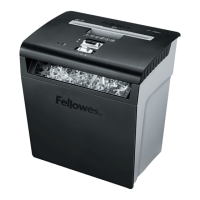
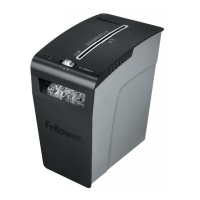
The Fellowes Powershred® P-28S is a paper shredder primarily designed to destroy sensitive documents, ensuring data security by rendering them unreadable. Its core function is to cut paper into narrow strips, making it suitable for shredding general paper documents. The device is intended for indoor use and is built to be user-friendly, with clear controls and straightforward operational steps.
Usage Features:
The shredder is equipped with a control switch that offers three main settings: Auto-On (I), OFF (O), and Reverse (R).
- Auto-On (I): This is the primary operational mode. When set to Auto-On, the shredder automatically activates when paper is inserted into the paper entry slot. This feature provides convenience, as users do not need to manually turn the machine on before each shredding task. The shredder will run briefly after each pass to ensure the entry is clear, optimizing efficiency and preventing paper buildup.
- OFF (O): This setting completely deactivates the shredder. It is recommended to set the shredder to OFF or unplug it when not in use, during cleaning, or before any servicing to prevent accidental operation and ensure safety.
- Reverse (R): The Reverse function is crucial for clearing paper jams. If paper becomes stuck in the shredder, switching to Reverse will attempt to back out the paper, allowing the user to remove it safely. This feature is a key component of the shredder's troubleshooting capabilities, enabling users to resolve minor issues without professional assistance.
The shredder is designed to handle paper only. It is explicitly stated that the device should not be used to shred items such as unopened junk mail, continuous forms, credit cards, staples, adhesive labels, transparencies, newspaper, CD/DVDs, cardboard, paper clips, laminates, file folders, X-rays, or any plastic other than what might be specifically noted. Adhering to these guidelines is essential for maintaining the shredder's performance and longevity. The paper entry slot is clearly marked, guiding users on where to insert documents for shredding. The bin, located at the bottom of the shredder head, collects the shredded material and needs to be emptied regularly to ensure continuous operation.
The manual highlights a "continuous operation" period of up to 3 minutes maximum. Exceeding this duration will trigger a 60-minute cool-down period, during which the shredder will temporarily cease operation to prevent overheating. This built-in safety mechanism protects the motor and extends the life of the device. The recommended daily usage rate is 40 sheets per day, with a maximum of 8 sheets per pass, indicating its suitability for intermittent, rather than heavy-duty, shredding tasks.
Maintenance Features:
Proper maintenance is vital for the safe and efficient operation of the Fellowes Powershred® P-28S. The manual provides several key instructions to ensure the device remains in good working condition and to prevent potential hazards.
- Clearing Paper Jams: In the event of a paper jam, the troubleshooting section outlines a clear procedure. Users are instructed to first set the control switch to Reverse (R) for 2-3 seconds to attempt to back out the paper. If the jam persists, the next steps involve alternating between Reverse and Auto-On (I) slowly. If the paper still cannot be cleared, the user should set the switch to OFF (O) and unplug the shredder, then gently pull any uncut paper from the paper entry. After clearing the jam, the shredder can be plugged back in, set to Auto-On (I), and shredding can resume. This systematic approach helps users resolve common operational issues.
- Emptying the Bin: The shredder's bin collects the shredded paper. The manual advises users to remove and empty the basket when it is full to prevent jams and ensure the shredder continues to operate correctly. A full bin can prevent the shredder head from seating properly, which may cause the device not to start.
- Cool-Down Period: If the shredder stops working due to continuous operation exceeding the recommended time, it will enter a 60-minute cool-down period. Users are advised to wait for this period to elapse before attempting to use the shredder again. This is a passive maintenance feature designed to protect the motor from overheating.
- Cleaning and Lubrication: The manual explicitly warns against using aerosol products, petroleum-based or aerosol lubricants, "canned air," or "air dusters" on or near the shredder. Vapors from these products can combust, causing serious injury. This instruction emphasizes the importance of using only approved cleaning methods, though specific cleaning instructions are not detailed in the provided excerpt. The general advice to unplug the shredder before cleaning or servicing is a fundamental safety measure.
- General Safety and Care: Users are reminded to keep children and pets away from the shredder and to keep hands, gloves, jewelry, clothing, and hair away from the paper entry and shredder openings. If any object enters the top opening, the user should switch to Reverse (R) to back it out. The manual also advises against touching exposed cutting blades under the shredder head. It is crucial not to use the shredder if it is damaged or defective, and users should never attempt to disassemble the shredder. The device should also not be placed near or over heat sources or water. These guidelines are essential for preventing accidents and ensuring the longevity of the device.
- Power Supply: The shredder must be plugged into a wall outlet or socket of the voltage and amperage designated on the label. The outlet must be installed near the equipment and easily accessible. The use of energy converters, transformers, or extension cords with this product is explicitly discouraged, as it can lead to fire hazards or damage to the shredder.
In summary, the Fellowes Powershred® P-28S is a straightforward and safe paper shredder for personal use, designed with user convenience and basic document security in mind. Its operational features, including Auto-On and Reverse functions, are complemented by clear maintenance guidelines and safety warnings, all aimed at ensuring a reliable and secure shredding experience.

 Need help?
 General


 To Next Page

