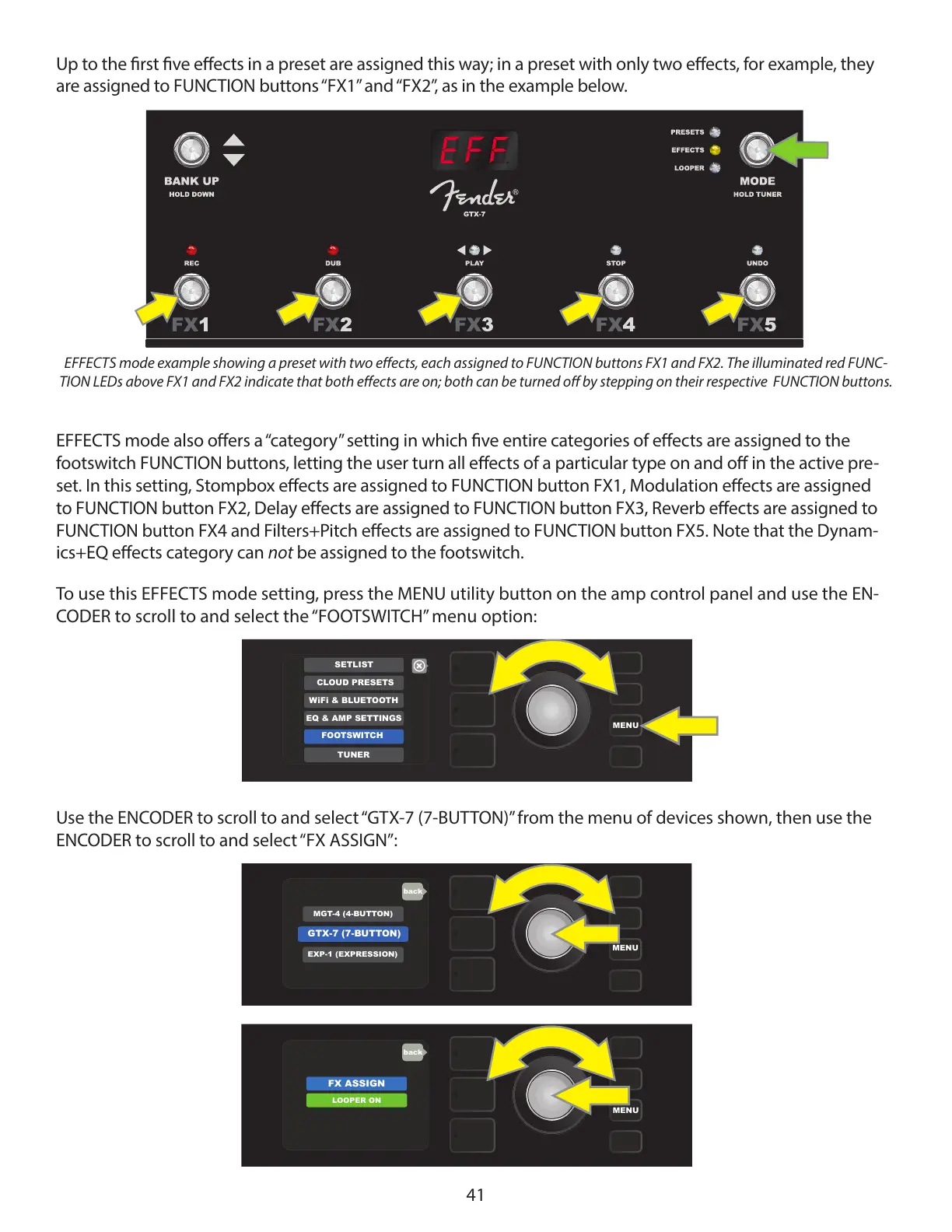
Up to the rst ve eects in a preset are assigned this way; in a preset with only two eects, for example, they
are assigned to FUNCTION buttons “FX1” and “FX2”, as in the example below.
EFFECTS mode also oers a “category” setting in which ve entire categories of eects are assigned to the
footswitch FUNCTION buttons, letting the user turn all eects of a particular type on and o in the active pre-
set. In this setting, Stompbox eects are assigned to FUNCTION button FX1, Modulation eects are assigned
to FUNCTION button FX2, Delay eects are assigned to FUNCTION button FX3, Reverb eects are assigned to
FUNCTION button FX4 and Filters+Pitch eects are assigned to FUNCTION button FX5. Note that the Dynam-
ics+EQ eects category can not be assigned to the footswitch.
To use this EFFECTS mode setting, press the MENU utility button on the amp control panel and use the EN-
CODER to scroll to and select the “FOOTSWITCH” menu option:
Use the ENCODER to scroll to and select “GTX-7 (7-BUTTON)” from the menu of devices shown, then use the
ENCODER to scroll to and select “FX ASSIGN”:
41
EFFECTS mode example showing a preset with two eects, each assigned to FUNCTION buttons FX1 and FX2. The illuminated red FUNC-
TION LEDs above FX1 and FX2 indicate that both eects are on; both can be turned o by stepping on their respective FUNCTION buttons.
MENU
EQ & AMP SETTINGS
SETLIST
CLOUD PRESETS
TUNER
WiFi & BLUETOOTH
FOOTSWITCH
MGT-4 (4-BUTTON)
GTX-7 (7-BUTTON)
MENU
EXP-1 (EXPRESSION)
back
MENU
FX ASSIGN
LOOPER ON
back


 To Next Page
 Loading...