TUNER MODE
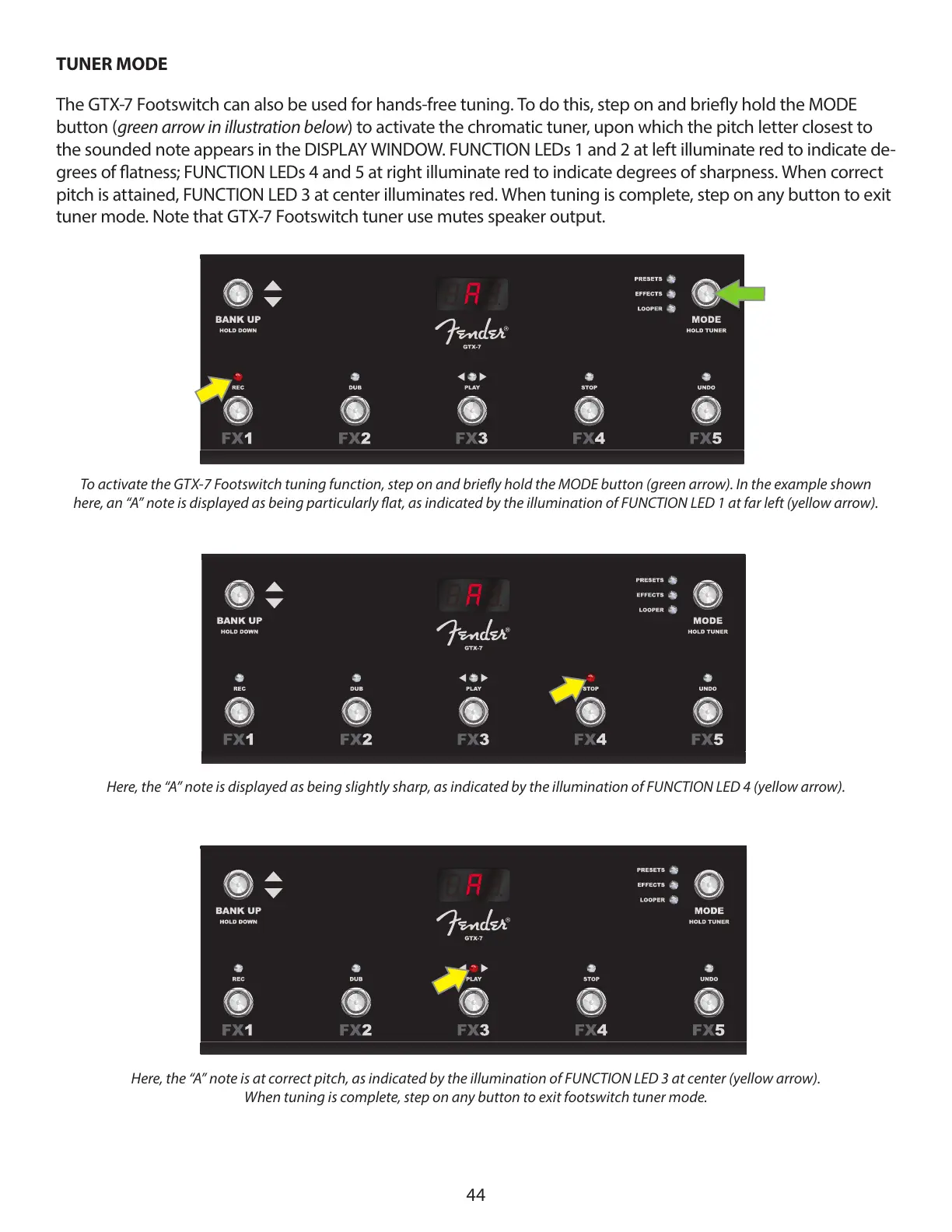
The GTX-7 Footswitch can also be used for hands-free tuning. To do this, step on and briey hold the MODE
button (green arrow in illustration below) to activate the chromatic tuner, upon which the pitch letter closest to
the sounded note appears in the DISPLAY WINDOW. FUNCTION LEDs 1 and 2 at left illuminate red to indicate de-
grees of atness; FUNCTION LEDs 4 and 5 at right illuminate red to indicate degrees of sharpness. When correct
pitch is attained, FUNCTION LED 3 at center illuminates red. When tuning is complete, step on any button to exit
tuner mode. Note that GTX-7 Footswitch tuner use mutes speaker output.
44
To activate the GTX-7 Footswitch tuning function, step on and briey hold the MODE button (green arrow). In the example shown
here, an “A” note is displayed as being particularly at, as indicated by the illumination of FUNCTION LED 1 at far left (yellow arrow).
Here, the “A” note is displayed as being slightly sharp, as indicated by the illumination of FUNCTION LED 4 (yellow arrow).
Here, the “A” note is at correct pitch, as indicated by the illumination of FUNCTION LED 3 at center (yellow arrow).
When tuning is complete, step on any button to exit footswitch tuner mode.


 To Previous Page
 Loading...