6
EN
Charge / Off / Start
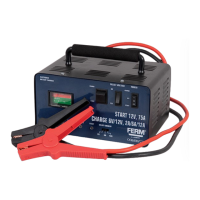
The product can be used as battery charger
“CHARGE”(I)andjumpstarter“START”(II).
Choosethecorrectmodeswiththeswitch(3
positions)attherightsideonthefrontpanel.
When the switch is in the middle position “OFF”
(0)thechargerisswitchedoff(Fig.2).
6V / 12V
The battery charger can charge batteries of
6V and 12V. For this purpose push the switch
at the right side of the front panel in chosen
position.
Charge / Start
Choosethecorrectmodeswiththeswitch(2
positions)inthemiddleonthefrontpanel.
Select current
Select the current 2A / 6A / 12A of the charger
to the positions corresponding to the voltage
and capacity of the charged storage battery.
Charge indicate
The 4 red lights on the left side on the front
panel indicate the levels of estimated battery
capacity(25%,50%,75%,FULL).
Reverse
The red light indicates that the battery charger
is not connected correctly to the battery: the
clampshavetobeexchanged(redclampon+
andblackclampon-).
Charging process
• Connecttheclampscorrectlytothebattery
and connect the plug to the mains.
• Selectthevoltage6V/12Vswitch
• Selectthe“CHARGE”modus(2position
switch)
• Turnthepowerswitchon“CHARGE”
position
• Thechargingcurrentisnowvisibleonthe
display on the front. This current meter is
not a precision instrument and only gives a
rough indication of the charging current.
• Duringthechargingprocessthecharging
indicator(4redlights)givesinformation
about the estimated battery capacity. When
the“FULL”indicatinglightgoeson,the
charging is complete.
• Switchthepowerswitchtothe“OFF”
position and disconnect from the mains
supply.
• Removetheclampsfromthe+and-poles
of the battery.
Jump starting process
• Chargethebatteryfor10-15minutes
according the steps above.
• Turnthepowerswitchto“START”position
• Selectthe“START”modus(2position
switch)
• Starttheautomobileimmediately
In this position the charger is able to operate
for a brief period in an over-current mode of
operation.
Warning!
Do not crank the engine > 5 sec.
Wait approximately 100 sec. between
starting attempts
Do not attempt to start more than
3 times. If three attempts fail, the
vehicle’s battery should be recharged
fully.
Trouble shooting
1. No charging current
• Badcontactofpowersocket
• Contactqualifiedelectrician
• SelectVoltage6V/12Vissetincorrectly
• Selectcorrectvoltageposition
• Initialvoltageistoolow
• Changebattery
• +and-polesofbatteryareoxidizedand/or
dirty
• Cleanpoles
• Batteryhasbeendamaged
• Replacethebattery
2. Low charging current
• +and-polesofbatteryareoxidizedand/or
dirty
• Cleanpoles
• Batteryischargedfully
• Measurespecificgravity
3. Excessive transformer noise
• SelectVoltage6V/12Vissetincorrectly
• Selectcorrectvoltageposition
• Unstableposition
• Changepositionforproperplacement
Check charged battery


 To Next Page
 Loading...