32
On some versions, when a door is
opened / closed with the key
removed, the display shows the total
milometer reading and the clock for
10 seconds; others will display the
time permanently.
The display can also show the
following:
– through the flashing “spanner”
icon, when the vehicle must be
taken to a Fiat Dealership for
Scheduled Servicing;
– TRIP COMPUTER indications;
– FIAT MY CAR menu;
– warning messages in the event of
failures;
– notification that the previously set
speed has been exceeded.
– select one of the various TRIP
COMPUTER functions
– confirm / modify a selected
function
– enter TRIP mode.
Before carrying out any operation,
you are advised to read the whole of
this section carefully.
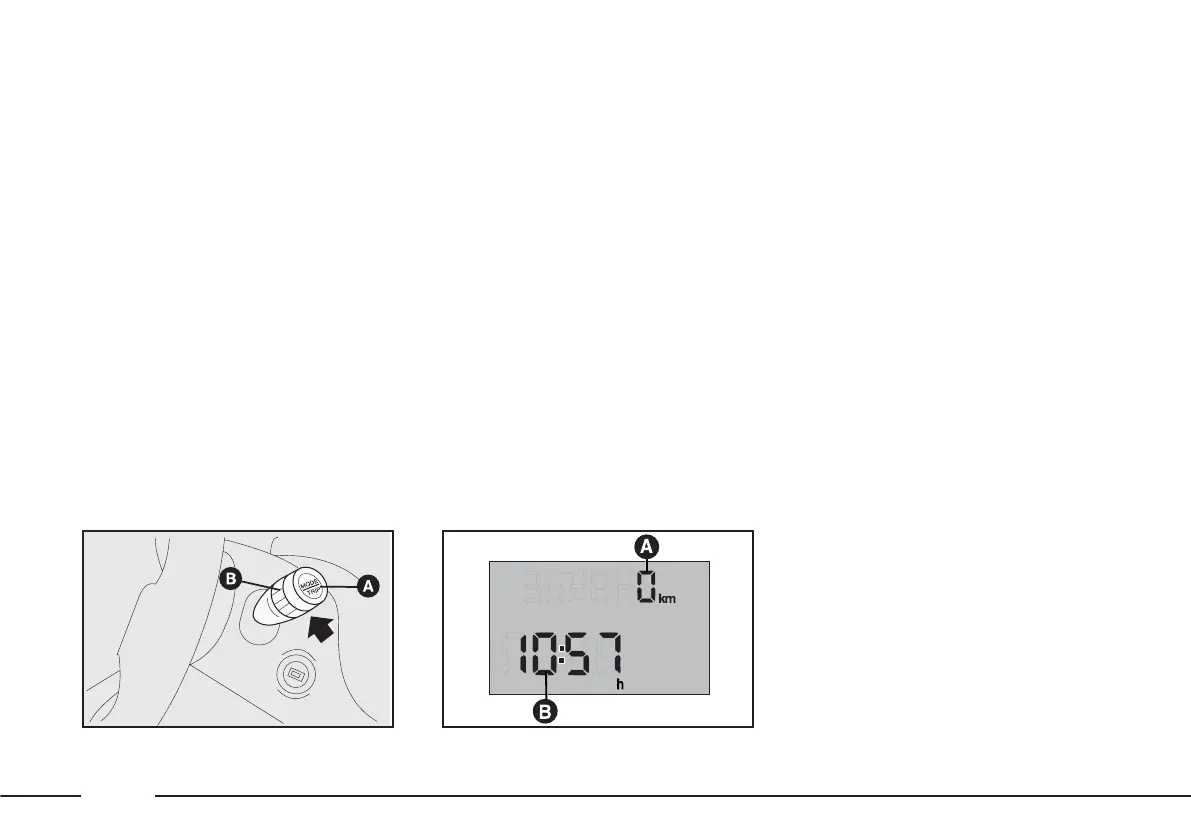
Standard display fig. 43
A – milometer (total/trip)
B – clock.
ELECTRONIC DISPLAY
The functions and messages
provided by the electronic display
depend on the optionals / version of
your vehicle.
CONTROL BUTTONS
To correctly make use of the
information that the display can
provide, with ignition key at MAR-
ON, you need to familiarise yourself
with the MODE/TRIP button A-fig. 42
at the end of the right stalk and with
MY CAR ring nut B.
The MODE/TRIP button allows you
to:
fig. 42
F0X1000m
fig. 43
F0X1001m











 To Next Page