36
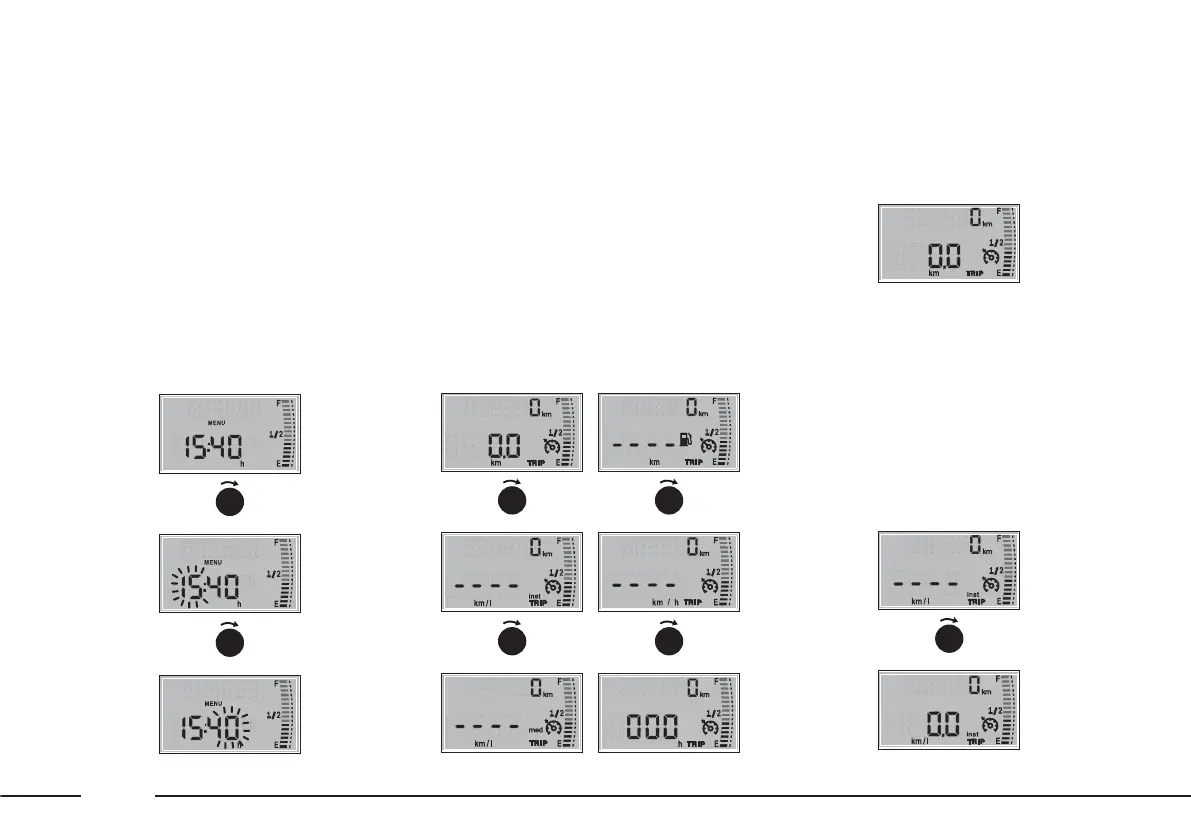
Clock (time adjustment)
To adjust the time, proceed as
follows:
– select the clock by rotating the
MY CAR ring nut;
– press the MODE/TRIP button: the
selected hours value flashes;
– set the time as desired by rotating
the MYCAR ring nut;
– proceed in the same way to set
the minutes.
If the ring nut remains turned for
more than 2 seconds, the value
increases / decreases rapidly.
Trip Computer
The Trip Computer functions are
shown on the display in the
following order: Distance travelled –
Instantaneous consumption –
Average consumption – Range –
Average speed – Trip time.
DISTANCE TRAVELLED
This shows the number of
kilometres travelled since the Trip
Computer was last reset.
INSTANTANEOUS
CONSUMPTION
This shows the vehicle’s fuel
consumption in this precise moment.
The figure is updated automatically
every second.
F0X1025m
F0X1019mF0X1020m
▼
MODE
TRIP
F0X1021m
▼
MODE
TRIP
F0X1022mF0X1023m
▼
MODE
TRIP
F0X1024m
▼
MODE
TRIP
F0X1016mF0X1017m
▼
MODE
TRIP
F0X1018m
▼
MODE
TRIP
F0X1026mF0X1027m
▼
MODE
TRIP











 To Next Page