M
1.4 Function DESC
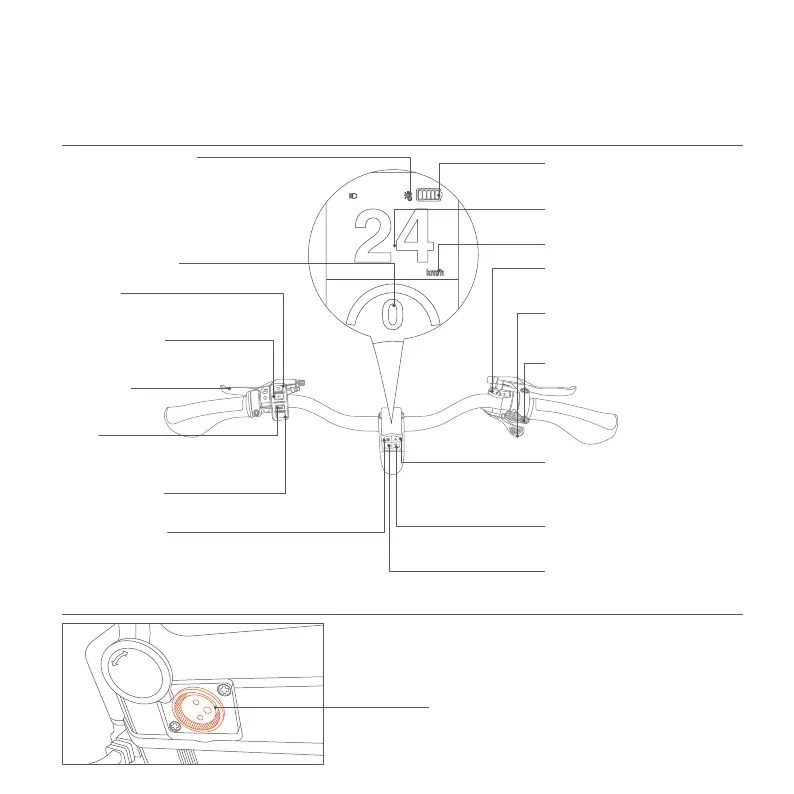
Handlebar
Battery
Front Brake
(The left side is front brake.)
Pedal Assist Level
(Press the button to switch the pedal
assist level.)
Headlight
(①Press and hold: Turn on/off lights.
②Click to switch between high and low beam.)
(Pull the handle outward to shift down)
(Pull the handle outward to shift up.)
(In case of overtaking,road section affecting
safety visibility or emergency, slow down and
ring the bell for signal.)
(①Click to achieve the power-assisted upshift.
②Press it for 5 seconds toswitch the display
between KMH and MPH.)
(Long press for more than 5 sec:turn on/off
the power assisted mode.)
7 Speed Shirft Up
7 Speed Shift Down
Horn
(Click to switch the display of the data.)
(①Click to switch the display of the data.
②Press and hold: Turn on/off the cruise control.
<The speed icon will flash>)
Fuctional Button
Fuctional Button
Power-assisted Shift Up
Power-on Button
(Click to achieve the power-assisted downshif.)
Power-assisted Shift Down
ChargingPort
(Insert the Fiido charger ONLY)
(Display the current derailleur gear.)
Speed Gear Display
5
Switch between KMH/MPH
(Display remaining power.)
Battery Status
High Temperature Alert
(Display current pedal assist level.)
Pedal Assist Display
(Display the current speed.)
Speed
(When a bike is under heavy load, like climbing steep slopes
or carrying excessive weight, the motor controller and
other parts may overheat. A high-temperature warning
icon appears on the display, and the motor output
automatically cut off. Wait 5 to 10 minutes for the
motor to cool and recover naturally before using it
again.)


 To Next Page
 Loading...