Video
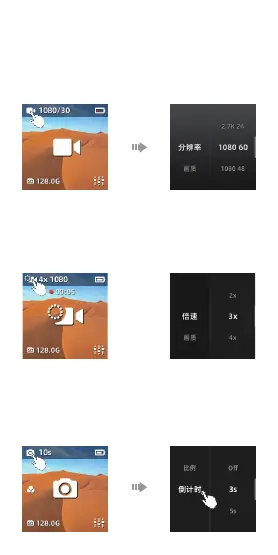
- Tap the following photo icon to enter the secondary
parameter setting page.
- Scroll to select items or parameter.
- These items can be adjusted: Output, Pic-Qua, HDR,
Colour and MIC.
- Swipe left or press the power button to exit setting page.
Slow-motion
- Tap the icon like following photo to enter the secondary
parameter setting page.
- Scroll to select items or parameter.
- These items can be adjusted: Speed, Pic-Qua, and Color.
- Swipe left or press the power button to exit setting page.
Photo
- Tap the following photo icon to enter the secondary
parameter setting page.
- Scroll to select items or parameters.
- These settings can be adjusted: HDR, Long-Exp, Ratio,
Timing and Night shot.
- Swipe left or press the power button to exit setting page.


 To Next Page
 Loading...