5.4 Pro Setting
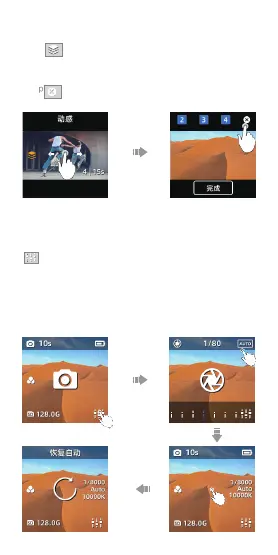
When in preview page, please click icon in the bottom right
to set the parameter of Shutter, ISO, White Balance.
- Swipe left and right or click icon in the top left to switch
items and scroll the parameter bar to adjust. Click a blank
space to exit the setting mode.
- Tap the icon of “Auto” to set all parameters as auto mode.
- Long press the screen to reset all parameters.
Short Video
- Tap to choose 5 templates: Sporty, Happy, Rhythm,
Warm and Summer.
- Tap the power button to take 3-4 videos, and click “finish”
the end the taking.
- Tap to delete the last video.


 To Next Page