The fischertechnik Hightech Robotics kit is an advanced educational and hobby robotics system designed for building and programming various functional models. It emphasizes a modular construction approach, allowing users to assemble diverse robotic structures and integrate a range of electronic components for complex functionalities.
Function Description:
The core of the fischertechnik Hightech Robotics kit is the TXT 4.0 Controller, which acts as the central processing unit for all models. This controller enables users to program and control the assembled robots, integrating inputs from various sensors and outputs to motors and other actuators. The kit supports building multiple functional models, including:
- Functional Model: A basic robotic platform demonstrating core functionalities like movement and interaction with its environment.
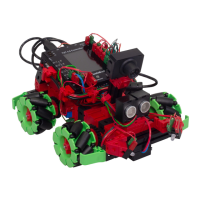
- Omniwheels x2/x4: Robots equipped with omni-directional wheels, allowing for advanced maneuverability in any direction.
- Cameraman: A robot designed to simulate a cameraman, potentially involving camera control and movement.
- Ball Robot: A robot capable of interacting with balls, possibly for tasks like pushing, collecting, or scoring.
- Painting Robot: A robot designed to simulate painting tasks, likely involving precise movement and tool control.
- Football Robot: A robot configured for playing football, demonstrating agility and object manipulation.
- Barcode Reader: A model integrating a barcode reader for data input and processing, showcasing sensor integration and decision-making.
The kit is designed to teach principles of robotics, programming, and engineering through hands-on construction and experimentation. It leverages the ROBOPro Coding App for programming, which supports various operating systems (iOS, Android, Windows, MacOS, Linux), making it accessible across different platforms. The eLearning Portal provides comprehensive support materials, including installation instructions, information on the TXT 4.0 Controller, and didactic accompanying materials.
Important Technical Specifications:
- TXT 4.0 Controller: The central control unit for all models. Specific processing power, memory, and connectivity details are not explicitly listed but it supports multiple inputs (I) and outputs (O) for motors (M) and components (C).
- Power Source: The models are powered by a fischertechnik Power Set or an 8.4V Accu Pack (Art. No. 35537). It explicitly states that 9V NiMH accu packs are not allowed.
- Rechargeable Battery: The kit includes a NiMH Accu rechargeable 8.4 V / 1800 mAh battery.
- Motors: The models utilize various motors, indicated by M1/C1, M2/C2, M3/C3, M4/C4 in the circuit diagrams, suggesting multiple motor control channels.
- Sensors: The kit includes a range of sensors:
- Phototransistor: Used for light detection, with a specified voltage of 9V.
- Light Barriers LED: Used for object detection, with a specified voltage of 9V / 0.01 A.
- Micro Servo 4.9/5 V: Small servo motors for precise angular control.
- IR Track Sensor: Infrared sensor for line following or obstacle detection.
- Ultrasonic Sensor: Used for distance measurement.
- 2X LED: General-purpose LEDs for visual feedback.
- USB Camera: For visual input and processing.
- Connectivity: The TXT 4.0 Controller features USB connectivity (USB1) for programming and data transfer.
- Cables: Various cable lengths are provided, including 20 cm and 30 cm, for connecting components.
- Structural Components: The kit includes a wide array of fischertechnik building blocks, axles, gears, and connectors, allowing for robust and flexible construction. Specific angles and lengths of structural elements are detailed in the spare parts list (e.g., 30°, 60°, 15°, 7.5° angle blocks, various length beams).
Usage Features:
- Modular Construction: The fischertechnik system is renowned for its modularity, enabling users to build and rebuild numerous models from the same set of components.
- Graphical Programming: The ROBOPro Coding App likely offers a user-friendly graphical programming interface, making it accessible for beginners while still supporting complex logic.
- Multi-Platform Compatibility: The ROBOPro Coding App runs on iOS, Android, Windows, MacOS, and Linux, ensuring broad accessibility.
- Educational Support: The eLearning Portal provides extensive didactic materials, including step-by-step assembly instructions, programming tutorials, and background information on robotics concepts.
- Safety Features:
- Power Source Restrictions: Only specified fischertechnik power sources (Power Set or 8.4V Accu Pack) should be used. Using other batteries, especially 9V NiMH packs, is explicitly prohibited due to explosion risk.
- Protection Class II: Models must only be connected to devices rated for protection class II, indicated by the corresponding symbol.
- Sharp Edges/Points: Caution is advised regarding components with sharp edges or points to prevent injury.
- Small Parts Warning: Risk of suffocation due to small balls and swallowable small parts.
- Battery Safety: Non-rechargeable batteries must not be charged. Rechargeable batteries should only be charged by adults, removed from the battery holder before charging, inserted with correct polarity, and removed when empty. Connecting terminals must not be short-circuited. Used batteries should be disposed of at special waste collection points. Wires should not be inserted into outlets. The charger should be regularly inspected for damage and not used if damaged until fully repaired.
- Charger is Not a Toy: The charger should only be used by children under 14 under adult supervision and instruction, indoors only, unplugged when not in use, and not operated if damaged.
- Servo Installation Order: Specific instructions emphasize the importance of following the correct order when installing servos to ensure proper function.
- Electromagnetic Interference: In case of external electromagnetic interference, the controller can be used again after the interference subsides. A brief power interruption and controller restart might be necessary.
Maintenance Features:
- Component Maintenance: All components, especially moving parts, should be maintained and cleaned as necessary to ensure longevity and optimal performance.
- Battery Care:
- Charger Usage: Only the fischertechnik charger should be used for the Accu Pack. It monitors the charge status and switches to trickle charge when full to prevent overcharging and damage.
- Deep Discharge Prevention: An empty Accu Pack must always be disconnected from connected devices (motors, lights, interfaces, IR receivers) via a switch or by unplugging to prevent deep discharge and permanent damage.
- Storage: If the Accu Pack is stored for more than 2 months without use, it will self-discharge. It should be stored fully charged and recharged at least every 2 months to prevent damage and capacity loss.
- Environmental Disposal: Used accumulators should not be disposed of with household waste but returned to the dealer or a designated collection point.
- Warranty: The Accu Set comes with a 6-month warranty from the date of purchase, covering material or manufacturing defects. Damage due to improper handling is not covered. Warranty claims require proof of purchase.

 Need help?
 General



 To Next Page