CLEANING INSTRUCTIONS
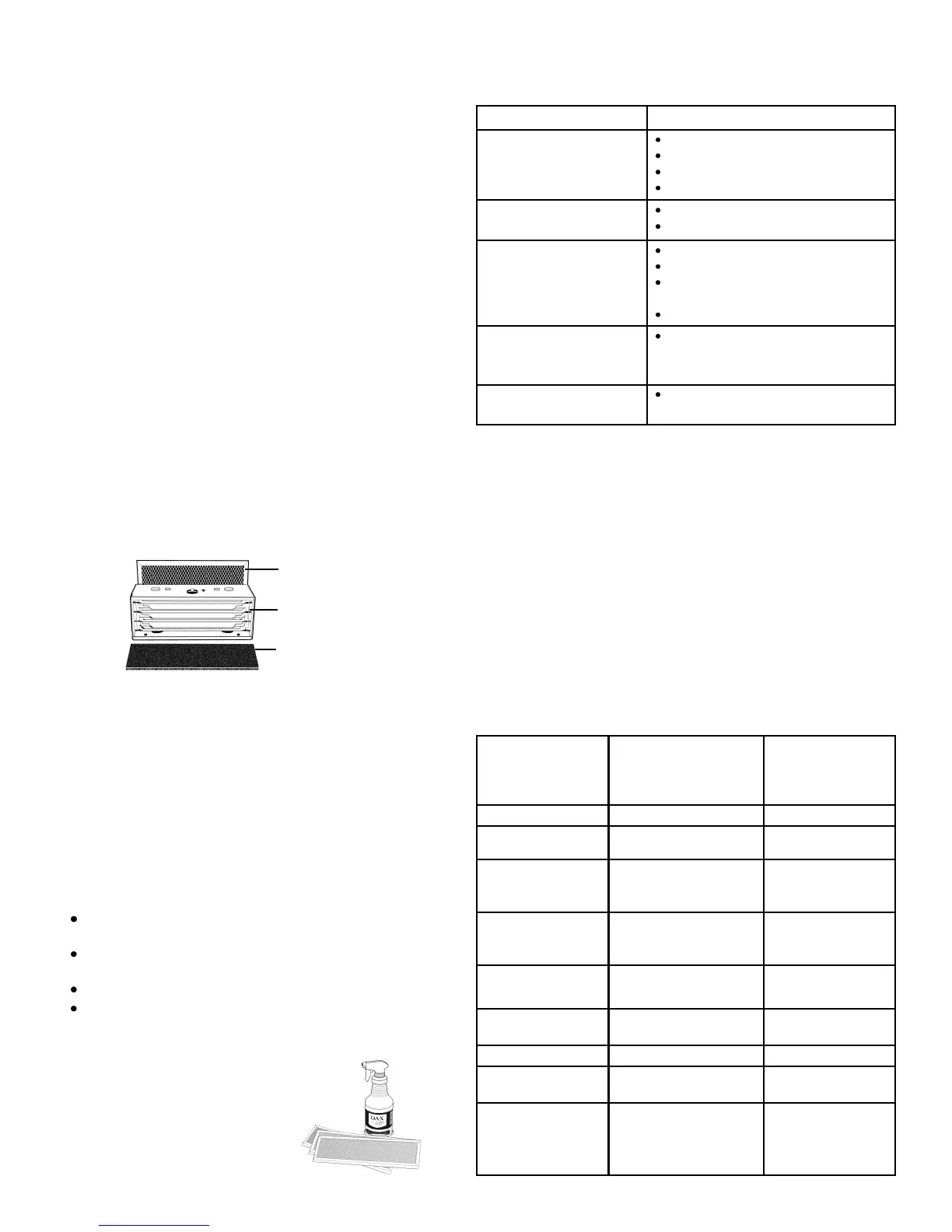
The prefilter and collecting cell must be washed on a regular
basis for the Air Cleaner to function at its peak efficiency.
The frequency of cleaning will vary from one environment to
another, therefore the cell should be checked monthly to
determine cleaning schedule. On average, the cell should
be washed every 3 months.
COLLECTING CELL
1. Turn Air Cleaner OFF. Remove the cell from the Air
Cleaner. Slide the carbon filter out of the retaining
bracket before cleaning. The prefilter is attached to the
front grill, and can be easily removed for washing.
2. Rinse prefilter and cell, and spray completely with DAX
Detergent (or non-chlorine, non-corrosive, non-abrasive,
non-ammonia, liquid household detergent). Let stand
for 5 minutes. Rinse well with hot water (120°F / 49°C
maximum). Repeat process 3 times.
3. If dirt remains, let cell soak in a solution of DAX
Detergent and hot water for 30 minutes.
4. For drying, place the cell on a 45° angle on one end,
with the arrow pointing sideways, and let stand for
several hours. A hair dryer may be used to speed up
drying time. Make sure the cell is completely dry before
reinserting back into Air Cleaner.
5. If arcing or snapping occurs or the lights do not come on
when the cell is placed back in the unit and turned on,
then remove the cell and allow to dry longer.
ODOR & GAS (VOC) REMOVAL FILTER
1. The Activated Carbon Odor & Gas (VOC) Removal Filter
must be replaced at regular intervals if odor removal is
desired (approximately every 3-6 months).
ODOR REMOVAL FILTERS ARE NOT WASHABLE.
CABINET
1. Turn Air Cleaner OFF.
2. A soft, damp, lint-free cloth may be used to remove dirt
and fingerprints from painted surfaces, grills and end
panels.
NEVER USE AN ABRASIVE CLEANER ON THE
CABINET.
WARNING
DO NOT WASH COLLECTING CELL IN
DISHWASHER.
Never use any object to clean between the cell plates as
this may cause damage to the plates or ionizing wires.
Never place the cell in an oven to dry.
The edges of the cell may be sharp — handle with care.
TROUBLESHOOTING CHART
The indicator light, located behind the front nameplate is also
used as the high voltage fault indicator. If the fan is
operating with the fan switch in the proper position, but the
light does not come on, then there is a problem in the high
voltage circuit. To determine what the problem is, turn the
Air Cleaner OFF and remove the collecting cell. Close the lid
and turn the Air Cleaner back ON. If the light comes back
on, the problem lies in the cell. Check the cell for wetness
from washing or look for a broken ionizing wire or bent cell
plate.
If the light does not come on, the problem is with the power
board or indicator light. If you are unable to correct any of
the above problems, call 1-800-267-8305 or email us at
info@fiveseasonsaircleaners.com.
TECHNICAL DATA
PROBLEM CAUSE
Fan does not operate
Indicator light off
Unit not plugged in
System switch not ON
Fan switch not in proper position
Lid not securely closed
Fan operating
Indicator light off
Cell wet from washing
Short in cell (see below)
Cell arcing excessively Cell wet from washing
Cell plate bent
Cell dirty or large lint ball/hair
caught in cell
Broken ionizing wire
Air cleaner vibrating
excessively
Unit not sitting on flat surface
Indicator light on
Cell not collecting dirt
Cell is in backward (arrow on cell
should point towards fan blower)
Dimensions
Length
Width
Height
18.0 in
12.0 in
5.0 in
45.5 cm
30.5 cm
12.7 cm
Weight 13.0 lbs 5.9 kg
Input Voltage 120 v 60 hz
220 v 60 hz
220-240 v 50 hz
Power
Consumption
(maximum)
85 watts
Air Flow
High Medium
Low
100 cfm
80 cfm
50 cfm
170 m³/hr
136 m³/hr
85 m³/hr
Output Voltage
Cell
-6000 VDC @ < 1 mA
Cell Collecting
Surface
432 in² 2787 cm²
Negative Ionizer -6000 VDC @ <.1 mA
Negative Ion
Output
2 x 327.7 K/in³ 2 x 20 K/cm³
Ideal for rooms up
to: (for over 3 air
changes/hour)
240 ft²
22.3 m²
Activated Carbon
Odor & Gas (VOC) Filter
Collecting Cell
Prefilter
DAX Detergent and Carbon Filters
are available from your Dealer.


 To Next Page
 Loading...